web
You’re offline. This is a read only version of the page.
close
Skip to main content

Announcements

News and Announcements icon
Community site session details

Community site session details

Session Id :
Customer experience | Sales, Customer Insights,...
Answered

Goals for Appointments/Leads by Team and Account

(0) ShareShare
ReportReport
Posted on by 280

Good morning,

We are thinking about creating goals for Appointments and Leads by Team/Account. I'm a bit confused if I should achieve this with the std MS Goal entity or by creating a new Goal/Budget entity which I will use. All managers will need to create the Goals later by them selves, and the goal entity seems a bit too complex. They later want to follow up, leads by month, appointments by month and also to see the current of each and also compare this with the last year. At the same time they want quickly to see accumulated count of each goal.

What pros and cons do you see with the std Goal entity vs creating a own entity which will solve this?

Thanks a lot for your input.

I have the same question (0)
  • LuHao Profile Picture
    40,892 on at

    Hi partner,

    I will choose the OOTB Goal entity.

    Creating a custom Goal entity can also meet this requirement. We can create some rollup fields to count the number of records per month. However, the rollup field requires the system administrator or system customizer to have the privilege to create it. By default, the sales manager does not have the privilege to create fields or modify the attributes of the field. So this involves the issue of security roles.

    In addition, even if we create a custom Goal entity to meet this requirement, if we have more complex Goal requirements in the future, then we have to continuously expand the functionality for custom Goal entity, which may end up being no less complex than OOTB Goal entity.

  • Wahaj Rashid Profile Picture
    11,323 on at

    Hi,

    Thank you for your query.

    I would suggest to first map your process with out-of-the-box Goal feature and see what is missing. As per my understanding, standard goal feature fits your need, you should not go for a custom solution.

    Furthermore, I am not sure how you find it complex, but it has features (like Parent and Child goals) that may benefit you in future.

    Take a look at following module to better understand:

    https://docs.microsoft.com/en-us/learn/paths/apply-goal-management-dynamics-365/

  • CEklx Profile Picture
    280 on at

    Okay, thanks for the input.

    - But what about how do I relate the Goals to Accounts since the Goal Owner is a lookup to user? Do I need to create the Relationship there also?

    - How do I then easily in the Goal set which Account this Goal should rollup their values from?

    - What about data migration of goals, to add all the metrics and all my filtering in the rollup queries, how can a Salesmanager easily import many goal records from excel in an easy intuitive way to users?

    - Seems like I can only use the Out-of-the-box Goal charts with the bullet of the target and so on. Could I save as and create my own? seems not like that, the Charts doesn't get so visually good.

    - How can I visibly show the Goal per months, for e.g if I set a goal from Jan to June on Opportunity Revenue, i want in the horizontal to view the "Months" and how the goal is going related to each month and the ongoing progress.

    Thanks alot!

  • Verified answer
    LuHao Profile Picture
    40,892 on at

    Hi partner,

    Please cover only one question in one thread, and post multiple questions in multiple threads.

    - But what about how do I relate the Goals to Accounts since the Goal Owner is a lookup to user? Do I need to create the Relationship there also?

    - How do I then easily in the Goal set which Account this Goal should rollup their values from?

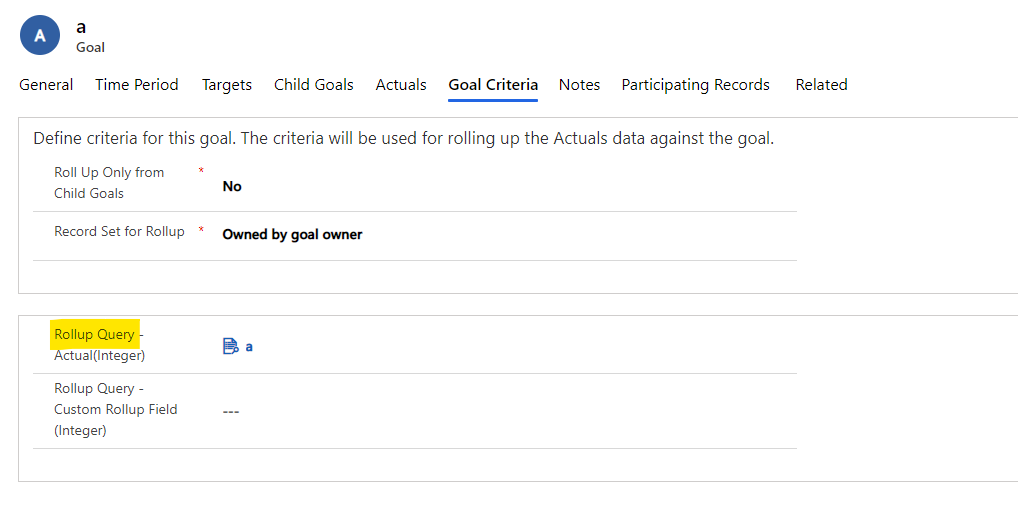
    We will use Rollup Query to specify the related Account for each Goal, provided that the entity type of Goal has an Account lookup field.
    pastedimage1612768679617v1.png

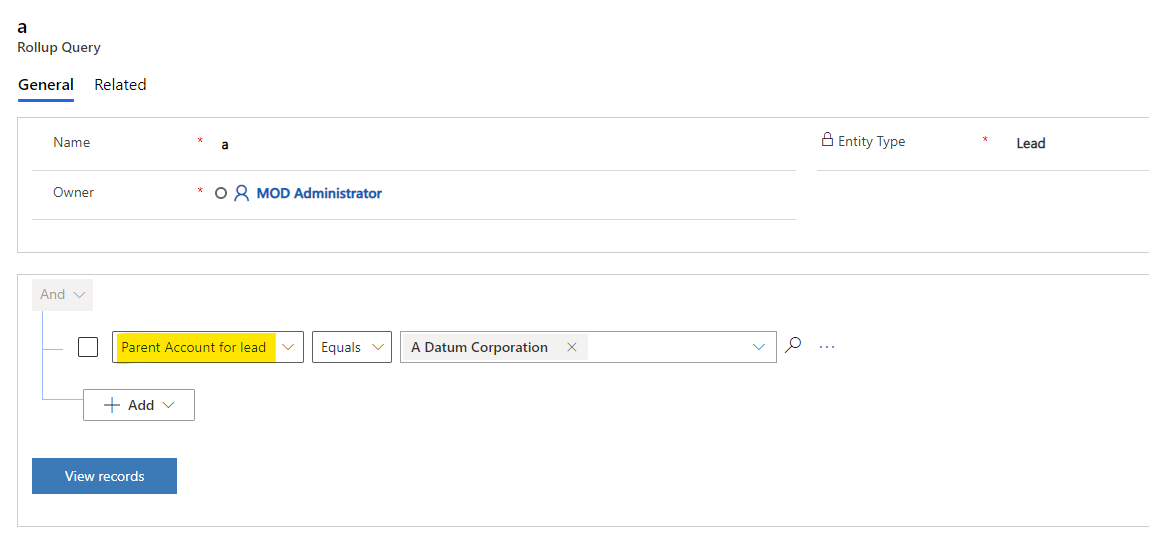
    In the Rollup Query, we can set the filter criteria to include Account-related.
    pastedimage1612768790226v2.png

    Documentation: https://docs.microsoft.com/en-us/dynamics365/sales-enterprise/create-edit-goal-rollup-query-sales

    - What about data migration of goals, to add all the metrics and all my filtering in the rollup queries, how can a Salesmanager easily import many goal records from excel in an easy intuitive way to users?

    Rollup queries are records independent of Goal, Rollup query is the lookup field of Goal entity. So we need to import rollup queries records first, and then import Goal records. 

    - Seems like I can only use the Out-of-the-box Goal charts with the bullet of the target and so on. Could I save as and create my own? seems not like that, the Charts doesn't get so visually good.

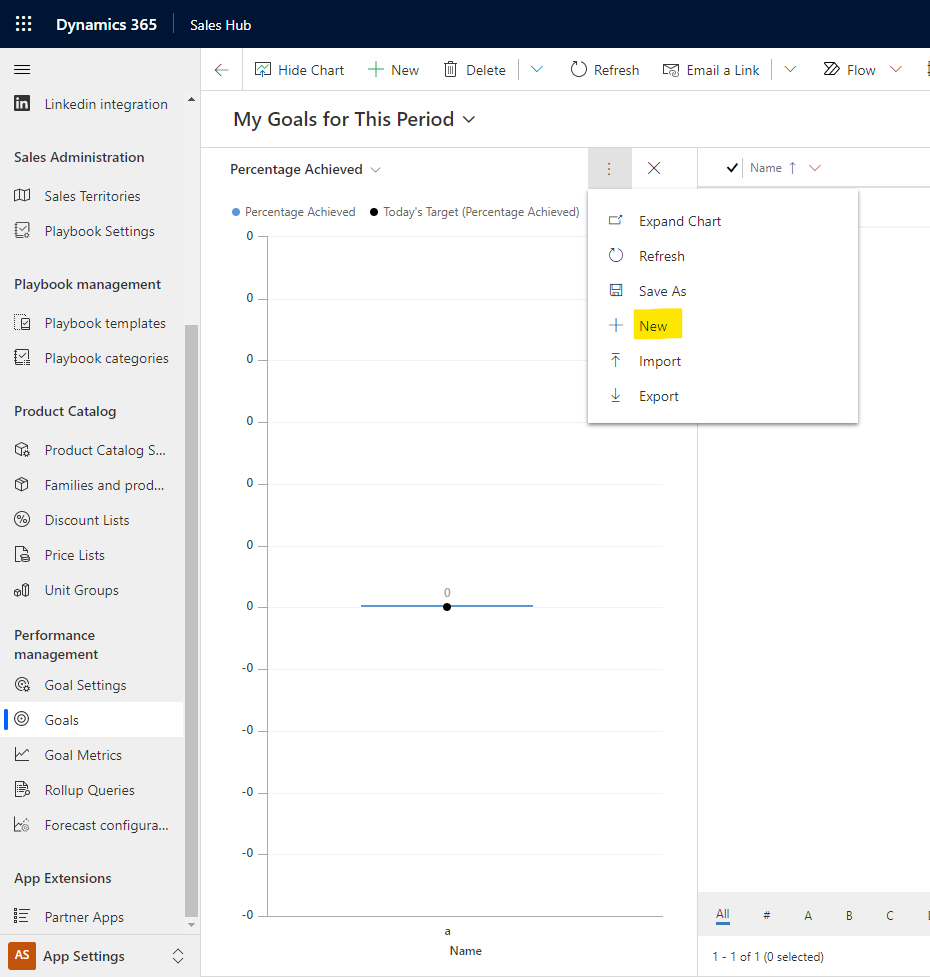
    Yes, you can create your personal charts of Goal. (The visibility is a single user, that is, Owner.)
    pastedimage1612775223434v3.png

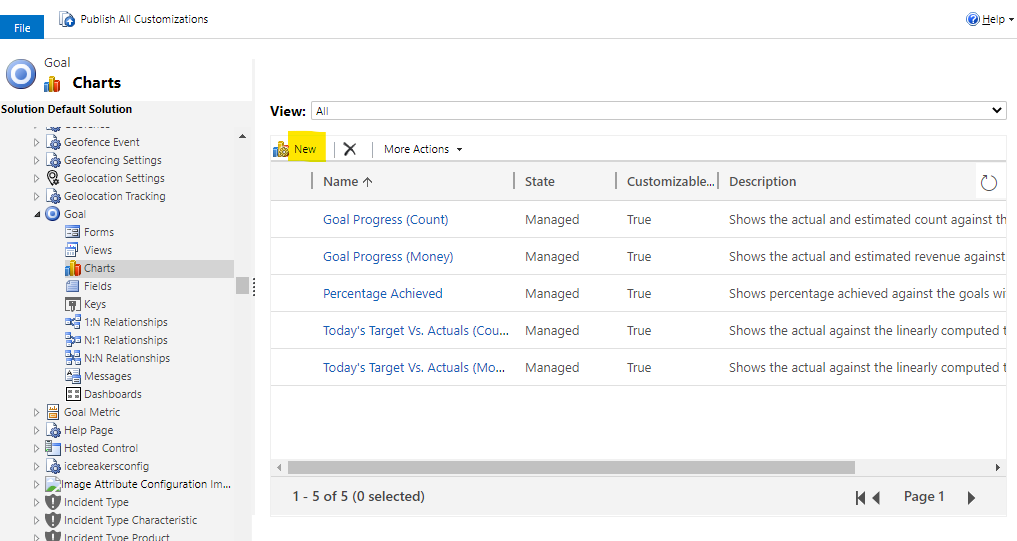
    Or you can create system charts of Goal. (The visibility is all users in the organization.)
    pastedimage1612775491070v4.png

    - How can I visibly show the Goal per months, for e.g if I set a goal from Jan to June on Opportunity Revenue, i want in the horizontal to view the "Months" and how the goal is going related to each month and the ongoing progress.

    I did not find a way to display the monthly Opportunity Revenue in Goal. You can post another question on this issue and let other experts participate in the discussion.

    Finally, please try not to post multiple questions in a single thread. You can post multiple threads, and each thread contains one question, which can attract more users to participate in the discussion.

  • CEklx Profile Picture
    280 on at

    Thanks a lot Hao, agree and will post questions in each thread.

Under review

Thank you for your reply! To ensure a great experience for everyone, your content is awaiting approval by our Community Managers. Please check back later.

Helpful resources

Quick Links

Season of Sharing Community Challenge Launch!

Jump in, show your community spirit, and win prizes!

Women in Power Builds Momentum

Expanding mentorship, skilling, and AI innovation

Congratulations to the April Top 10 Community Leaders

These are the community rock stars!

Leaderboard > Customer experience | Sales, Customer Insights, CRM

#1
Nagaraju_Matta Profile Picture

Nagaraju_Matta 121

#2
ManoVerse Profile Picture

ManoVerse 67 Super User 2026 Season 1

#3
Abhilash Warrier Profile Picture

Abhilash Warrier 66 Super User 2026 Season 1

Last 30 days Overall leaderboard

Product updates

Dynamics 365 release plans



