web
You’re offline. This is a read only version of the page.
close
Skip to main content

Announcements

News and Announcements icon
Community site session details

Community site session details

Session Id :
Microsoft Dynamics AX (Archived)

Where Can I Get "Total Discount" Field in PO > Totals?

(0) ShareShare
ReportReport
Posted on by 1,044

Hello awesome community! 

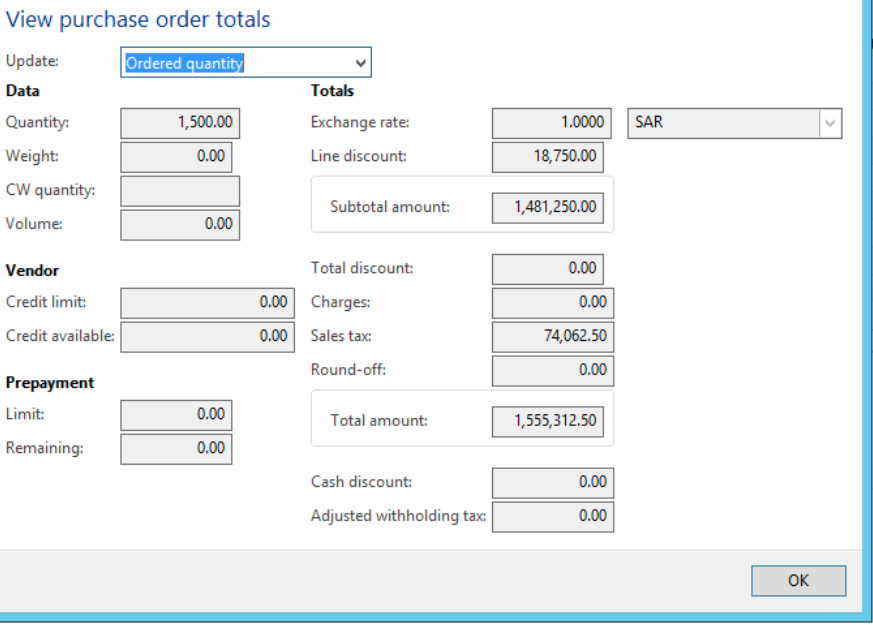
In PO > Totals, I want to get the "Total Discount" value in my SSRS report,

Here is a screenshot of the field I need to get:
7848.Capture.PNG

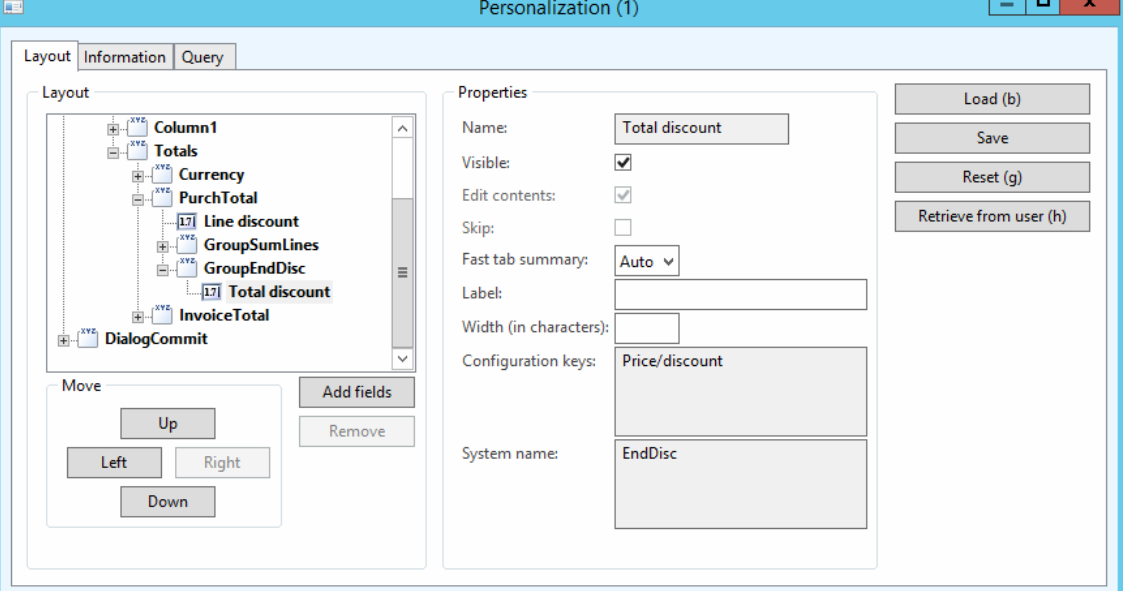
The problem is I don't know its table name or field name, I believe it's in "PurchTotalsSummary" table but I don't know the name of the field because when I right click on the field then click on "Personalize" it does not give me the table and field names.

Here is a screenshot of Personalize screen:
6646.Capture2.PNG

Your help is appreciated!

Thanks in advance!

*This post is locked for comments

I have the same question (0)
  • Zain Mehmood Profile Picture
    4,311 Most Valuable Professional on at

    Hi Momochi,

    Can you tell me what is your purpose to use the total discount field ??

    Regards,

    Zain Mehmood. 

  • Momochi Profile Picture
    1,044 on at

    Hello Mr. Zain,

    Sorry I'm just a report developer, all what I know is that I need to get this field's data to use it for other calculations.

    Thanks.

  • Verified answer
    Sefa Duman Profile Picture
    1,167 on at

    Hi Momochi,

    PurchTotalsSummary table is empty initially. If you click "Totals" button on Purchase order listpage, AX calculates totals and fills PurchTotals form.

    And PurchTotals form is not directly related to any table. It uses classes and methods to calculate and show total amounts.

    If you want to use this functionality you can call PurchTotals button clicked method or you can use PurchTotals class.

    Best regars,

    Sefa

  • Zain Mehmood Profile Picture
    4,311 Most Valuable Professional on at

    Hi Momochi,

    I asked because i wanted to know that if this can be achieved by other way around. Anyways, Sefa is right. The 'Purch Totals' form is not related to any table. It runs the calculations when we click it.

    You can try the same as suggested by him.

    Regards,

    Zain Mehmood

  • Momochi Profile Picture
    1,044 on at

    Hello Mr. Sefa, Thanks for your time and help.

    First I'm sorry I'm really new to Ax development and I don't have much experience so my following description might sound unprofessional but I hope you can help.

    Ok, I went to check on "PurchTotals" class methods, and I found the method name which was given in the "personalize" screen the "EndDisc" method, how can I use it to get the calculation from it? the method's parameter is ( [boolean _roundResult] ). I thought I could use it with PO ID as a parameter.

  • Momochi Profile Picture
    1,044 on at

    I wish I could help but i'm not experienced enough I'm new to Ax sorry :)

  • Verified answer
    Momochi Profile Picture
    1,044 on at

    I found this link that shows me how to use the "PurchTotals" class

    community.dynamics.com/.../how-to-calculate-purchase-order-total-value

    Thank you Mr. Sefa :)

Under review

Thank you for your reply! To ensure a great experience for everyone, your content is awaiting approval by our Community Managers. Please check back later.

Helpful resources

Quick Links

Season of Sharing Community Challenge Launch!

Jump in, show your community spirit, and win prizes!

Women in Power Builds Momentum

Expanding mentorship, skilling, and AI innovation

Congratulations to the May Top 10 Community Leaders

These are the community rock stars!

Leaderboard > 🔒一 Microsoft Dynamics AX (Archived)

#1
CP04-islander Profile Picture

CP04-islander 10

#2
Harisgillani Profile Picture

Harisgillani 4

#2
dserp Profile Picture

dserp 4

Last 30 days Overall leaderboard

Featured topics

Product updates

Dynamics 365 release plans



