web
You’re offline. This is a read only version of the page.
close
Skip to main content

Notifications

Announcements

No record found.

Community site session details

Community site session details

Session Id :
Customer experience | Sales, Customer Insights,...
Suggested Answer

CRM 2013 - 32bit failed to install

(1) ShareShare
ReportReport
Posted on by 22

Hey all,

I have been installing CRM 2013 Outlook plugin on our laptops for the past 2 years now. I never had any problem. Today I tried to install it on a new batch of laptops and it fails all the time. The reason for the failure is because Microsoft Visual C++ Runtime could not be downloaded succesfully. I tried to manual install it but this didn't fix it. Some of the links that are used in the installer aren't available anymore on the web. Perhaps that also contributes to the problem.

Does someone have any idea what I might try to fix this?

I tried:

Installing a different 2013 package
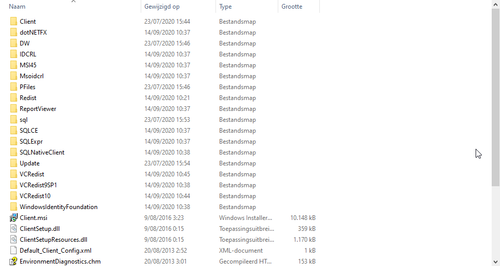
Manually creating folder structure and placing the corresponding files in it.
Multiple laptops.
Complete reset of the laptop
Any help will be greatly appreciated.

I have the same question (0)
  • Suggested answer
    Gustavo Longo Profile Picture
    on at

    Hello Jolu,

    Hope you are well.

    On this scenario, the approach to download pre-requirement components sounds the best option.

    Need to pay attention that Redist folder (which will contain all pre-requirement component folders) should be on the same level of Client folder.

    Use this article for further reference:

    community.dynamics.com/.../automate-creating-a-crm-2013-redist-folder-to-install-crm-2013-without-an-internet-connection

    Regards,

  • Jolu_itsme Profile Picture
    22 on at

    Thanks for your suggestion.

    I have tried this approach but it failed. I used the current installer that I have. Do you happen to have a link to a valid installer for CRM 2013 Outlook Plugin? I want to try again with a different installer, maybe it's the installer that isn't working anymore.

    Sometimes I get the error Microsoft Visual C++ Runtime could not be downloaded succesfully.

  • BigRed2 Profile Picture
    25 on at

    Any success in finding a fix?  We are experiencing the same issues - although we're also also seeing an error with the Windows Live ID Sign-In Assistant cannot load successfully as well on some machines.

  • Jolu_itsme Profile Picture
    22 on at

    As a matter of fact I do.

    I will post the fix in a few minutes.

  • Suggested answer
    Jolu_itsme Profile Picture
    22 on at

    I have found a solution for this.

    My approach needs a few dependencies which you can download from this URL Download Dependencies

    What you have to do is start the installer and try to install it. When it fails you click on the link to open the logs.
    In the logs you will see a line that points to the hidden folder AppData>Local>Temp>MS...
    Take note of that or copy the path.

    Browse to that folder and paste the contents of the downloaded zip file inside the folder that was referred to in your log file.

    Try to run the installer again and it will give you an error prompt but just click ok and let it install.

    Hope this works for you too.

  • BigRed2 Profile Picture
    25 on at

    THANK YOU, THANK YOU, THANK YOU!  This worked like a charm.  You are a life saver - we are in no financial position to upgrade at this time, but we frequently have to reload machines and we're pretty dependent on this client.

    I cannot thank you enough.  Thank you for following up with the solution!

  • MarcusW Profile Picture
    15 on at

    Hi!

    We are also struggling with this issue. But sadly Google seems to have been quick to stop your link. Jolu_itsme

    Is it possible to get the instructions, or a list of files in the zip file? Or even better a new link for the zip file?  Or maybe BigRed2 can provide me with a link? 

    Thanks in advance

  • BigRed2 Profile Picture
    25 on at

    See if this link works for you.  If not, please let me know a way to contact you directly to send you a link and I'll get them to you.  https://we.tl/t-NRwyD2bzcb  (Link is only good for a week I think)

    These are the contents in case you need to try to find them on your own:

    Contents-of-Dependencies-folder.jpg

  • MarcusW Profile Picture
    15 on at

    Superb! Thanks a lot both of you. It also solved our problem based upon the solution and the upload.

    Managed to get it fixed by copying the wllogin_64.msi file into C:\Users\Username\AppData\Local\Temp\MSCRM_{A8A8C054-D9A1-4DD1-AF5C-0311D7596E25} <- This varies from computer to computer.  

    Error| Windows Live ID Sign-in Assistant did not download successfully.  To try again, ensure your internet connection is working, then try again.

    Error|   hr=0xc0040202

  • Jolu_itsme Profile Picture
    22 on at

    Yea it differs from PC to PC. Some of the pc’s I needed to install crm on needed different files so I have includes all I needed in my link. Sorry that it got deleted that quick.

    @BigRed2 thanks for the help with the links.

Under review

Thank you for your reply! To ensure a great experience for everyone, your content is awaiting approval by our Community Managers. Please check back later.

Helpful resources

Quick Links

Responsible AI policies

As AI tools become more common, we’re introducing a Responsible AI Use…

Neeraj Kumar – Community Spotlight

We are honored to recognize Neeraj Kumar as our Community Spotlight honoree for…

Leaderboard > Customer experience | Sales, Customer Insights, CRM

#1
Tom_Gioielli Profile Picture

Tom_Gioielli 170 Super User 2025 Season 2

#2
#ManoVerse Profile Picture

#ManoVerse 70

#3
Jimmy Passeti Profile Picture

Jimmy Passeti 50 Most Valuable Professional

Last 30 days Overall leaderboard

Product updates

Dynamics 365 release plans



