web
You’re offline. This is a read only version of the page.
close
Skip to main content

Notifications

Announcements

No record found.

Community site session details

Community site session details

Session Id :
Finance | Project Operations, Human Resources, ...
Answered

Data management - Projects entity

(0) ShareShare
ReportReport
Posted on by 200

Hi,

I need to import with Data Management the project entity: "Projects"

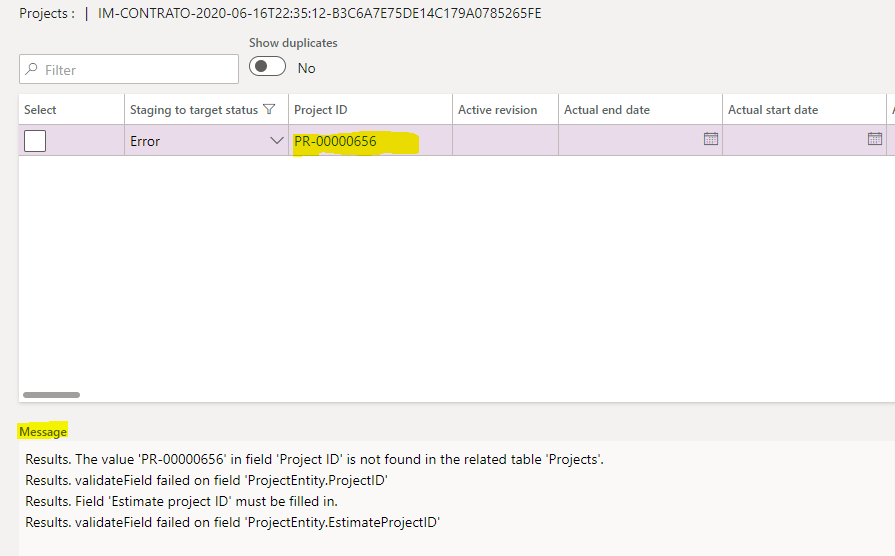
This is the error in the staging:
pastedimage1592347861204v1.png

Results. The value 'PR-00000656' in field 'Project ID' is not found in the related table 'Projects'.
Results. validateField failed on field 'ProjectEntity.ProjectID'
Results. Field 'Estimate project ID' must be filled in.
Results. validateField failed on field 'ProjectEntity.EstimateProjectID'

The project is not in the table Projects because i'm trying to import...the same case with the field "Estimate Project ID"...

Any idea?

Thanks!

I have the same question (0)
  • Suggested answer
    Junaid Idrees Profile Picture
    on at

    Hi Marcarena,

    Before you import projects through DM, Did you check your project Id numbering sequence is manual or auto? If you have already specified Projects ID's in import template then your numbering sequence should be manual for smooth upload.

    I was just wondering to know, Why Estimated Project ID is mandatory in your initial projects upload?  if your project type is fixed price with revenue recognition principle based on "Completed Contract" or "Completed Percentage" then that should be your 2nd step when you want to recognize revenue from Manage >> Estimated option

  • Verified answer
    André Arnaud de Calavon Profile Picture
    301,025 Super User 2025 Season 2 on at

    Hi Macarena,

    You can try to disable the field validation for the Project ID. What project type are you trying to import? Is it an investment or fixed-price?

    If you don't need the estimate project, you can also try to disable the field validation for the Estimate project ID on the target entity.

  • Verified answer
    Rahul Mohta Profile Picture
    21,032 on at

    seems it is fixed price project which always on creates an estimate project number as well

    should get that auot create on estimate project or provide a unique value

  • Ludwig Reinhard Profile Picture
    Microsoft Employee on at

    Good morning Macarena,

    There have been a number of suggestions/answers provided.

    Did they help you fixing your problem or do you need any additional information/help?

    If nothing else is needed then please be so kind and verify the answers.

    Many thanks for your support.

    Best regards,

    Ludwig

  • Macarena Presa Rinaldi Profile Picture
    200 on at

    Hi, thanks to all.

    I resolved it configuring in the Data Management module the ProjectID to value No in the field "Call validate field method" and can import ok. (because i need to import trought DM a projectid different than my sequence number).

    pastedimage1592489582969v3.png

    The "Estimatedproject" field i resolved it by deleting the column in the excel, and the Fixed Prices projects imported D365FO assigned the estimation project correctly, even though I did not include that column. I imagine it is due to the settings in the project group.

    But in one legal entity i can't import the Projects entity (in the other 12 legal entity i can), the new error is: "The data value violates integrity constraints."

    pastedimage1592489706206v4.png

    Any idea?

    Thanks!

  • Suggested answer
    nmaenpaa Profile Picture
    101,160 Moderator on at

    If "Data violates integrity constraints" you have duplicate records in your file.

    Perhaps you did some mistake when setting up the auto-generation for project Id in the data project in this company. Or there is something different in your file.

Under review

Thank you for your reply! To ensure a great experience for everyone, your content is awaiting approval by our Community Managers. Please check back later.

Helpful resources

Quick Links

Responsible AI policies

As AI tools become more common, we’re introducing a Responsible AI Use…

Neeraj Kumar – Community Spotlight

We are honored to recognize Neeraj Kumar as our Community Spotlight honoree for…

Leaderboard > Finance | Project Operations, Human Resources, AX, GP, SL

#1
Martin Dráb Profile Picture

Martin Dráb 611 Most Valuable Professional

#2
André Arnaud de Calavon Profile Picture

André Arnaud de Cal... 529 Super User 2025 Season 2

#3
Sohaib Cheema Profile Picture

Sohaib Cheema 285 User Group Leader

Last 30 days Overall leaderboard

Product updates

Dynamics 365 release plans



