web
You’re offline. This is a read only version of the page.
close
Skip to main content

Notifications

Announcements

Community site session details

Community site session details

Session Id :
Customer Service forum

Error while setting up Auto case creation Rule

(0) ShareShare
ReportReport
Posted on by 65

Hello , 

I am getting an error while setting up rule for auto case creation as all required field are fine . Plz share comments .

Auto-case-Rule-error.PNG

Thanks

Categories:
I have the same question (0)
  • Wayne Walton Profile Picture
    13,730 on at

    Something is not complete in that Case form.  Review and check again, or at least add a screenshot of the form itself.

  • LeoAlt Profile Picture
    16,331 Moderator on at

    Hi partner,

    According to your screenshot, there must be something wrong with your case form setting here.

    community112.png

    Click on "Set Properties" and check if there is any problem, pay more attention to the required fields.  Moving the mouse over the error icon can display the wrong content.

    You could also refer to the article and video for more steps.

    https://docs.microsoft.com/en-us/dynamics365/customer-engagement/customer-service/set-up-rules-to-automatically-create-or-update-records

    https://www.youtube.com/watch?v=jrpvSUobfv4

    Hope it helps.

    Best Regards

    Leo

  • K Sharma Profile Picture
    65 on at

    Hello Wayne ,

    Thanks fr your comments !!

    Please find the screenshot below as I have value for all required fields but still it gives error stating "One or more require properties for the step are missing . 

    auto-case-form.PNG

    auto-case-form.PNG

  • K Sharma Profile Picture
    65 on at

    Hello Leo ,

    Thanks fr your comments !!

    Please find the screenshot below as I have value for all required fields but still it gives error stating "One or more require properties for the step are missing .

    8875.auto-case-form.PNG8875.auto-case-form.PNG

  • LeoAlt Profile Picture
    16,331 Moderator on at

    Hi partner,

    According to your second screenshot, the value of Origin field is null.

    community114.png

    Please double check.

    Best Regards,

    Leo

  • K Sharma Profile Picture
    65 on at

    Hello Leo ,

    I have tested again as per your comments but case is not getting created after moving the email to required Queue . Email is coming in required Queue but there is  no case record associated as specify in the action . Please find the screenshot below and share your comments .

    Create-case1.PNG

    Regards

  • LeoAlt Profile Picture
    16,331 Moderator on at

    Hi partner,
    Do you mean the email do not have any Regarding case?

    If so, you could add condition that the Regarding field of email is not null.

    Like the If...Else...logic.

    If email regarding filed is not null, then create new case.

    Else( regarding is null), xxxxxx(follow your business logic)

    In addition, could you kindly share complete requirement so that we could help you do it better.

    Best Regards,

    Leo

  • K Sharma Profile Picture
    65 on at

    Hi Leo , 

    My Requirement is based as OOB CRM functionality :

    Dynamics 365 shall automatically create cases when an email is sent to the Order Management When a customer care representative (CCR) routes an email from one queue to the Sample queue, Dynamics 365 shall automatically create a case which further includes :

    1. During the auto case creation, the system automatically populates the case's Contact field with the email sender's name
    2. During the auto case creation, the system automatically populates the case's Title field with the subject of the email
    3. During the auto case creation, the system auto populates the Case Type field with the value X
    4. During the auto case creation, the system auto populates the Category field with the value Order
    5. During the auto case creation, the system auto populates the Sub Category field with the value Request


    After Setting Up rules as mentioned I am able to see the email movie to Sample Queue but there is no Case associated with it as defined in the action in the Rule . Plz share your comments 

    Thanks

  • Verified answer
    LeoAlt Profile Picture
    16,331 Moderator on at

    Hi partner,

    Thanks for your detailed information.

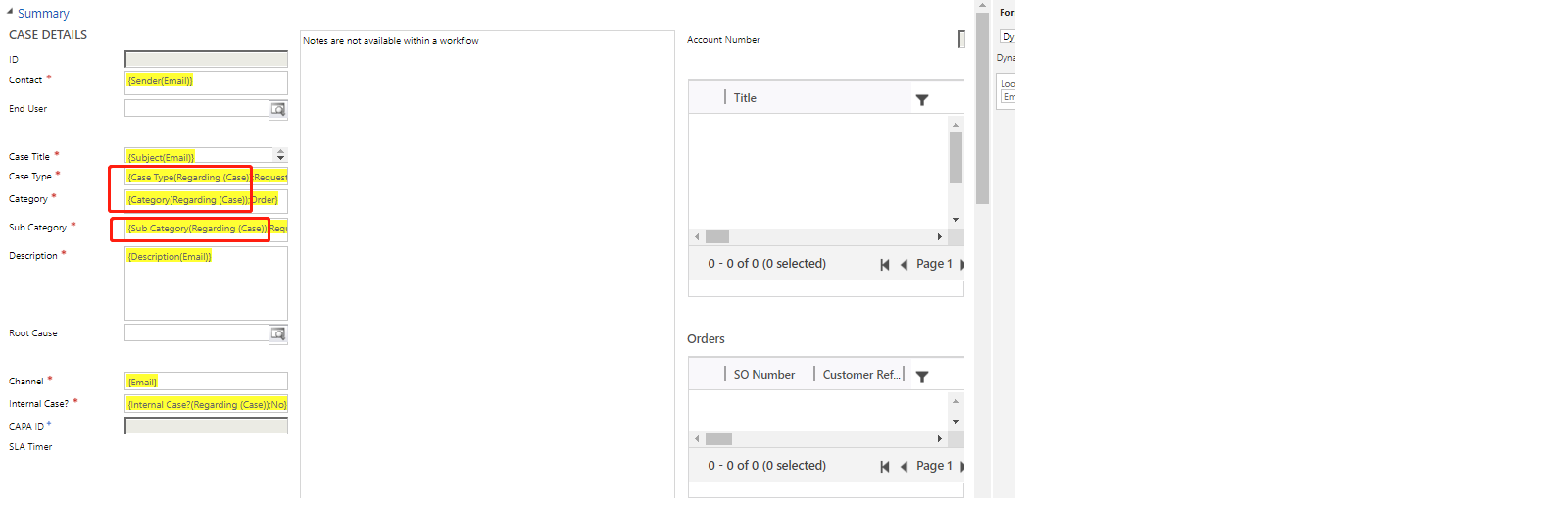
    According to your description, the case field "Case Type", "Category" and "Sub Category" should be set by default value "X", "Order" and "Request".

    I wonder that why you set the field value with regarding case's field from your last screenshot.
    community126.png

    1.If you just want the default text value, so you should remove the "Regarding case" and only left "X", "Order" and "Request" and then you could create the case successfully without related case.
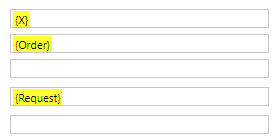
    community126.png

    2.If you need the Regarding case's field value to be default value of new case, so you could add conditions "Email regarding is not null" to filter emails without related cases.

    Hope it helps.

    Best Regards,

    Leo

  • K Sharma Profile Picture
    65 on at

    Hello Leo , 

    I have made the changes as per your comments but still case not getting created as can see email moved into Queue only .

    Default-case-value.PNG

    Regards

Under review

Thank you for your reply! To ensure a great experience for everyone, your content is awaiting approval by our Community Managers. Please check back later.

Helpful resources

News and Announcements

Season of Giving Solutions is Here!

Quick Links

November Spotlight Star - Khushbu Rajvi

Congratulations to a top community star!

Forum Structure Changes Coming on 11/8!

In our never-ending quest to help the Dynamics 365 Community members get answers faster …

Dynamics 365 Community Platform update – Oct 28

Welcome to the next edition of the Community Platform Update. This is a status …

Leaderboard > Customer Service

Last 30 days Overall leaderboard

Featured topics

Product updates

Dynamics 365 release plans
