web
You’re offline. This is a read only version of the page.
close
Skip to main content

Notifications

Announcements

No record found.

Community site session details

Community site session details

Session Id :
Finance forum

Trace (Log)

(0) ShareShare
ReportReport
Posted on by 1,089

Hi Experts,

Can any one share you knowledge on, is it possible to use 'nlog' dll to develop logging and tracing functionality in D365FO.

Thanks in advance

Guru

I have the same question (0)
  • Verified answer
    Martin Dráb Profile Picture
    237,880 Most Valuable Professional on at

    I guess it is possible, but you're quite limited by the fact that you don't control production environments in cloud. You can't change configuration files, collect local trace files and things like that.

    Note that Microsoft uses EventSource classes to log events (e.g. in WorkflowTrace::Log()) and there already is a support for tracing in D365FO.

  • Guruprasanna Profile Picture
    1,089 on at

    Thanks martin,

    If we use EventSource, where we can see the work flow trace log ?

    Thanks in advance

    Guru

  • Suggested answer
    Martin Dráb Profile Picture
    237,880 Most Valuable Professional on at

    As nlog, ETW can be configured to save data to various locations, therefore it depends...

    But by default, D365FO events are stored in event logs. In case of production environments, you can look at raw logs in LCS.

  • Guruprasanna Profile Picture
    1,089 on at

    Thanks for quick response,

    I have tried using below code in runnable class.

    WorkflowTrace::Log("Test",TraceLevel::Verbose, TraceOrigin::WFRuntime);

    WorkflowTrace::Log("test",TraceLevel::Info, TraceOrigin::WFRuntime);

    Unfortunately not able to see "Test" message in event viewer.
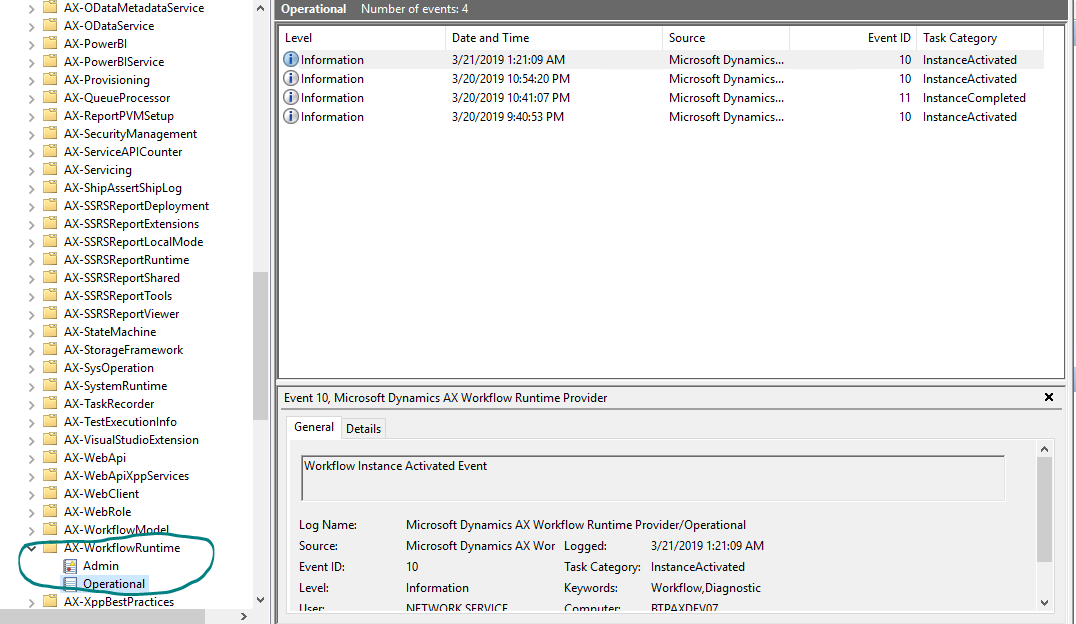
    2211.Capture.PNG

    Thank you

    Guru

  • Martin Dráb Profile Picture
    237,880 Most Valuable Professional on at

    In this particular case, you would have to enable Debug log.

    Select AX-WorkflowRuntime and from Actions (the panel on the right edge) select View > Show Analytic and Debug Logs. Then select the Debug log and click Enable Log (in the Action panel).

Under review

Thank you for your reply! To ensure a great experience for everyone, your content is awaiting approval by our Community Managers. Please check back later.

Helpful resources

Quick Links

November Spotlight Star - Khushbu Rajvi

Congratulations to a top community star!

Forum Structure Changes Coming on 11/8!

In our never-ending quest to help the Dynamics 365 Community members get answers faster …

Dynamics 365 Community Platform update – Oct 28

Welcome to the next edition of the Community Platform Update. This is a status …

Leaderboard > Finance

Last 30 days Overall leaderboard

Featured topics

Product updates

Dynamics 365 release plans
