web
You’re offline. This is a read only version of the page.
close
Skip to main content

Announcements

News and Announcements icon
Community site session details

Community site session details

Session Id :
Microsoft Dynamics AX (Archived)

Error Submitting Approval for Vendor Creation

(0) ShareShare
ReportReport
Posted on by 2,075

Dear All,

I have another case for workflow approval. 

I make customization workflow approval for vendor creation

when I submit the approval, I got those error message a first, middle or last name is required.

anyone ever experience this ?

this make my approval status failed change into submitted state.

if I update the approval status directly at database, make it value into 1, then the menu changed into action for approval, rejected, etc.

I check, that we have same account number for vendor account, but different dataAreadId ( different site/company )

please help , any work-around to get those error message.

thank you
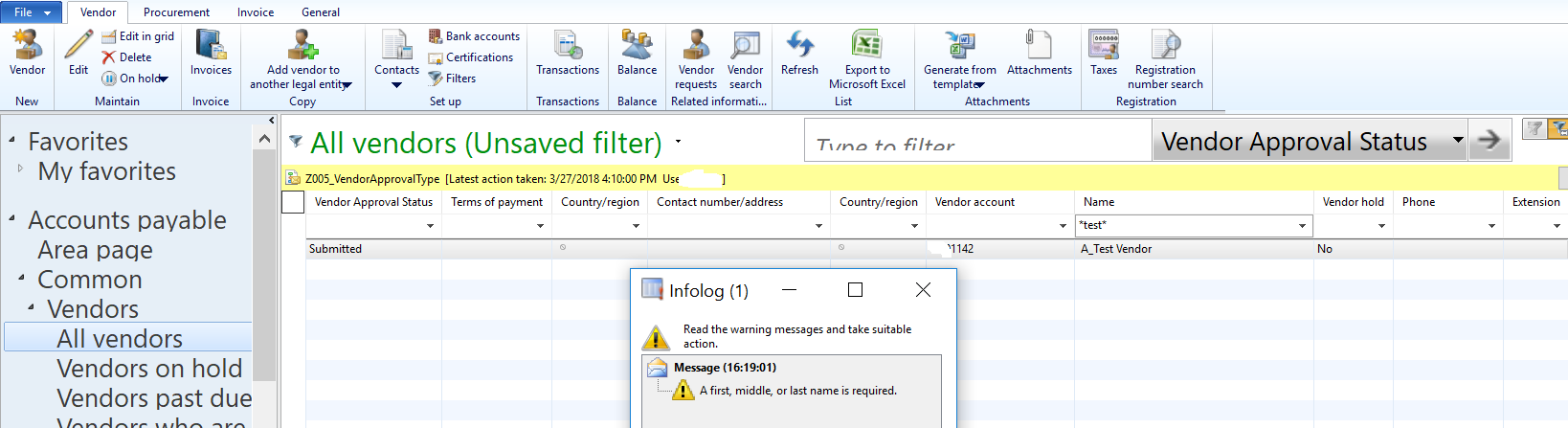
Error-Submit-Approval-Vendor-Creation.png

*This post is locked for comments

I have the same question (0)
  • Suggested answer
    Mahmoud Hakim Profile Picture
    17,887 on at

    this workflow as you mention not standard , so you can debug this issue and review your code

  • benjamin84 Profile Picture
    2,075 on at

    Hi Crispin,

    I don't know the history our implementation,

    for early accountnumber , we have same account number despite we have different company/ dataareaId, but for the latest account number we already distinct the account number sequence code number.

    do you know how to eliminate those message error ?

    thank you

  • benjamin84 Profile Picture
    2,075 on at

    Hi Mahmoud,

    previously I had create this and no problem, i don't backup my project when my user request to restore db prod to my dev db.

    right now i experience this,

    do you ever experience this error message too ?

    Thank you

  • Suggested answer
    Mahmoud Hakim Profile Picture
    17,887 on at

    i can understand from this message one of your fields not filled with required data , check this fields filled or not

  • benjamin84 Profile Picture
    2,075 on at

    Hi Mahmoud,

    do I need to complete first,middle,last name for those vendor only, or I should  amend and complete for whole vendor list I had ?

    Thank you

  • Suggested answer
    Mahmoud Hakim Profile Picture
    17,887 on at

    if this is mandatory data for your workflow , so if you create new vendor , you must fill it based on your business development

  • benjamin84 Profile Picture
    2,075 on at

    Hi Mahmoud,

    I already checked and added middle and last name for those vendor contact.

    but I still got this error message.

    thank you

  • benjamin84 Profile Picture
    2,075 on at

    Hi Mahmoud,

    already filled this information for those vendor contact, but still problem

    Thank you

Under review

Thank you for your reply! To ensure a great experience for everyone, your content is awaiting approval by our Community Managers. Please check back later.

Helpful resources

Quick Links

Season of Sharing Community Challenge Launch!

Jump in, show your community spirit, and win prizes!

Women in Power Builds Momentum

Expanding mentorship, skilling, and AI innovation

Congratulations to the April Top 10 Community Leaders

These are the community rock stars!

Leaderboard > 🔒一 Microsoft Dynamics AX (Archived)

#1
CP04-islander Profile Picture

CP04-islander 21

#2
dekion Profile Picture

dekion 4

#2
Virginia99 Profile Picture

Virginia99 4

Last 30 days Overall leaderboard

Featured topics

Product updates

Dynamics 365 release plans



