web
You’re offline. This is a read only version of the page.
close
Skip to main content

Announcements

News and Announcements icon
Community site session details

Community site session details

Session Id :
Microsoft Dynamics AX (Archived)

Role for the view history in the purchase order and purchase requisition

(0) ShareShare
ReportReport
Posted on by 4,057

Hi All

In order to see the "overview" and "work item" tab on the purchase order and purchase requisition workflow "view history" form, which role i have to assigned to the user.
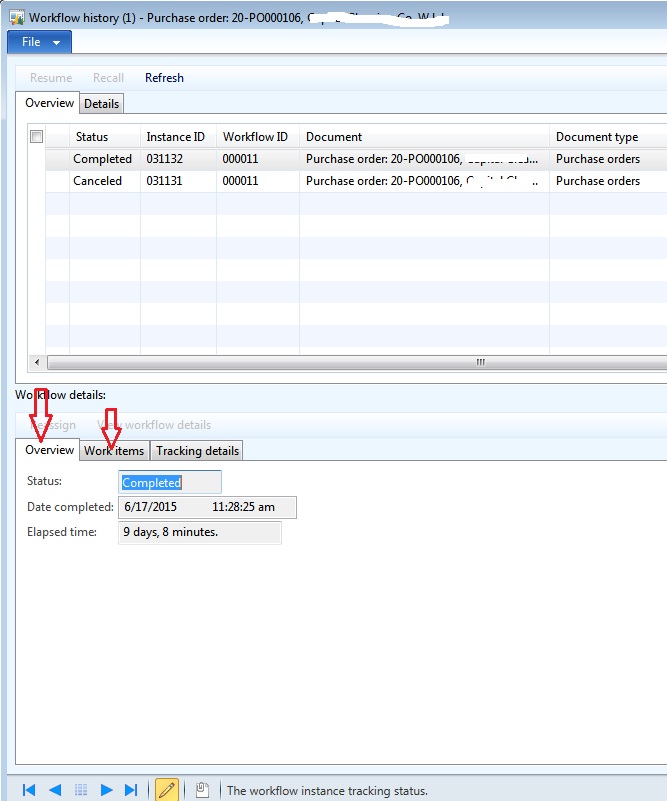
 4682.13.jpg

Please advise

*This post is locked for comments

I have the same question (0)
  • Sohaib Cheema Profile Picture
    49,668 Super User 2026 Season 1 on at

    there should be no SPECIAL role for this.

    Because, if you will explorer role named as "System User", you will find that any user who has access to "System User" can see workflow history (provided that he/she access to specific document) i.e. workflows where he/she is submitter or approver or participant in any way at any step of workflow. If user does not ahs access to document/record, he/she cannot see workflow history of that specific record (unless he/she is admin)

    would you please like to describe details of your case

  • imran ul haq Profile Picture
    4,057 on at

    thanks Sohaib for your reply.

    Actually i have one user (group operation manager), he is also the part in the workflow as approver, he want to see the both tab (Overview and the work item), i have already assign the purchase manager and system user role to it but those tab not visible.

    Previously system admin role was assigned and now i remove it, so he want to see those tab.

  • Sohaib Cheema Profile Picture
    49,668 Super User 2026 Season 1 on at

    can he see the workflow history..??? for a specific workflow instance?

  • imran ul haq Profile Picture
    4,057 on at

    yes he can see the workflow history

  • Sohaib Cheema Profile Picture
    49,668 Super User 2026 Season 1 on at

    Display menu item WorkflowStatusDetail is responsible for display/hiding of these tables, which is your focus.

    There is EnumType parmeter on this menuitem (WorkflowStatusDetail) which makes decision of hiding and showing tab in Workflow history form.

    This menu item is already part of SystemUser Role. Is that Role customer for you...??? I am asking about SystemUser Role

  • imran ul haq Profile Picture
    4,057 on at

    5826.14.jpg

    no that role is not customized and in the Enum type Parameter of menuitem WorkflowStatusDetail details is defined.

  • Sohaib Cheema Profile Picture
    49,668 Super User 2026 Season 1 on at

    okay, is WorkflowViewWorkflowHistory (Privileged ) customized?

    one more thing, which workflow is having issue? Name/Type  of workflow?

  • imran ul haq Profile Picture
    4,057 on at

    15.jpg

    No it is not customized, and issue with the purchase order and purchase requisition workflow, and work flow types are PurchTableTemplate and PurchReqReview

  • Verified answer
    Sohaib Cheema Profile Picture
    49,668 Super User 2026 Season 1 on at

    Alright, I have done some debugging and found below.

    These Tabs (Overview and Work-Items), these are controlled via class method. These are controlled in setControlVisible (method) of WorkflowStatusForm (Class).


    Overview Tab is made visible only for admin user with below line of code

    overviewControl.visible(adminUser);


    Work-Items Tab is made visible in 3 cases

    1. If user is admin

    2. If user has IT manger Role

    3. If user contains                 WF privileges.

      Below line of codes control its visibility

      if (adminUser || isUserITManager || isUserContiansWFPrivilege)

         {

             workItemsControl.visible(true);

         }

         else

         {

             workItemsControl.visible(false);

         }         

      So, as a conclusion I would say it needs customization to enable these tabs for normal users

  • imran ul haq Profile Picture
    4,057 on at

    thanks Sohaib for your help and usual support.

    As you said these are for the work-item tab is available for the admin,IT Manger and WF privileges users, so i create one role and attached all the workflow privileges to it and add the role to the user now it is coming fine. But for the overview tab i tried to add the user in the class by editing the WorkflowStatusForm class by adding line:

    overviewControl.visible("user ID"User); after overviewControl.visible(adminUser); but it haven't work, can suggest me if i can fix this for one user only for "iulhaq".

Under review

Thank you for your reply! To ensure a great experience for everyone, your content is awaiting approval by our Community Managers. Please check back later.

Helpful resources

Quick Links

Season of Sharing Community Challenge Launch!

Jump in, show your community spirit, and win prizes!

Women in Power Builds Momentum

Expanding mentorship, skilling, and AI innovation

Congratulations to the April Top 10 Community Leaders

These are the community rock stars!

Leaderboard > 🔒一 Microsoft Dynamics AX (Archived)

#1
CP04-islander Profile Picture

CP04-islander 21

#2
dekion Profile Picture

dekion 4

#2
Virginia99 Profile Picture

Virginia99 4

Last 30 days Overall leaderboard

Featured topics

Product updates

Dynamics 365 release plans



