web
You’re offline. This is a read only version of the page.
close
Skip to main content

Announcements

News and Announcements icon
Community site session details

Community site session details

Session Id :
Microsoft Dynamics AX (Archived)

Setup Data import/export framework

(0) ShareShare
ReportReport
Posted on by

When setting up Data import/export framework, under shared working directory when validating service account access to directory we get an infolog error message. Please see images below for details. Any help will be greatly appreciated.

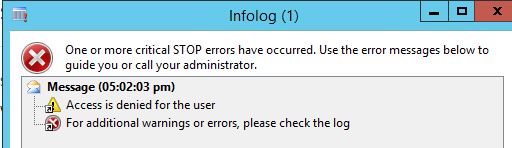
DIMF1.JPG

*This post is locked for comments

I have the same question (0)
  • Verified answer
    Bilal Issa Profile Picture
    4,370 on at

    Hi,

    please make sure the AOS account has read write permission on the shared directory.

    Regards,

    Bilal

  • Verified answer
    Community Member Profile Picture
    on at

    Hi, Please make sure that you are using a shared directory and AOS service account has write permissions on the specified directory.

    Keep us updated if this was the issue?

  • Verified answer
    Faisal Fareed Profile Picture
    10,796 User Group Leader on at

    Please make sure you have given appropriate rights to the user you are performing this action, in most cases check AOS service account user. this user should have write access to shared directory.

    I assume you are configuring DIEF from System Admin user.

  • Verified answer
    Community Member Profile Picture
    on at

    As per my understanding it use to be good if this folder is created at AOS server, this will solve the access permission issue.

    So I suggest you should create the folder accordingly

    Please update us with details like where you have created this folder.

  • Verified answer
    André Arnaud de Calavon Profile Picture
    305,624 Super User 2026 Season 1 on at

    Hi Lhamo,

    To provide a complete answer:

    - AOS service account should have read/write access on the directory.

    - The account that runs the Data Import/Export Service should also have these same rights. In many cases this is the same windows account as the AOS, but could be different.

    - If you are using a network path, don't use a drive letter as this can be different or not setup for the service accounts. So use an UNC path. If you use an UNC like (\\machinename\directory\) you can use any directory on any machine (don't forget the permissions on this directory).

Under review

Thank you for your reply! To ensure a great experience for everyone, your content is awaiting approval by our Community Managers. Please check back later.

Helpful resources

Quick Links

Season of Sharing Community Challenge Launch!

Jump in, show your community spirit, and win prizes!

Women in Power Builds Momentum

Expanding mentorship, skilling, and AI innovation

Congratulations to the May Top 10 Community Leaders

These are the community rock stars!

Leaderboard > 🔒一 Microsoft Dynamics AX (Archived)

#1
CP04-islander Profile Picture

CP04-islander 21

#2
dserp Profile Picture

dserp 4

#2
dekion Profile Picture

dekion 4

Last 30 days Overall leaderboard

Featured topics

Product updates

Dynamics 365 release plans



