web
You’re offline. This is a read only version of the page.
close
Skip to main content

Notifications

Announcements

No record found.

Community site session details

Community site session details

Session Id :
Finance | Project Operations, Human Resources, ...
Answered

Drill down Functionality on General ledger account statement (SSRS REPORT) not working

(0) ShareShare
ReportReport
Posted on by 344

Good day.. The voucher column on the general ledger account statement is not live (no drill down available) when you lick a voucher number to direct you to the original transactions posting into that main account. Is there any configuration that activates drill down for all SSRS reports?. Please assist.

Regards 

Alexio Pfumai

7801.DRIILL-DOWN.png

I have the same question (0)
  • Suggested answer
    Ludwig Reinhard Profile Picture
    Microsoft Employee on at

    Hello Alexio,

    If you click on the blue highlighted voucher number then the voucher form should open and give you details about the transactions.

    Irrespective of that, I would not consider a drilldown from a 'print' report as necessary.

    We have the trial balance form in GL, which allows you the drill down you are looking for.

    In addition, there is the Management Reporter, which also allows you a drill down.

    Should be sufficient in my opinion.

    Don't you think so?

    Best regards,

    Ludwig

  • Alexio Pfumai Profile Picture
    344 on at

    Hi @Ludwig

    Thanks for your response. The user wants drill down from the printed report and when one clicks at the blue highlighted voucher number it is not giving me details about the transactions. Can you assist on how to make the blue highlighted voucher number field active?

  • Suggested answer
    Ludwig Reinhard Profile Picture
    Microsoft Employee on at

    Hi Alexio,

    I don't have this report available in my D365FO demo machine but from the past I know that you could open the voucher by doing a right mouse click.

    Do you know if this is an old report that has been migrated from a previous AX2012 version or whether this is a self designed report?

    Best regards,

    Ludwig

  • Alexio Pfumai Profile Picture
    344 on at

    Hi Ludwig

    It is a generic report coming from the system. It is the main account statement available in general ledger under: General ledger>COA>Accounts>Main accounts

  • Alexio Pfumai Profile Picture
    344 on at

    Hi Ludwig

    To shade more light on reports with no drill down, the dimension statement report in general ledger is included

  • Suggested answer
    Ludwig Reinhard Profile Picture
    Microsoft Employee on at

    Hi Alexio,

    I double checked that and the blue hyperlinks work in my case.

    A prerequisite is that the report is not shown in the PDF previewer but that the output is generated as an ordinary SSRS report.

    So, please ensure that this feature is turned off

    docs.microsoft.com/.../preview-pdf-documents

    In the PDF document the hyperlink does not work.

    Best regards,

    Ludwig

  • Alexio Pfumai Profile Picture
    344 on at

    Hi Ludwig

    Thanks for your response. I have turned off the PDF Previewer on Report options but when I print the SSRS report the system throws a warning:

    ''Print destination Screen is not supported in current environment, redirected print destination to PDF file.''

    When i checked the print destinations i found out that SCREEN is not available. The D365FO system is an On-premise Deployment, is there  a configuration i missed that makes the print to screen supported?

    7367.PDF-SETTINGS.png

    2072.PRINT-DESTINATIONS.png

  • Suggested answer
    Ludwig Reinhard Profile Picture
    Microsoft Employee on at

    Hi Alexio,

    I tested this in two independent D365FO systems (in PU34 and PU35) and got the following:

    Run the report 

    (Note that I can select screen)

    4722.acc1.png

    Output

    3264.acc2.png

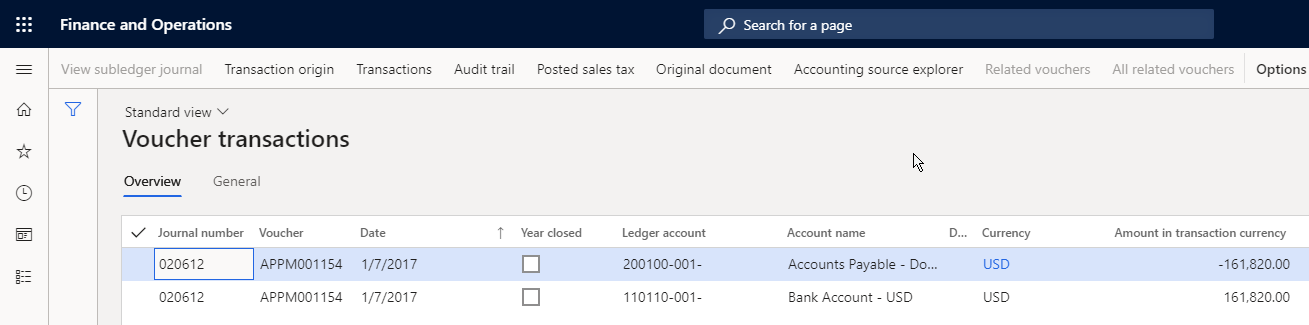
    If I click on one of the hyperlinks, the following form opens automatically
    2860.acc3.png

    Do you have a second plain vanilla MS contoso system available where you could double check the behavior in your system?

    Do you know if somebody else in your company can possibly test-print the report?

    Is the outcome that your colleague gets the same?

    Do you know if IT has made some modifications to your documents and document printing?

    What you can try in addition is resetting the usage data of your user to see if this influenced the outcome. 

    Best regards, 

    Ludwig

  • Suggested answer
    Junaid Idrees Profile Picture
    on at

    Hi Alexio,

    If your application is on on-prem environment then you have to use extension to enable drill through link in your application report.

    Please refer to the below link:

    https://docs.microsoft.com/en-us/dynamics365/fin-ops-core/fin-ops/get-started/features-not-implemented-on-prem

    If you will disable "Preview document using pdf" from report option then while generating any report system will through an exception that you received. 

    To shed some light on that, if we are using on cloud version and our environment is tier one (lower) devaos then we can disable the "PDF viewer" and system will generate the report in "Docentric viewer" not "PDF viewer" then you will be able to drill down on voucher easily. And if our environment is tier two (higher) sandbox then system disable the drill through link feature on report option screen. 

  • Community Member Profile Picture
    on at

    I have a similar situation going on with a GL Dimension Statement.

    Modules-->GL-->Inquiries and Reports --> Ledger Reports-->Dimensional Statement.

    The finance team isn't able to click on the Voucher anymore because the blue hyperlink to the voucher isn't there anymore. 

    4353.pastedimage1594070695256v1.png

    Checked the report options and the preview is set to No:

    6254.pastedimage1594071154797v2.png

    Any thoughts?

    Thanks!

Under review

Thank you for your reply! To ensure a great experience for everyone, your content is awaiting approval by our Community Managers. Please check back later.

Helpful resources

Quick Links

Responsible AI policies

As AI tools become more common, we’re introducing a Responsible AI Use…

Neeraj Kumar – Community Spotlight

We are honored to recognize Neeraj Kumar as our Community Spotlight honoree for…

Leaderboard > Finance | Project Operations, Human Resources, AX, GP, SL

#1
Martin Dráb Profile Picture

Martin Dráb 559 Most Valuable Professional

#2
André Arnaud de Calavon Profile Picture

André Arnaud de Cal... 464 Super User 2025 Season 2

#3
Sohaib Cheema Profile Picture

Sohaib Cheema 250 User Group Leader

Last 30 days Overall leaderboard

Product updates

Dynamics 365 release plans



