web
You’re offline. This is a read only version of the page.
close
Skip to main content

Notifications

Announcements

No record found.

Community site session details

Community site session details

Session Id :
Service | Customer Service, Contact Center, Fie...
Suggested Answer

Automatically placing case from email into queue

(0) ShareShare
ReportReport
Posted on by 5

Hi,

What I want to accomplish:

1.) Have emails convert to cases and be put into a specific queue automatically

2.) Have cases unassigned once they arrive in the queue so users can pick the case themselves

I have a queue set up and it's linked to the relevant mailbox. The mailbox is active. I'm able to get cases generated automatically when sending an email, but it makes me the owner of each case (not ideal).

Here's what I've done so far:
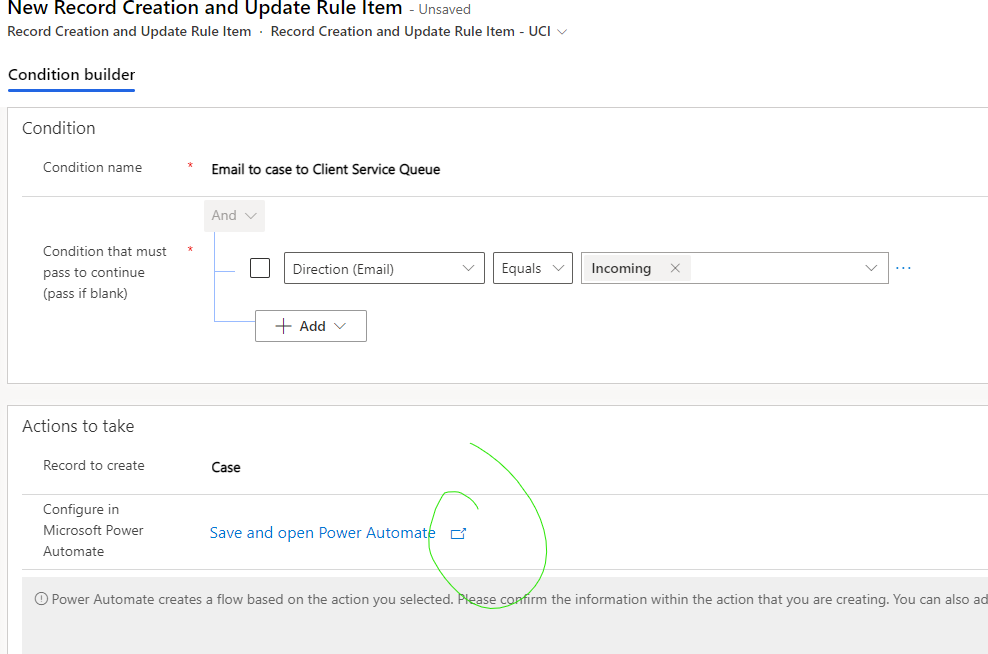
pastedimage1651163546308v1.png

pastedimage1651164480940v2.png

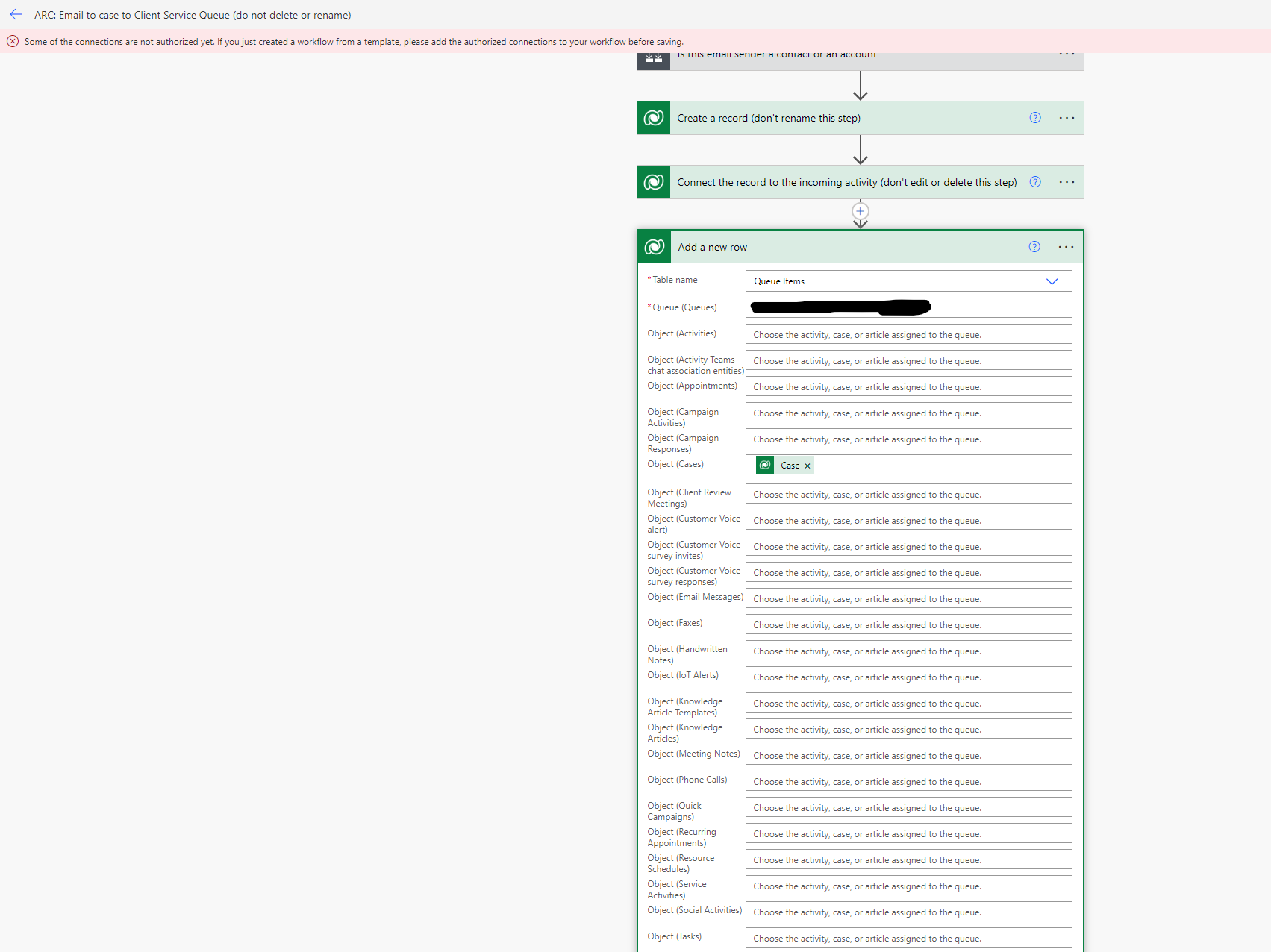
There is a red error message at the top of the screen of the 2nd screen show. I'm not sure what it's referring too or how to fix it.

Thank you!

I have the same question (0)
  • Suggested answer
    Community Member Profile Picture
    on at

    Hi kmbell1,

    Please change you Add Queue Items step like this:

    Value in Queue: /queues(29d9e4e6-7dc0-ec11-983e-000d3a59defb). Please change the 29d9e4e6-7dc0-ec11-983e-000d3a59defb to your queue id.

    Object (Cases): /incidents(@{outputs('Create a record (don''t rename this step)')?['body/incidentid']})

    pastedimage1651210317210v1.png

    Result:

    pastedimage1651210501498v2.png

    Note:

    1. Owner is a required field so it must have value. You could only change Owner to someone else.

    2. About the error message in your screenshot, if your flow can run well, you could just ignore it. Some discussion about this error:

    Solved: Some of the connections are not authorized yet - Power Platform Community (microsoft.com)

    Some of the connections are not authorized yet. - Power Platform Community (microsoft.com)

  • MirandaK Profile Picture
    15 on at

    Steve,

    I really appreciate your assistance. This worked for me. What do I add to the flow to remove the original email from the same queue?

Under review

Thank you for your reply! To ensure a great experience for everyone, your content is awaiting approval by our Community Managers. Please check back later.

Helpful resources

Quick Links

Responsible AI policies

As AI tools become more common, we’re introducing a Responsible AI Use…

Neeraj Kumar – Community Spotlight

We are honored to recognize Neeraj Kumar as our Community Spotlight honoree for…

Leaderboard > Service | Customer Service, Contact Center, Field Service, Guides

#1
Tom_Gioielli Profile Picture

Tom_Gioielli 45 Super User 2025 Season 2

#2
Daniyal Khaleel Profile Picture

Daniyal Khaleel 27 Most Valuable Professional

#3
Soundari Profile Picture

Soundari 15

Last 30 days Overall leaderboard

Featured topics

Product updates

Dynamics 365 release plans