web
You’re offline. This is a read only version of the page.
close
Skip to main content

Announcements

News and Announcements icon
Community site session details

Community site session details

Session Id :
Microsoft Dynamics AX (Archived)

Get URL field in Customer Creation form and store it as URL in Contact information

(0) ShareShare
ReportReport
Posted on by 180

Hello,

I have added URL field in DirPartyQuickCreateForm (Customer Creation form) which is stored in Contact Information of Customer.

My problem is I have added the field as URL but it is stored as Type=Phone. (refer the attached image)

I want to store that field as Type=URL only.
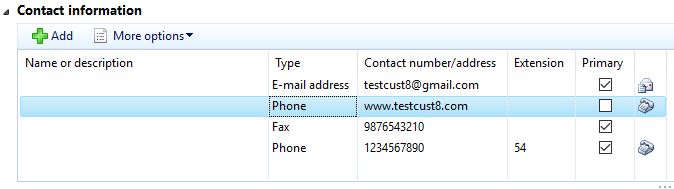
custUrl.JPG

Any idea how to do this?

Thanks in Advance!!!

*This post is locked for comments

I have the same question (0)
  • Martin Dráb Profile Picture
    239,660 Most Valuable Professional on at

    It seems that you're not adding it right. If you want us to spot a problem in your implementation, you'll have to tell us what you did.

  • Suggested answer
    Vilmos Kintera Profile Picture
    46,149 on at

    Base Enum fields are drop-down selections (enumerations) which you select from a pre-defined element list, you cannot enter any custom values however you want. You need to customize the Base Enum behind that field within the AOT if it does not have the URL element already, after which you should be able to select it. I have not verified if it is already there since AX is not in front of me right now, have a look at it yourself.

  • Abhishek Chavda Profile Picture
    180 on at

    @Martin, 

    I added data source with joins to other data sources in the same way it was there for Email and Fax.

    Then in design part I added a string edit field for URL and assigned data source and data field to it. (refer the attached images)

    6864.dataSource.JPG

    6864.dataSource.JPG

  • Abhishek Chavda Profile Picture
    180 on at

    @Vilmos,

    Yes, the URL element is already there in base enum LogisticsElectronicAddressMethodType.

  • Verified answer
    Vilmos Kintera Profile Picture
    46,149 on at

    Did you implement the methods on the datasource? Have a look at the standard ones, they have a bunch of business logic on the form datasources, including setting the address type in the initValue() method.

  • Verified answer
    Abhishek Chavda Profile Picture
    180 on at

    @Vilmos,

    Yes, I got it. I forgot to override methods in data sources for URL field.

    Now, it works fine.

Under review

Thank you for your reply! To ensure a great experience for everyone, your content is awaiting approval by our Community Managers. Please check back later.

Helpful resources

Quick Links

Season of Sharing Community Challenge Launch!

Jump in, show your community spirit, and win prizes!

Women in Power Builds Momentum

Expanding mentorship, skilling, and AI innovation

Congratulations to the April Top 10 Community Leaders

These are the community rock stars!

Leaderboard > 🔒一 Microsoft Dynamics AX (Archived)

#1
CP04-islander Profile Picture

CP04-islander 21

#2
Harisgillani Profile Picture

Harisgillani 4

#2
dekion Profile Picture

dekion 4

Last 30 days Overall leaderboard

Featured topics

Product updates

Dynamics 365 release plans



