web
You’re offline. This is a read only version of the page.
close
Skip to main content

Announcements

No record found.

News and Announcements icon
Community site session details

Community site session details

Session Id :
Dynamics 365 Community / Forums / Finance forum / Attach file to Journal...
Finance forum

Attach file to Journal Records from Share point location as an Attachment in D365 FO

(0) ShareShare
ReportReport
Posted on by

Hi Folks,

I have a requirement of attaching a file to a Journal Line record from the share point location specified in Document Management Parameters form.

When share point URL is configured in D365 Environment, whatever files we attach to a record gets automatically uploaded in location path of share point based on Document Type Setup in D365 FO.

The requirement is I need to attach a file which is already present in Sharepoint location to a Journal Line Record as an attachment through code in D365 FO.
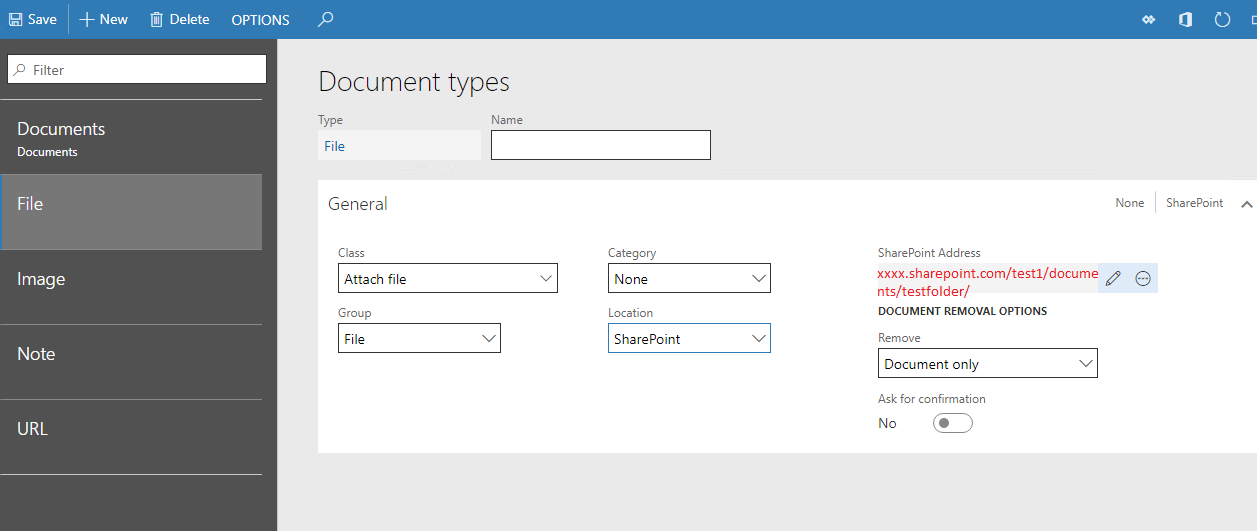
Sharepoint.png

Is there a way to link the files from share point to D365 without manually attaching and uploading in D365 FO .

Thanks in Advance.

I have the same question (0)
  • Blue Wang Profile Picture
    Microsoft Employee on at

    Hi Sanjay46,

    You mentioned putting files on shared points.
    I saw this: https://stoneridgesoftware.com/sending-flat-files-from-dynamics-365-for-operations-to-a-different-location/

    You can try the FTP Method , building the DLL and binding the specified path.

    I hope it will help you.

  • Suggested answer
    Eugen Glasow Profile Picture
    6,361 on at

    Create a duplicate of the LedgerJournalAttachmentsEntity entity (aka "General journal attachments"). Namely, square-headed Microsoftees declared this entity non-public. Then use Microsoft flow to pick up files from the Sharepoint folder and attach to the journal through this new entity. Please be aware the above entity attaches files to the journal header, not the lines.

  • Suggested answer
    Ludwig Reinhard Profile Picture
    Microsoft Employee on at

    Hello Sanjay46,

    Agree with Eugen, MS Flow should be able to handle that as long as you can establish a clear and unique connection between your journal lines and the Sharepoint element.

    Best regards,

    Ludwig

  • Community Member Profile Picture
    on at

    Thanks Ludwig Reinhard and Eugen Glasow,

    But could you please explain me how to pick up files from sharepoint folder using Sharepoint connector in Microsoft flow and map with D365 Connector . I went through some actions in Sharepoint connector in MS flow but I am unable to find an appropriate one to map with. 

    7802.Flow_2D00_sharepoint.png

    Regards,

    Sanjay.C

  • Suggested answer
    Eugen Glasow Profile Picture
    6,361 on at

    The trigger is "Create file", obviously.

    P.S. "Created or modified". Your screenshot shows Actions, but you need Triggers.

  • Community Member Profile Picture
    on at

    Thanks Blue Wang ,

    But the the requirement is I need to attach a file in D365 from Sharepoint folder location.

  • Community Member Profile Picture
    on at

    Thanks Eugen for your prompt reply,

    So you mean trigger will be create File, then it will be triggered when ever you upload a file to Sharepoint site in specific folder. But the requirement is we need to attach a file to Journal Record in D365 from Sharepoint location as attachment.

  • Suggested answer
    Ludwig Reinhard Profile Picture
    Microsoft Employee on at

    Hello Sanjay46,

    Not everything will work out of the box if you use journals.

    You might have to modify / extend the existing entities.

    Also you have to define where and how you establish the linkage to Sharepoint.

    (How does the system know where to attach the document)

    Another thing that you have to note is that you can only modify unposted journal transactions.

    To get an idea how MS Flow can help realizing this, you can have a look at one of my older blog posts about vendor invoice recording and approvals where I did something similar.

    Best regards,

    Ludwig

  • Eugen Glasow Profile Picture
    6,361 on at

    [quote user="Sanjay46"]

    Thanks Eugen for your prompt reply,

    So you mean trigger will be create File, then it will be triggered when ever you upload a file to Sharepoint site in specific folder. But the requirement is we need to attach a file to Journal Record in D365 from Sharepoint location as attachment.

    [/quote]

    You did not disclose how the connection between the file and the record is established. Of course this depends on what happens first.

    I assumed the journal is created first, then a file is uploaded. Otherwise how can you attach a file to something (journal line) what does not yet exist? Hence, the trigger would be at the Sharepoint side.

    Of course you may also assume that they are created at the same time and start looping the journals, but how are you going to mark the journal [lines] as processed in this case?

    Check out Ludwig's and Andre's blogs for inspiration.

  • Community Member Profile Picture
    on at

    The files are already uploaded in Sharepoint portal in specific location path,

    Relation between the record and file is that LedgerjournalTrans Table contains an additional field which carries information about the file name for each journal lines like below,

    xxxx.sharepoint.com/test/documents/testfolder/journalInfo.xls

    So initial design was a batch job that will be run by the user, which in turn reads the path from LedgerjournalTrans table through X++ code and add as attachment for specific journal in D365,
    But after lot of analysis , I assumed the possibility to achieve this functionality through code is minimum,
    So Let me explore through MS flow for this functionality,
    Thanks  Eugen Glasow Ludwig Reinhard for helping me out .

    Regards,

    Sanjay.C

Under review

Thank you for your reply! To ensure a great experience for everyone, your content is awaiting approval by our Community Managers. Please check back later.

Helpful resources

Quick Links

November Spotlight Star - Khushbu Rajvi

Congratulations to a top community star!

Forum Structure Changes Coming on 11/8!

In our never-ending quest to help the Dynamics 365 Community members get answers faster …

Dynamics 365 Community Platform update – Oct 28

Welcome to the next edition of the Community Platform Update. This is a status …

Leaderboard > Finance

Last 30 days Overall leaderboard

Featured topics

Product updates

Dynamics 365 release plans



