Hi everyone,
I am having the following error while adding a web service (.svc file) as a service reference in Visual studio project.
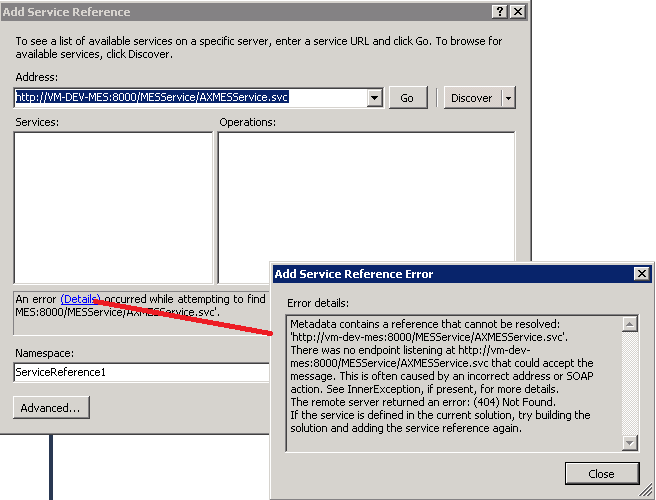
I have done some testing to add this web service successfully and consumed it in AX with the following scenarios which shows when I am able to access this web service with what IE settings.
Tests:
- With “Automatically detect settings” set to true in IE:
- tried to access the MESService using Visual Studio, but failed to connect.
- tried to access the MESService using IE, but failed to connect (kept asking for credentials).
- tried to access the MESService using AX (from X++ code), does NOT connect and gives (407) proxy authentication error.
- With “Automatically detect settings” set to false in IE:
- tried to access the MESService using Visual Studio, and got connected successfully.
- tried to access the MESService using IE, and got connected successfully.
- tried to access the MESService using AX (from X++ code), and got connected.
- Created a separate .NET project and consumed the MESService:
- with “Automatically detect settings” set to true in IE, the service is not accessible.
- with “Automatically detect settings” set to false in IE, the service is accessible.
- with “Automatically detect settings” set to true in IE, the service is accessible with some changes made to the configuration of the .NET project.
- Made the same configuration changes (as mentioned in 3.c.) in places where AX looks for the MESService, tried to access the MESService using AX (from X++ code), but still AX cannot connect and gives (407) proxy authentication error.
- Created a “wrapper” service for MESService on the AOS Server and hosted it on the AOS server’s IIS. Then created a separate .NET project and consumed this “wrapper” service. This also worked fine.
- Changed the X++ code to now consume the wrapper service (instead of the MESService), but still AX cannot connect and gives (407) proxy authentication error.
I found couple of log entries which might help in this case but did not find anything workable for me.
Blog Entries
https://community.dynamics.com/ax/b/axfortechies/archive/2010/06/03/consuming-asmx-webservice-or-wcf-service-in-dynamics-ax.aspx#.Udy0vZxMYhA
http://community.dynamics.com/ax/b/daxmusings/archive/2011/10/19/consuming-external-webservices-in-ax-2012.aspx#.Ud3uoPmNmP8
Call from AX
When I tried to call this web service from AX I got the following error which may be more explanatory to know the base of this issue.
Any thoughts or pointer will be highly be appreciated.
Regards,
Faisal
*This post is locked for comments
I have the same question (0)










 Share
Share Report
 10,796
 All responses (
 Answers (



