web
You’re offline. This is a read only version of the page.
close
Skip to main content

Notifications

Announcements

No record found.

Community site session details

Community site session details

Session Id :
Customer experience | Sales, Customer Insights,...
Answered

Always Show Related->Connections Tab

(0) ShareShare
ReportReport
Posted on by 50

I am building a custom form in the Account entity.  I would like one of the tabs to be the same as what I would get if I used the default Contact card and clicked Related -> Connections.  Basically, I am trying to save users a click and also make it easier for users to see how to view connections.  I can add a new tab with a section that displays Connected From (related records), but that view doesn't have the action buttons that are shown on by going Related -> Connections (Show Chart, Connect, Scheduling, etc.).  How can I either add those buttons to my new tab, or in the alternative make the Related -> Connections tab always visible?

I have the same question (0)
  • LuHao Profile Picture
    40,892 on at

    Hi Gurs,

    Could you provide some screenshots to show what you want to achieve?

  • Paul_Owen Profile Picture
    2,027 on at

    You could just create a subgrid to show the connections, for example Stakeholders on Opportunity is an OOB Connection Grid, I don't know what you mean about other buttons for Charts etc? Can you provide a screenshot?

    Regards

    Paul

  • Gurs Profile Picture
    50 on at

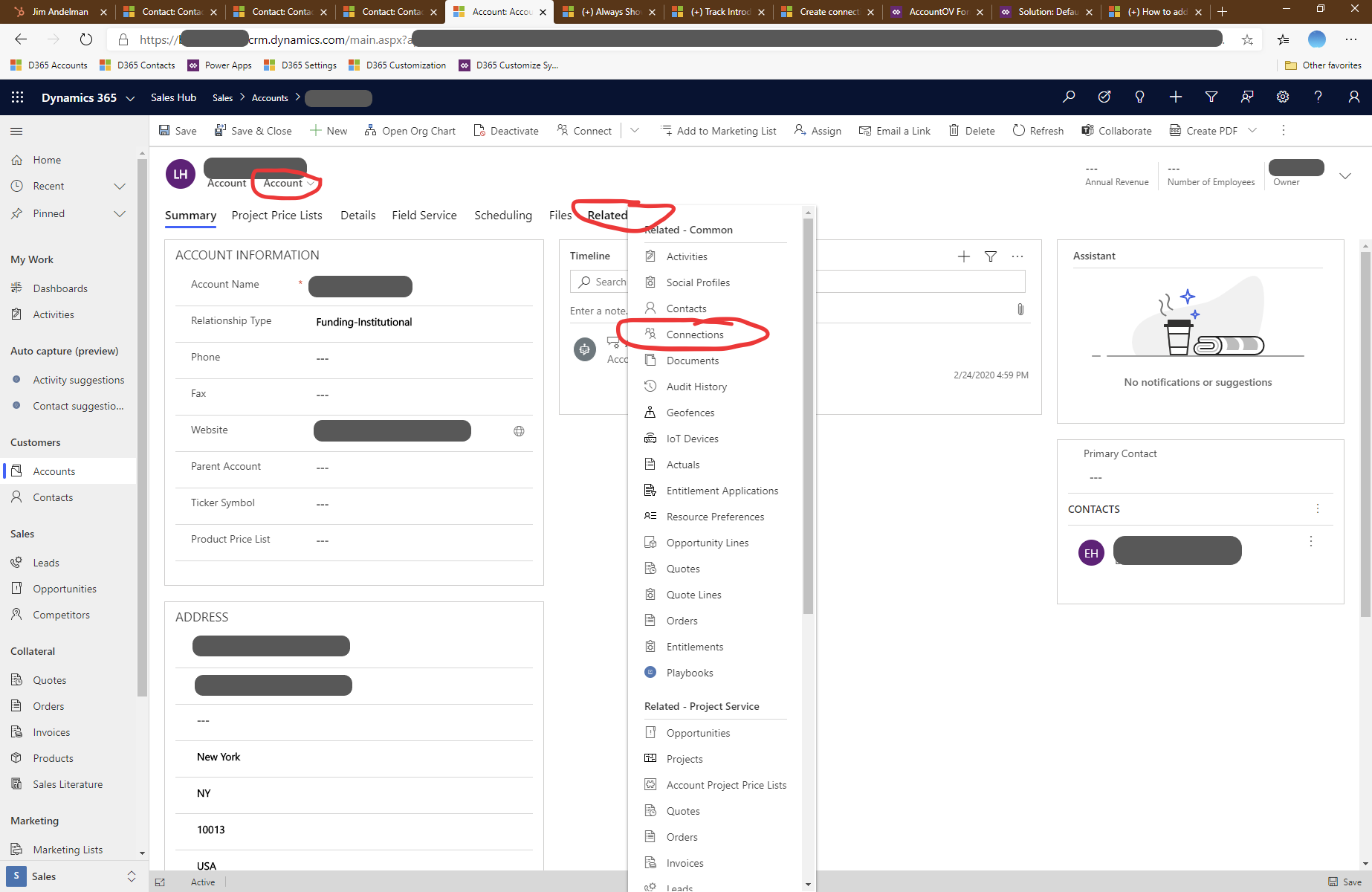
    Thanks Lu and Paul.  Here are some screenshots to explain what I am trying to accomplish.  First is the standard Sales Hub Contact form.  You can see that there is no tab for Connections.  When you click the Related tab, you get a drop-down menu where you can then select Connections:
    D365-Related-20200226.png

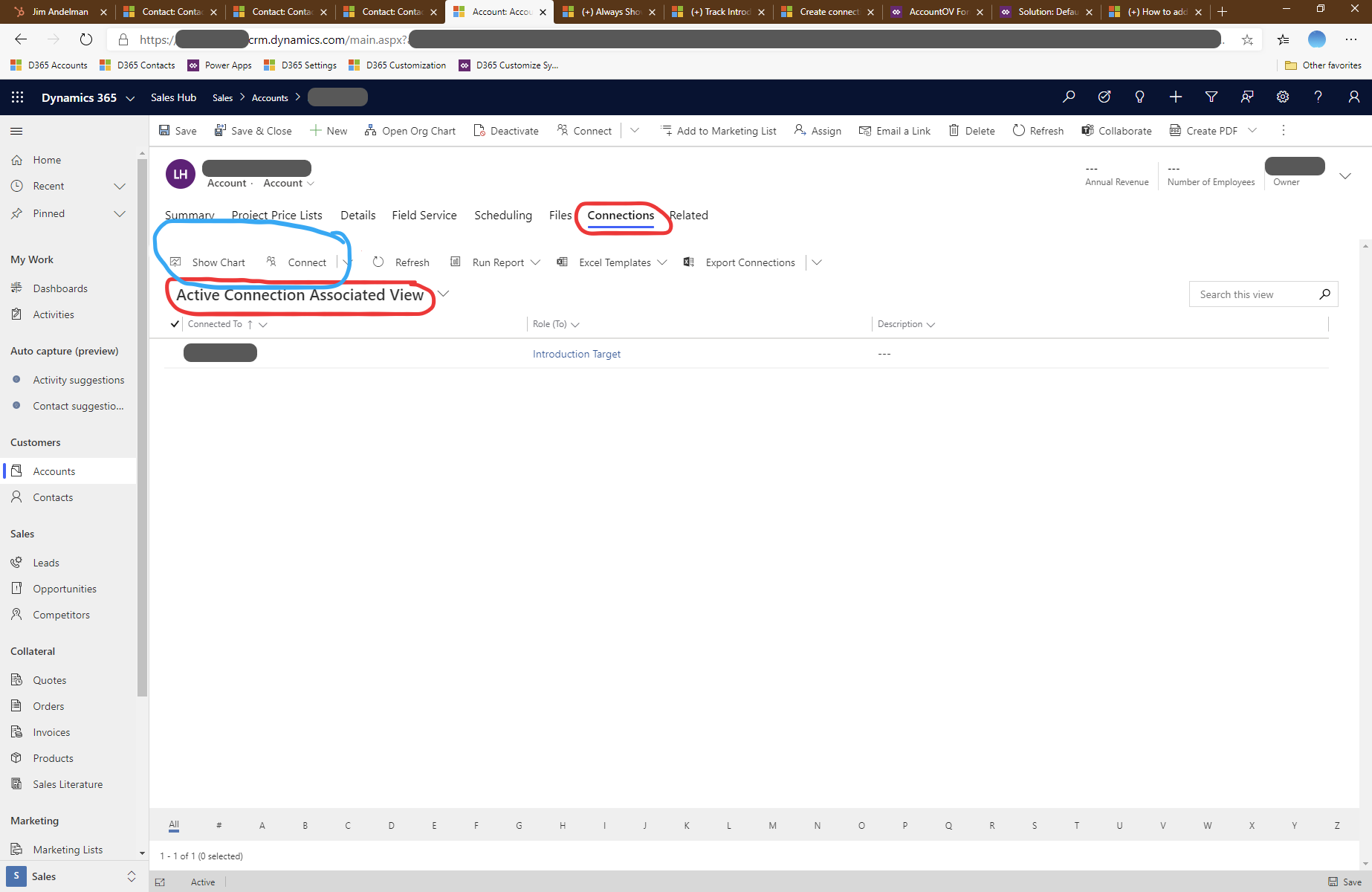
    Once you click Connections, suddenly the Connections tab appears, and you are viewing "Active Connections Associated View".  This view contains buttons for Show Chart and Connect with a dropdown, which allows you to add a connection (circled in blue):
    D365-Related_2D00_Connections-20200226.png

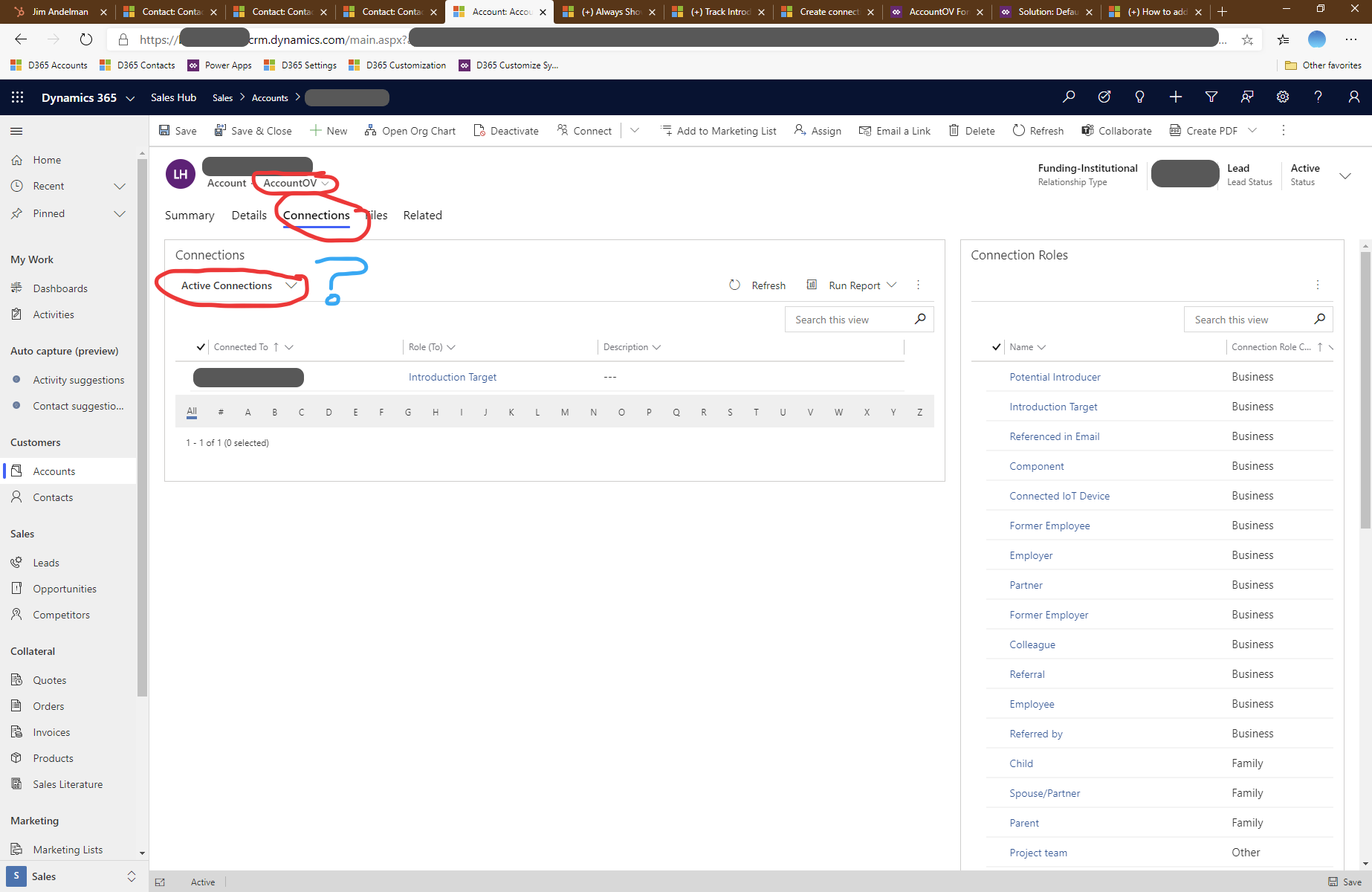
    Finally, here is the custom form I created (ContactOV), on which I created a tab called Connections that is always visible.  On that tab I placed a subgrid that shows related records, set the Entity to Connections (Connected From) and the default view to Active Connections.  The information displayed looks much like the previous screenshot, except that I don't have the buttons in blue from above.  So I have no way to add a connection or view a chart of connections, without clicking Related and then Connections, which defeats the purpose:
    D365-Connections-20200226.png

    My goal is to either add the buttons circled in blue to my custom form/tab, or conversely figure out how to get the stock D365 Connections tab to always show on my custom form.  Hopefully that clarifies my situation and goals.  Thanks for the help!

  • Verified answer
    Paul_Owen Profile Picture
    2,027 on at

    I think you'd have to create a custom iframe to show that like in this example https://blog.crgroup.com/embedding-sharepoint-documents-in-a-dynamics-365-form/

    Regards

    Paul

  • Gurs Profile Picture
    50 on at

    That looks like it would do the trick, Paul Owen, but is likely above my pay grade.  Also, I realized that even though the Connect button isn't where I want it to be (right above the grid), there is a Connect button in the row with Save, New, etc.  Not perfect, but close enough!  Thanks again!

Under review

Thank you for your reply! To ensure a great experience for everyone, your content is awaiting approval by our Community Managers. Please check back later.

Helpful resources

Quick Links

Responsible AI policies

As AI tools become more common, we’re introducing a Responsible AI Use…

Neeraj Kumar – Community Spotlight

We are honored to recognize Neeraj Kumar as our Community Spotlight honoree for…

Leaderboard > Customer experience | Sales, Customer Insights, CRM

#1
Tom_Gioielli Profile Picture

Tom_Gioielli 185 Super User 2025 Season 2

#2
#ManoVerse Profile Picture

#ManoVerse 110

#3
Gerardo Rentería García Profile Picture

Gerardo Rentería Ga... 69 Most Valuable Professional

Last 30 days Overall leaderboard

Product updates

Dynamics 365 release plans
