web
You’re offline. This is a read only version of the page.
close
Skip to main content

Notifications

Announcements

No record found.

Community site session details

Community site session details

Session Id :
Finance | Project Operations, Human Resources, ...
Suggested Answer

Email Customer Statements

(0) ShareShare
ReportReport
Posted on by 1,914

Hello All,

I trust that you are all well.

I have a customer that upgraded to GP2018 R2.

in GP, there are 2 options to use to email statements. These are:

1. By setting up and using the Customer Email Options screen.

pastedimage1583797473738v1.png

2.  By setting up and using the Send Email Statements via the Customer Card Options button.
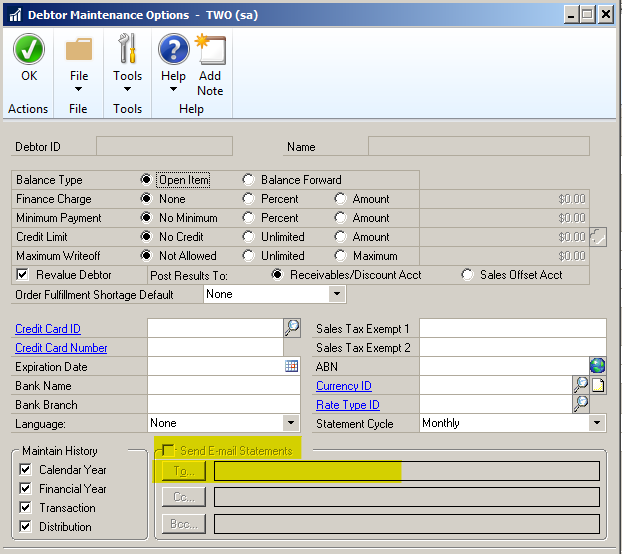
pastedimage1583797558828v2.png

Option 2 works fine and the statements do get sent out in PDF format and the customer is able to open and view the statements.

Option 1 does not work.

When using option 1, the statement is sent out in WORD format (even though we are not using Templates for the statements), but rather just modified the statement to add a logo.

- AT first, the emailing of the statement seems to go in a loop and we need to end the task and re-send.

When the statement does get sent out in WORD format, (even via Print to Screen and then select - Email), the customer is unable to open the file and gets the error as shown below.

pastedimage1583799239941v3.png

i have tried all suggestions i could find in the forumns, but this does not work.

Even though option 2 is working as expected, the customer requires option 1 to work as well.

any idea what i could be missing and what i could do to resolve this.

Regards,

Jay

Categories:
I have the same question (0)
  • Suggested answer
    Nicole Hellerud Profile Picture
    1,712 on at

    Hey Jay the Wizard-

    Thank you for your post and well wishes.

    To start this off, the two methods noted are handled differently within Microsoft Dynamics GP.

    Method two is leveraging the Report Writer (Standard) report only while Method one leverages the Word Template functionality.

    You’ll not be able to leverage both emailing aspects it’s either one or the other.

    As you are having issues with method one, I’ll put some details below to investigate:

    The error “We’re sorry. We can’t open rmStmt_MILEONE GP PTY_00 because we found problem with its contents” is generally a result of the Word Template not being saved in compatibility mode. There is an article out there on how to re-configure compatibility mode on the template.

    Error message when printing or emailing multiple Word Templates

    community.dynamics.com/.../error-message-when-printing-or-emailing-multiple-word-templates

    If this article doesn’t resolve the issue, then it comes down to first testing whether the canned GP RM Statement on Blank Paper will email, if so, then what is different between the two templates. I would try removing the logo, as this sounds to be the only modification (maybe logo file is too large?).

    You could try creating a new modified template using the canned GP template as a starting point and see whether that emails/prints.

    Hope this helps get you to a solution.

    Wishing you a wonderful week ahead!

    Nicole Fiskum

    Support Engineer

    Microsoft Dynamics

  • Suggested answer
    Jay The Wizard Profile Picture
    1,914 on at

    Hello Nicole,

    Thank you very much for your response.

    This does make sense.

    I will definately tke this into consideration, but thank you again as this does answer my question and it does provide me with a solution.

    Regards,

    Jay

  • Nicole Hellerud Profile Picture
    1,712 on at

    Hey Jay-

    WOOT! glad I was able to offer some good direction for you.

    Please feel to reach back out to the communities should you have further questions/concerns.

    Wishing you the best week(end) ahead!

    Nicole Fiskum

    Support Engineer

    Microsoft Dynamics

Under review

Thank you for your reply! To ensure a great experience for everyone, your content is awaiting approval by our Community Managers. Please check back later.

Helpful resources

Quick Links

Responsible AI policies

As AI tools become more common, we’re introducing a Responsible AI Use…

Neeraj Kumar – Community Spotlight

We are honored to recognize Neeraj Kumar as our Community Spotlight honoree for…

Leaderboard > Finance | Project Operations, Human Resources, AX, GP, SL

#1
Martin Dráb Profile Picture

Martin Dráb 544 Most Valuable Professional

#2
André Arnaud de Calavon Profile Picture

André Arnaud de Cal... 450 Super User 2025 Season 2

#3
Sohaib Cheema Profile Picture

Sohaib Cheema 250 User Group Leader

Last 30 days Overall leaderboard

Product updates

Dynamics 365 release plans



