web
You’re offline. This is a read only version of the page.
close
Skip to main content

Announcements

News and Announcements icon
Community site session details

Community site session details

Session Id :
Customer experience | Sales, Customer Insights,...
Suggested Answer

Add Letter activity to Timeline control Add option

(0) ShareShare
ReportReport
Posted on by 470

Hi,

I'm trying to add out of box LETTER entity to timeline add option, so that I can create new letter record from timeline. Although I enabled Quick Create  and the Letter entity is already enabled for unified interface.
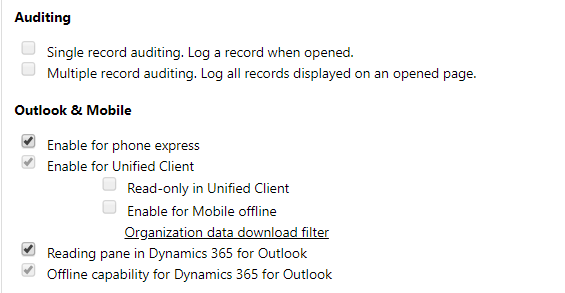
pastedimage1589288739068v1.png

But the letter entity still does not show up under Add (+) button of Timeline control. When I created another entity "Custom Letter" of activity type, it does show up:
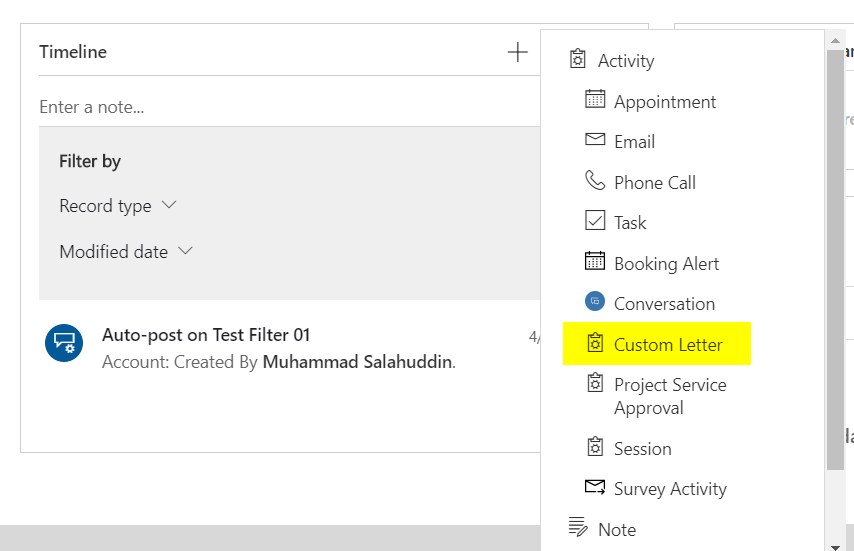
pastedimage1589289155173v1.png


Is there a way to add LETTER under Add (+) button for creation?


Thanks,

I have the same question (0)
  • Suggested answer
    Anupam.Khasia Profile Picture
    183 Super User 2026 Season 1 on at

    Hello,

    Standard letter entity is not type of activity type so you won't be able to add it in timeline. If  you want to have you can create custom activity type entity and add it in Timeline.

    Thanks

  • Muhammad Salahuddin Profile Picture
    470 on at

    Thanks Anupam for your response.

    When I go to default solution and check Letter, it is defined as an activity:

    pastedimage1589291490527v1.png

    If you look at the email / task, they are also defined similar to Letter (as activity).


    Thanks,

  • Suggested answer
    meelamri Profile Picture
    13,218 User Group Leader on at

    By design, you can't use Letter activity in Timeline.

  • Suggested answer
    Satish Tiwari - CRM Profile Picture
    Microsoft Employee on at

    As a workaround, you can use below steps to add a letter activity in timeline -

    1. Open record, go to Related tab > Activities > New Activity > Letter

    pastedimage1589885045931v1.png

    2. After filling all details and then do save & close.

    3. Now, you should be able to see the letter activity in the timeline -

    pastedimage1589885059804v2.png

  • Suggested answer
    Thomas Guernier Profile Picture
    5 on at

    Hi,

    For those who are still searching:

    Go to make.powerapps.com

    Go to the form you want to modify and click on the Timeline

    On the right pane, under Activties, click on "Letter" and on the popup check "create from timeline"

    pastedimage1605265548024v2.png

    Regards,

  • yvka123 Profile Picture
    17 on at

    thank you!

  • A D Perkin Profile Picture
    50 on at

    Thanks for that post Thomas - just implemented the exact change suggested

    [quote user="Thomas Guernier"]

    Hi,

    For those who are still searching:

    Go to make.powerapps.com

    Go to the form you want to modify and click on the Timeline

    On the right pane, under Activties, click on "Letter" and on the popup check "create from timeline"

    pastedimage1605265548024v2.png

    Regards,

    [/quote]

Under review

Thank you for your reply! To ensure a great experience for everyone, your content is awaiting approval by our Community Managers. Please check back later.

Helpful resources

Quick Links

Season of Sharing Community Challenge Launch!

Jump in, show your community spirit, and win prizes!

Women in Power Builds Momentum

Expanding mentorship, skilling, and AI innovation

Congratulations to the May Top 10 Community Leaders

These are the community rock stars!

Leaderboard > Customer experience | Sales, Customer Insights, CRM

#1
Hamza H Profile Picture

Hamza H 140 Super User 2026 Season 1

#2
Nagaraju_Matta Profile Picture

Nagaraju_Matta 128

#3
Abhilash Warrier Profile Picture

Abhilash Warrier 70 Super User 2026 Season 1

Last 30 days Overall leaderboard

Product updates

Dynamics 365 release plans



