web
You’re offline. This is a read only version of the page.
close
Skip to main content

Announcements

News and Announcements icon
Community site session details

Community site session details

Session Id :
Microsoft Dynamics AX (Archived)

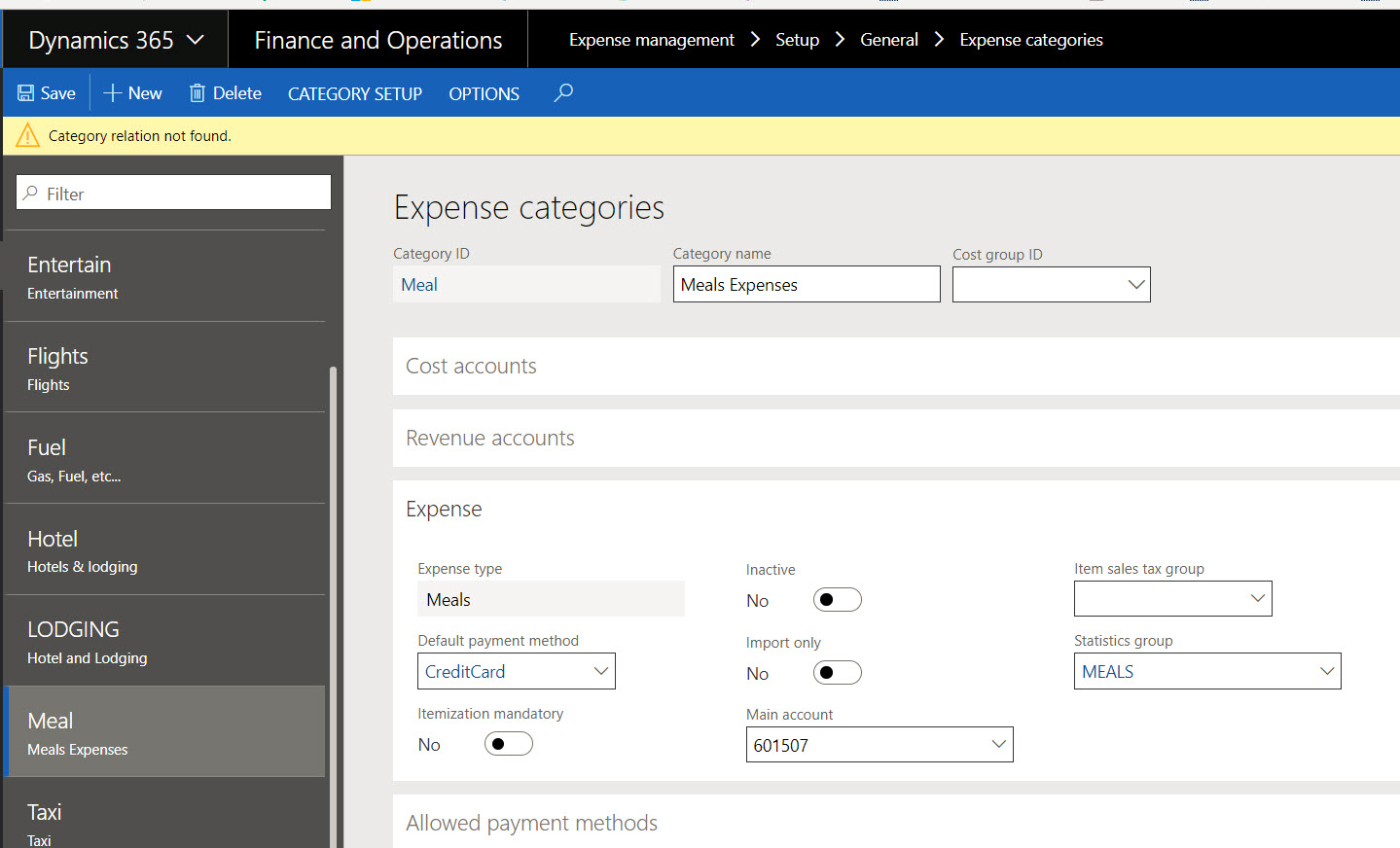
Category relation not found

(0) ShareShare
ReportReport
Posted on by 1,261

Hi all, 

I'm in Contoso demo lab D365 FO and I'm trying to complete the expense categories setup by adding the correct taxes. 

When I open ANY category, due to the fact that there is missing parameter somewhere, I cannot modify the record nor close it anymore. 

It's completely bugged. 

I have been through every project and expense parameter of the given category and nothing seems to be missing. 

Has anybody seen this error? Where is it coming from? 
0385.a.jpg

*This post is locked for comments

I have the same question (0)
  • Ludwig Reinhard Profile Picture
    Microsoft Employee on at

    Hello Veronika,

    Can you check the setup of the category in the OrgAdmin module under setup/categories?

    Best regards,

    Ludwig

  • Richard Wehmeyer Profile Picture
    1,004 on at

    Check to see if "Meals Expenses" exists as a shared category

  • Veronika Filonenko Profile Picture
    1,261 on at

    Hi Ludwig, 

    I was hoping to find something different in terms of setup of the category under OrgAdmin. But it looks like a shared table that you can refer from the Project module under Project category? Am I missing something? 

    I'm still not sure what exact parameter to modify. I have tried them all. 

    Just in case here are the screen shots of the Demo data of Contoso. 

    Shared category

    6683.c.jpg

    Hotel category

    Usage, Project, Expense and Subcategory sections

    6683.c.jpg

    6403.d.jpg

     The error comes on when you hit the 'Edit' button. If you do nothing else, and then click on the 'Save' button, that is when the error happens. 

    It looks to me that the demo data was loaded with some missing logic. So as soon as you open a given data, the system immediately throws an error.

  • Suggested answer
    Ludwig Reinhard Profile Picture
    Microsoft Employee on at

    Hi,

    I tested the same in the USMF demo company and modified the item sales tax group from blank to 'ALL' for the Meal category.

    I did not receive an error message.

    When does the message exactly pop up?

    Do you have another 'contoso test system' to double check?

    Do you know what tax changes have been made?

    Best regards,

    Ludwig

  • Veronika Filonenko Profile Picture
    1,261 on at

    The point is that, it has nothing to do with the taxes, I can't even rich that parameter. It happens exactly when I hit 'Edit' button. Then I try to change any parameter on the form, and it will give me that error. I can't save.

    It happens in D365 update 15, And I just tested it in update 12 same problem.

    I'll keep looking.

  • Verified answer
    Ludwig Reinhard Profile Picture
    Microsoft Employee on at

    Hello Veronika,

    This sounds strange. Do other users have the same problem?

    Do you have any modifications implemented into the demo system or is it a plain vanilla contoso system?

    I tested the change in a 8.0 PU15 system where everything worked fine.

    Best regards,

    Ludwig

  • Veronika Filonenko Profile Picture
    1,261 on at

    Ok Ludwig,

    I found the problem. We have an ISV installed from a partner for Project cost control from AXtension, those 2 envrionnements had the solution installed.

    I tested in a third one, without the solution, and there is no error!

    Thanks alot for the help

Under review

Thank you for your reply! To ensure a great experience for everyone, your content is awaiting approval by our Community Managers. Please check back later.

Helpful resources

Quick Links

Season of Sharing Community Challenge Launch!

Jump in, show your community spirit, and win prizes!

Women in Power Builds Momentum

Expanding mentorship, skilling, and AI innovation

Congratulations to the May Top 10 Community Leaders

These are the community rock stars!

Leaderboard > 🔒一 Microsoft Dynamics AX (Archived)

#1
CP04-islander Profile Picture

CP04-islander 10

#2
Harisgillani Profile Picture

Harisgillani 4

#2
dserp Profile Picture

dserp 4

Last 30 days Overall leaderboard

Featured topics

Product updates

Dynamics 365 release plans



