web
You’re offline. This is a read only version of the page.
close
Skip to main content

Notifications

Announcements

No record found.

Community site session details

Community site session details

Session Id :
Microsoft Dynamics AX (Archived)

Disable Button Group "Journals" from List page in Production Control

(0) ShareShare
ReportReport
Posted on by

Hi,

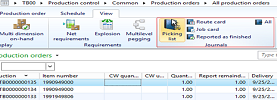
I want to disable picking list , route card , job card from production control -> view -> journals from the list page only. I am able to disable these buttons when i am opening individual records. But from the grid list page i want to disable it .

How can i do that?

*This post is locked for comments

I have the same question (0)
  • André Arnaud de Calavon Profile Picture
    300,904 Super User 2025 Season 2 on at

    Hi Divija,

    What is the business requirement? Should it always be disabled or based on some conditions?

    If it should be completely disabled, you can do it using security.

    Otherwise you have to look which interaction handler class is used. You can add the logic in this class. You can find the interaction class name on the form properties in the AOT.

  • Community Member Profile Picture
    on at

    Hi Calavon,

    Based on one condition like if(tablename.customfield != "No Hold").

    Can you tell me how to disable those buttons.

  • Suggested answer
    Martin Dráb Profile Picture
    237,795 Most Valuable Professional on at

    Override selectionChanged() method in the list page interaction class and implement your logic there.

    Actually, it's already explained on MSDN: How to: Enable and Disable an Action Pane Button on a List Page [AX 2012].

  • André Arnaud de Calavon Profile Picture
    300,904 Super User 2025 Season 2 on at

    Hi Divija,

    The answer is in my previous reply. The list page form has an interaction class. In this class you can add the logic. Related to the ProdTableListPage form and used interaction class ProdTableListPageInteraction there are some examples.

  • Community Member Profile Picture
    on at

    Hi Martin,

    I am also following the same thing, but my condition is not working over there. It's disabled for all the records not based on my condition.

  • Community Member Profile Picture
    on at

    Calavon,

    I am writing my logic over that class only on selection change method but that's not applying my condition.

    My condition is if my field value is Hold then all these buttons should be disabled.

    please provide the condition

  • Martin Dráb Profile Picture
    237,795 Most Valuable Professional on at

    Sorry, I can't tell you what's wrong in your code unless you show it.

  • Community Member Profile Picture
    on at

    If(prodtable.customfield == "Hold")

    {

    this.listPage().actionPaneControlEnabled(formControlStr(prodtablelistpage, journals), true);

    }

    this what i am writing in the selection change method

  • Martin Dráb Profile Picture
    237,795 Most Valuable Professional on at

    I don't see how are you assigning value to prodtable. When you debugged your code (as you surely do if something doesn't work as expected), did you verify that you got the right record in prodtable variable?

  • Verified answer
    Community Member Profile Picture
    on at

    The below code is Working for me 

    ProdTable   prodTable;

       prodTable = this.listPage().activeRecord(queryDataSourceStr(ProdTableListPage, ProdTable));

       super();  //standard code

       this.setButtonAccess(); // standard code

       if(ProdTable.AMPHHoldStatusId != "No Hold")

       {

           this.listPage().actionPaneControlEnabled(formControlStr(ProdTableListPage, Journals), false);

       }

       else

       {

           this.listPage().actionPaneControlEnabled(formControlStr(ProdTableListPage, Journals), true);

       }

Under review

Thank you for your reply! To ensure a great experience for everyone, your content is awaiting approval by our Community Managers. Please check back later.

Helpful resources

Quick Links

Responsible AI policies

As AI tools become more common, we’re introducing a Responsible AI Use…

Neeraj Kumar – Community Spotlight

We are honored to recognize Neeraj Kumar as our Community Spotlight honoree for…

Leaderboard > 🔒一 Microsoft Dynamics AX (Archived)

#1
Martin Dráb Profile Picture

Martin Dráb 4 Most Valuable Professional

#1
Priya_K Profile Picture

Priya_K 4

#3
MyDynamicsNAV Profile Picture

MyDynamicsNAV 2

Last 30 days Overall leaderboard

Featured topics

Product updates

Dynamics 365 release plans



