web
You’re offline. This is a read only version of the page.
close
Skip to main content

Notifications

Announcements

No record found.

Community site session details

Community site session details

Session Id :
Microsoft Dynamics AX (Archived)

Invalid data container type

(0) ShareShare
ReportReport
Posted on by

Dear All,

I am working with AIF - Document Services in Ax 2012.

I have completed the following step and I got the "INVALID DATA CONTAINER TYPE"

1) Created New Project

2) Created New Query 

3) Generate AIF Document Services 

I got the Error.
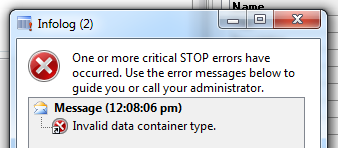
 

Please help me debugging this.


Thanks,

Akshay Chauhan

*This post is locked for comments

I have the same question (0)
  • Suggested answer
    satish kumar k Profile Picture
    10 on at

    This Error is solved by using the below steps

    1.Take Backup from Database Server.

    Lets say Backup Files are DAX2012.bak,DAX2012Baseline.bak

    2.Create New database from Dynamics AX 2012 Setup

    Lets say New Database Names are  DAX2012NEW,DAX2012NEWBaseLine

    3.Restore the New Database(DAX2012) with our backup file(DAX2012.bak not DAX2012Baseline.bak)

    4.Then Go To Administrative Tools -> Server Configuration Manager -> go to Data Base Connection

      Server Name:ur Database Server Name

      DataBase:DAX2012NEW

      BaseLineDatabaseName:DAX2012NEWBaseLine

    5.Click on Apply it will stop AOS Services and restart Services or else u can restart services manually

    6.After all this close all things then Administrative Tools -> Server Configuration Manager->  Configuration

       ->Manage->save configuration file with new name DAX2012NEW ,use this file.

    7.We can get whole customizations with out any changes with out the error "Invalid Data Container",now u can do all scenarios with AIF.

    8.Although this might be a temporary solution it will suits in Development Environment,Because in Live it is different Scenario

    Thanks & Regards,

    Satish Kumar K

    Technical Consultant

  • dynamics developer Profile Picture
    2 on at

    It did'n solve my problem :( still getting invalid data container type.

    I have seen this solution everywhere.. does anybody have solved this problem with it?

  • Dick Wenning Profile Picture
    8,705 Moderator on at

    is it a default wcf service?

    do all fields of the tables have proper EDT objects?

    what is the query?

  • dynamics developer Profile Picture
    2 on at

    I edited the DataContainerTypes macro and removed the names of macros which i have deleted. and the error was gone.

    hope it helps someone.

    thanks

  • Andras Profile Picture
    5 on at

    Hi,

    Try to compile forward the AfStronglyTypedDataContainer class, it helped me when I had a similar issue.

    Regards,

    Andras

  • Suggested answer
    Tommy Skaue Profile Picture
    Moderator on at

    You probably had the Data Migration Framework (or Data Import Export Framework) installed. These models have some changes to that macro. :-)

  • mostafa mahmoud Profile Picture
    5,125 on at

    TOMMY SKAUE the same issue appear after install DMF any solution for that issue

  • Tommy Skaue Profile Picture
    Moderator on at

    I always jump in my chair when I see my name typed out with CAPS LOCK. Hehe. ;-)

    Faress, did you check the macro DataContainerTypes and made sure it isn't overshadowed in any of the customization layers? Did you also forward compile the AifStronglyTypedDataContainer class?

  • mostafa mahmoud Profile Picture
    5,125 on at

    OK I got It TOMMY SKAUE :D ,

    I did the forward compile for  the AifStronglyTypedDataContainer class ,  and i check the DataContainerTypes  macro and  found that there is two lines

    #AxdDMFExeStatusDCT

    #AxdDMFProcessGrpDCT

    i tried to  delete them but with no doubt , by the way there is  now customization i just installed the DMF and after that the issue begin to raise  

  • Dick Wenning Profile Picture
    8,705 Moderator on at

    1 After installing DMF, and a full compile of the AOT. dit you get compile errors?

    2 show me the query .

Under review

Thank you for your reply! To ensure a great experience for everyone, your content is awaiting approval by our Community Managers. Please check back later.

Helpful resources

Quick Links

Responsible AI policies

As AI tools become more common, we’re introducing a Responsible AI Use…

Neeraj Kumar – Community Spotlight

We are honored to recognize Neeraj Kumar as our Community Spotlight honoree for…

Leaderboard > 🔒一 Microsoft Dynamics AX (Archived)

#1
Priya_K Profile Picture

Priya_K 4

#2
MyDynamicsNAV Profile Picture

MyDynamicsNAV 2

#2
Rahul.p Profile Picture

Rahul.p 2

Last 30 days Overall leaderboard

Featured topics

Product updates

Dynamics 365 release plans



