web
You’re offline. This is a read only version of the page.
close
Skip to main content

Announcements

No record found.

News and Announcements icon
Community site session details

Community site session details

Session Id :
Microsoft Dynamics NAV (Archived)

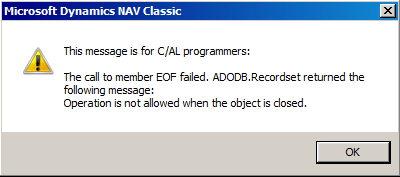
The call to the member EOF Failed Error when using ADO Record Set

(0) ShareShare
ReportReport
Posted on by 50,269 Super User 2026 Season 1

I am using ADO Automation to read the data from the another SQL Server, everything is working fine but when there are no rows to return i get the below error. I tried to use the RecordSet.RecordCount but that too gives me an error "Operation is not allowed when the object is closed".  Please let me know if anybody has suggestions to resolve this issue.
2016_2D00_12_2D00_27_5F00_23_2D00_47_2D00_18.png

*This post is locked for comments

I have the same question (0)
  • Suggested answer
    Yogesh Kulkarni_ Profile Picture
    1,762 on at

    Suresh, just trying to solve this.

    Dont know whether it applies to your case or not.

    But, you can't close the recordset, because you never actually opened it.

    A Read statement does not return any records, so the recordset will not be opened and on closing it returns an error.

    Please check this if it can help you.

    http://forum.mibuso.com/discussion/51958/ado-recordset-error

    -Yogesh Kulkarni

    Please verify, if you find answer helpful.

  • Verified answer
    Suresh Kulla Profile Picture
    50,269 Super User 2026 Season 1 on at

    Yogesh,

    Thank you for the reply , the error is not happening on close but during the call of EOF or getting the RecordCount. I did try commenting execute command but i still get the same error. It looks like i need to make some change on stored procedure to  SET NO COUNT ON. I don't have access to SP so i will ask tomorrow for that change and will let you know.

    In the meantime if you have any other suggestions please let me know.

  • Verified answer
    Suresh Kulla Profile Picture
    50,269 Super User 2026 Season 1 on at

    We were able to solve this by making changes to the stored procedure, we are getting this error because the stored procedure was returning zero when there are no rows, so we use @@ROWCOUNT to set and execute our query. SET NO COUNT ON and SET NO COUNT OFF will work in some scenarios, it depends more on Stored procedure.

Under review

Thank you for your reply! To ensure a great experience for everyone, your content is awaiting approval by our Community Managers. Please check back later.

Helpful resources

Quick Links

Introducing the 2026 Season 1 community Super Users

Congratulations to our 2026 Super Stars!

Meet the Microsoft Dynamics 365 Contact Center Champions

We are thrilled to have these Champions in our Community!

Congratulations to the March Top 10 Community Leaders

These are the community rock stars!

Leaderboard > 🔒一 Microsoft Dynamics NAV (Archived)

Last 30 days Overall leaderboard

Featured topics

Product updates

Dynamics 365 release plans



