web
You’re offline. This is a read only version of the page.
close
Skip to main content

Announcements

News and Announcements icon
Community site session details

Community site session details

Session Id :
Dynamics 365 Community / Forums / Finance forum / Get financial dimensio...
Finance forum

Get financial dimensions values using code X++

(0) ShareShare
ReportReport
Posted on by 65

How to get all Financial Dimension Values using X++.

I want to fetch Dimension Value and Description in the 2nd picture.

I already checked the form(DimensonValueDetails) but the controls(GroupValue and GroupDescription) have Values(Common-table) Data source. Do you have any idea how to fetch this data? 

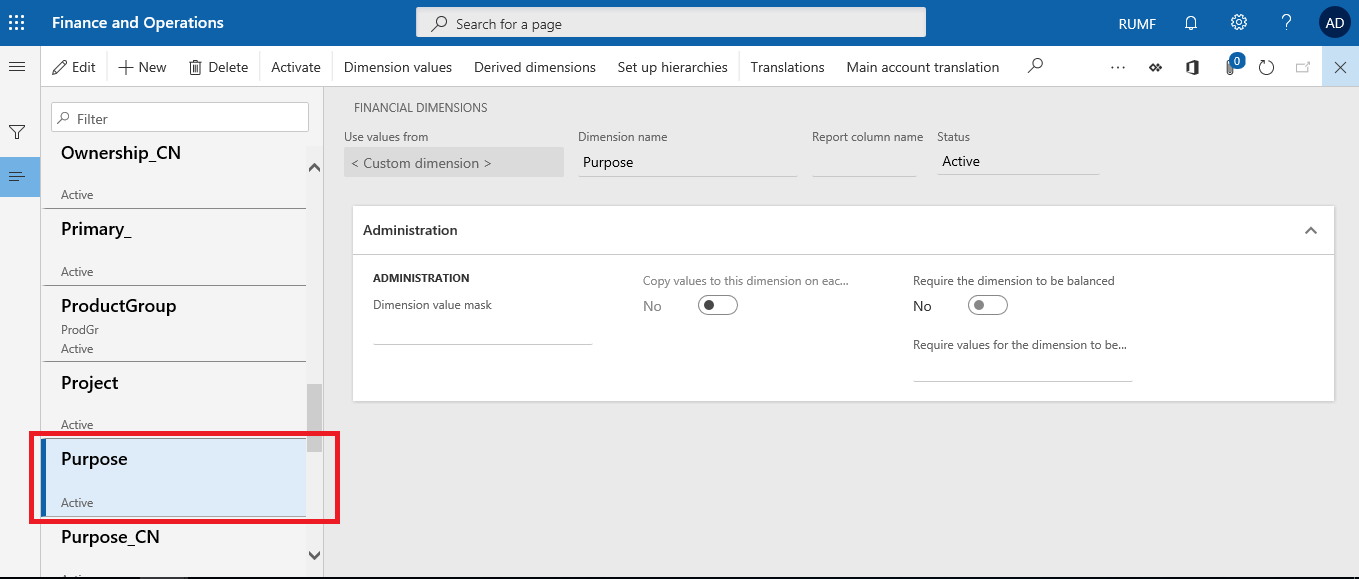
General Ledger > Chart Of Accounts > Dimensions > Financial Dimensions

53148.png

6036.png

I have the same question (0)
  • Martin Dráb Profile Picture
    239,735 Most Valuable Professional on at

    It depends.

    First of all, it depends on whether you want to values already used as financial dimensions or all values that could be potentially used as dimensions (such as all cost centers).

    For example, if you have ten cost centers but only one was used as a dimension, you'll find one record in DimensionAttributeValue table. If you want to see all potential values, you have to look into the table with cost centers (you can use DimAttributeOMCostCenter view for this purpose).

  • Community Member Profile Picture
    on at

    You can take help from this view FinancialDimensionValueEntityFinancialTagView.

  • jerrold-verzosa Profile Picture
    65 on at

    I looked at DimAttributeOMCostCenter and it has the Name field.
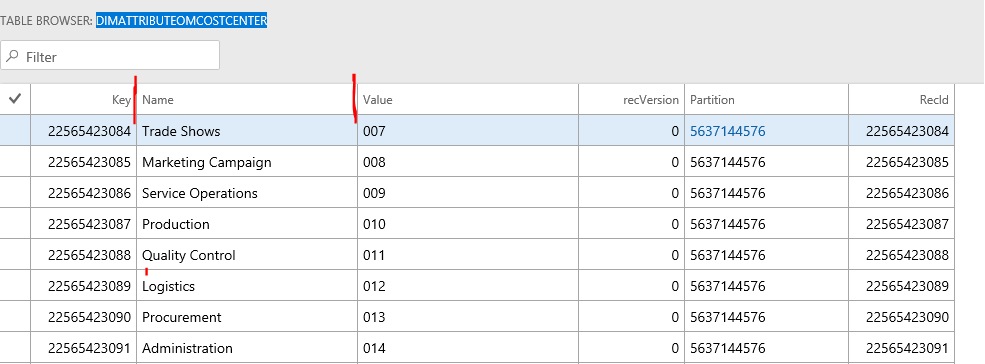
    64104.png

    How about this Purpose?6761.png

    Where should I get the Name and Description field? 
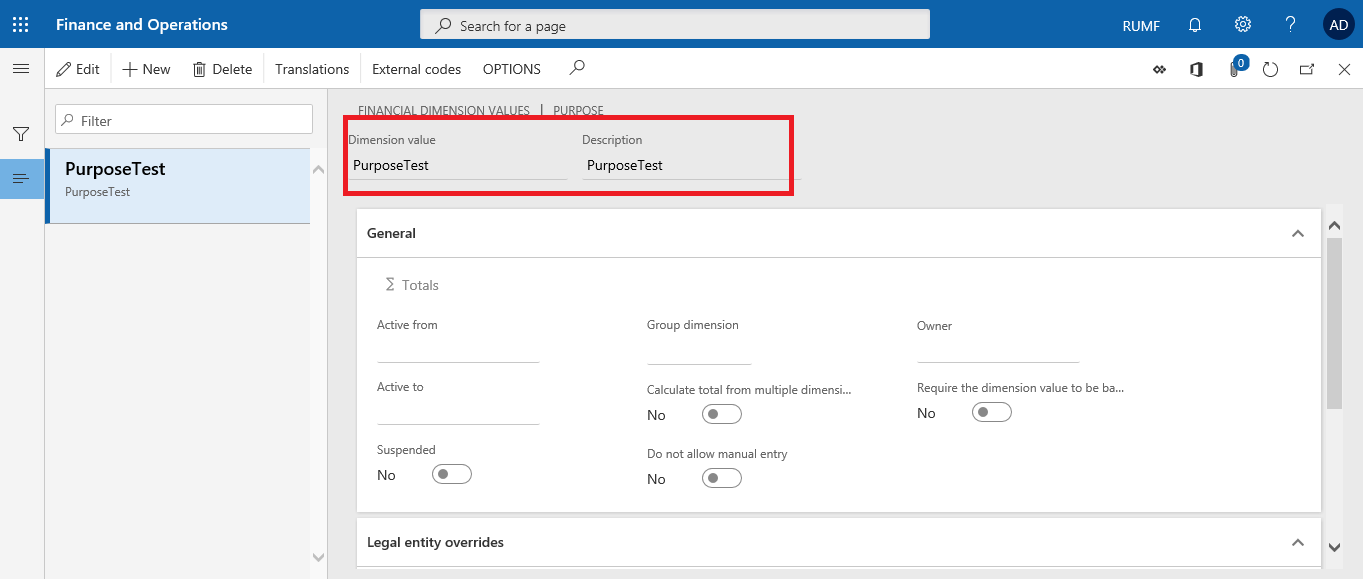
    32755.png

    [quote]

    It depends.

    First of all, it depends on whether you want to values already used as financial dimensions or all values that could be potentially used as dimensions (such as all cost centers).

    For example, if you have ten cost centers but only one was used as a dimension, you'll find one record in DimensionAttributeValue table. If you want to see all potential values, you have to look into the table with cost centers (you can use DimAttributeOMCostCenter view for this purpose).

    [/quote]

    Thanks!

  • Martin Dráb Profile Picture
    239,735 Most Valuable Professional on at

    "Purpose" is a custom dimension, therefore values must be defined manually. They're stored in DimensionFinancialTag table.

  • Ludwig Reinhard Profile Picture
    Microsoft Employee on at

    Hello Jerrold-verzosa,

    What do you try to achieve here at the end of the day?

    That is, why you need those data and for what purpose?

    Best regards,

    Ludwig

  • jerrold-verzosa Profile Picture
    65 on at

    How am I going to connect DimensionFinancialTag table with DimensionAttribute? I want to query Purpose and its dimension values. Is it possible?

  • jerrold-verzosa Profile Picture
    65 on at

    I want to know how to fetch the values in Financial dimension because I'm going to use it as a filter/parameter for my UI Builder. Thanks

  • Ludwig Reinhard Profile Picture
    Microsoft Employee on at

    Hello Jerrold-verzosa,

    Is my understanding correct that you want to restrict the data users can see in the UI based on financial dimensions?

    Is that what you try to achieve?

    Best regards,

    Ludwig

  • jerrold-verzosa Profile Picture
    65 on at

    As of now, I just want to know where to fetch the records based on my screenshots previously.

    I want to achieve this in my UI Builder.
    Thanks!
    4812.png

  • Verified answer
    Community Member Profile Picture
    on at

    You can try this,

    View FinancialDimensionValueEntityFinancialTagView contains custom dimension values .

    View FinancialDimensionValueEntityExistingListView contains dimension values from fixed List

    View FinancialDimensionValueEntityView contains union of all, You can add filter to field Dimension attribute. and get values.

Under review

Thank you for your reply! To ensure a great experience for everyone, your content is awaiting approval by our Community Managers. Please check back later.

Helpful resources

Quick Links

November Spotlight Star - Khushbu Rajvi

Congratulations to a top community star!

Forum Structure Changes Coming on 11/8!

In our never-ending quest to help the Dynamics 365 Community members get answers faster …

Dynamics 365 Community Platform update – Oct 28

Welcome to the next edition of the Community Platform Update. This is a status …

Leaderboard > Finance

Last 30 days Overall leaderboard

Featured topics

Product updates

Dynamics 365 release plans