web
You’re offline. This is a read only version of the page.
close
Skip to main content

Notifications

Announcements

No record found.

Community site session details

Community site session details

Session Id :
Finance | Project Operations, Human Resources, ...
Suggested Answer

Vendor payments in foreign currency

(0) ShareShare
ReportReport
Posted on by 1,419

Hi, 

Could you share your best method to deal with payments in foreign currencies, please? 

Does anyone know if this tab has been added for this purpose? Why the currencies fields are free text fields instead of dropdowns? 

pastedimage1626771522067v1.png

The scenario I am trying to find the best solution for is: 

* Invoice booked in GBP

* Invoice paid from a EUR bank account - therefore I have a quantity in EUR in my bank that does not match the quantity that D365 is calculating

When I bring the invoice to the payment proposal it brings GBP but I need to register EUR in my bank account. I guess it will still do so as my accounting currency is EUR, but is it possible that the transaction currency is also EUR even if we are paying a GBP invoice? How do I make the amounts match? What I am doing at the moment is to change the exchange rate on the payment line but this is difficult to guess and more difficult to make the amounts match to the cent compared with what we have in the bank. 

pastedimage1626771701408v2.png

Thanks for your contributions! 

I have the same question (0)
  • Suggested answer
    Ludwig Reinhard Profile Picture
    Microsoft Employee on at

    Hello CapsLock,

    The inbound payment tab that you shared is one that is not available in the standard application; at least not in the ones that I have available.

    I would suspect that this is an extension that has been made for your company.

    Can you please talk to your system admins / development team to find out more about its usage?

    The community might not be able to help you with that modified feature.

    Best regards,

    Ludwig

  • Suggested answer
    André Arnaud de Calavon Profile Picture
    301,025 Super User 2025 Season 2 on at

    Hi CapsLock,

    I'm with Ludwig. This should be part of a customization or partner add-on. I have checked the form design for a possible localization, but this is not in the standard application. Besides missing the lookup, the placement of the fields are not like the normal form patterns in Dynamics 365.

  • CapsLock Profile Picture
    1,419 on at

    Thanks both. 

    I'm with you in that the tab for Inbound payment info must be a customization. I couldn't find it again so probably it was a test from the developers. Nonetheless the main point of my question was to discuss the best procedure to book a payment in local currency for an invoice in foreign currency. I share here below what I have tried so far. Could you give me your feedback on if you do it the same way or if there is a different way of doing this please? 

    So, I create a payment proposal and create a payment for an invoice totalling 1000USD: 
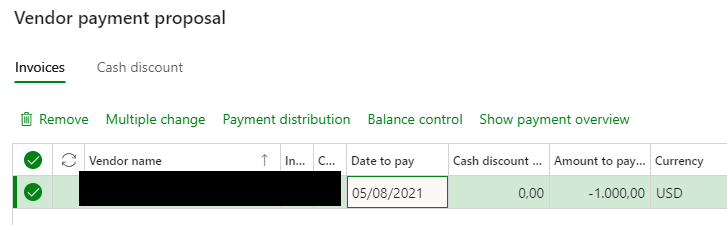
    pastedimage1628170363757v1.png

    The invoice comes to the payment journal lines in EUR, which already doesn't seem correct - any feedback on if this is expected behaviour? 

    pastedimage1628170557605v2.png

    So I delete the line and start the process of creating a payment proposal again. This time I add more columns to the grid so I can see the amount in EUR according to the exchange rate informed in D365, in this case, 909.09EUR. 

    pastedimage1628171131589v3.png

    In the bank statement I see the bank has applied a different exchange rate as it discounted -920 from my bank account. I would expect the field "Exchange rate adjusment amount" could be editable so I can enter this amout but it is not. Any ideas how to make this field editable? 

    As I can't edit that field to introduce the 920, as a workaround, I change the exchange rate in the payment proposal:

    pastedimage1628171428830v4.png

    But still the system still takes the invoice to the payment journal lines as 1000EUR. This should not be the case, should it? 

    I then go to the general tab of the payment proposal and change the currency there from EUR to USD. This way I can also edit the exchange rate: 

    pastedimage1628173106666v5.png

    I cannot use formulas in this field so I have to calculate outside of the system the rate to be informed. But the problem is that then the system tries to post the payment in USD and my bank does not accept payments in foreign currency. I need to book the payment of this invoice in USD in EUR. 

    After this, I conclude that it is not possible to do so with a payment proposal. 

    I try then to pay the invoice with the function "Settle transactions" instead. In this case the system does bring the invoice to the payment journal lines in EUR but it takes as the transaction currency EUR as well so I can't change the exchange rate. 

    pastedimage1628173709980v6.png

    Any suggestion on how people manage payments in local currency of foreign currencies will be appreciated. 

    Thanks! 

  • OsmanIstanbul Profile Picture
    2,818 on at

    Hi,

    try to enter your payment in two lines:

    1. line account type: vendor, currency usd, edit exchange rate,

    2. line account type: bank, currency eur

Under review

Thank you for your reply! To ensure a great experience for everyone, your content is awaiting approval by our Community Managers. Please check back later.

Helpful resources

Quick Links

Responsible AI policies

As AI tools become more common, we’re introducing a Responsible AI Use…

Neeraj Kumar – Community Spotlight

We are honored to recognize Neeraj Kumar as our Community Spotlight honoree for…

Leaderboard > Finance | Project Operations, Human Resources, AX, GP, SL

#1
Martin Dráb Profile Picture

Martin Dráb 611 Most Valuable Professional

#2
André Arnaud de Calavon Profile Picture

André Arnaud de Cal... 529 Super User 2025 Season 2

#3
Sohaib Cheema Profile Picture

Sohaib Cheema 285 User Group Leader

Last 30 days Overall leaderboard

Product updates

Dynamics 365 release plans



