web
You’re offline. This is a read only version of the page.
close
Skip to main content

Announcements

No record found.

News and Announcements icon
Community site session details

Community site session details

Session Id :
Finance | Project Operations, Human Resources, ...
Answered

Data entity Export - Database connection issue

(0) ShareShare
ReportReport
Posted on by 11,310

Good morning

I'm using a local development Virtual machine. Its upgraded as below.
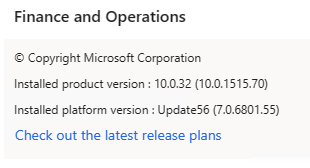
pastedimage1680770520473v2.png

Everything is working ok except for exporting of data entities. I receive the following error

"Infolog for job 'Export process: VendParameters' (68719494210)Infolog for task Move to staging from target: Vendor parameters (VendParameters-2023-04-06T10:19:19-3609D37883E948A980C315A878ECC066) (68719494215) Failed to acquire connection to database.-Exception from HRESULT: 0xC020801C"

Has anybody come across this?

P.S. I have tested with other entities with the same result

I have the same question (0)
  • Bharani Preetham Peraka Profile Picture
    3,634 Moderator on at

    Please have a look on this link.

    community.dynamics.com/.../how-to-resolve-error-exception-from-hresult-0xc0202009-while-data-export

  • Jonathan  Halland Profile Picture
    11,310 on at

    Hi. Unfortunately that seems to be a different issue. This one seems to be to do with the connection between the Data framework and SQL on the VM

  • Bharani Preetham Peraka Profile Picture
    3,634 Moderator on at

    Have you checked this in event viewer? If yes, what does it say?

  • Jonathan  Halland Profile Picture
    11,310 on at

    Couldnt find anything particularly helpful there

    pastedimage1680774784048v1.png

  • Mohit Rampal Profile Picture
    12,565 Moderator on at

    Hi, can you access SQL server? Please ensure SQL server service is running.

  • Jonathan  Halland Profile Picture
    11,310 on at

    Hi. Everything is running, i can access F&O, Visual studio dev, syncronise DB etc. Just the Data framework is giving issues

  • Suggested answer
    GirishS Profile Picture
    27,833 Moderator on at

    Hi Jonathan,

    Restart the "Microsoft Dynamics 365 Unified Operations: Data Import Export Framework Service" and check.

    Thanks,

    Girish S.

  • Jonathan  Halland Profile Picture
    11,310 on at

    Thanks for the suggestion, unfortunately still have the same issue. Even after a full VM reboot

  • Suggested answer
    Komi Siabi Profile Picture
    13,190 Most Valuable Professional on at

    Hello Jonathan,

    The event viewer talks about a database connection issue with timeout.

    I suggest you increase the time session and retry.

    DATA-IMPORT-timeout.png

  • Suggested answer
    Mohit Rampal Profile Picture
    12,565 Moderator on at

    Please check if this thread

    community.dynamics.com/.../1288305

Under review

Thank you for your reply! To ensure a great experience for everyone, your content is awaiting approval by our Community Managers. Please check back later.

Helpful resources

Quick Links

Introducing the 2026 Season 1 community Super Users

Congratulations to our 2026 Super Stars!

Congratulations to our 2025 Community Spotlights

Thanks to all of our 2025 Community Spotlight stars!

Leaderboard > Finance | Project Operations, Human Resources, AX, GP, SL

#1
André Arnaud de Calavon Profile Picture

André Arnaud de Cal... 509 Super User 2026 Season 1

#2
Giorgio Bonacorsi Profile Picture

Giorgio Bonacorsi 375

#3
Adis Profile Picture

Adis 268 Super User 2026 Season 1

Last 30 days Overall leaderboard

Product updates

Dynamics 365 release plans



