web
You’re offline. This is a read only version of the page.
close
Skip to main content

Announcements

News and Announcements icon
Community site session details

Community site session details

Session Id :
Finance | Project Operations, Human Resources, ...
Unanswered

Management reporter - adding new book codes/attribute category

(0) ShareShare
ReportReport
Posted on by 143

Hi all,

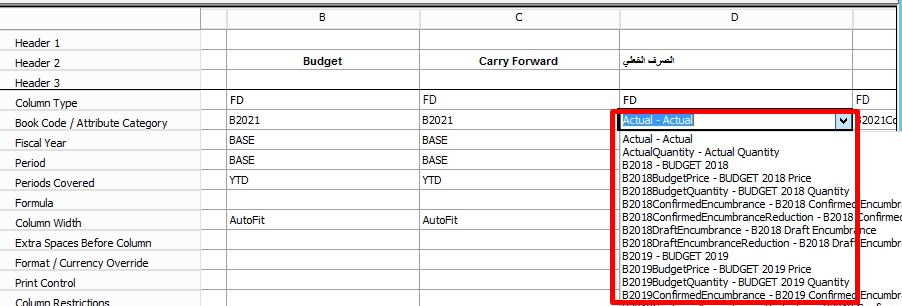
I am rather new to the Management reporter and I can't find a documentation related to book codes/attribute category when column type is financial dimension (FD).

Are the options in the drop down menu "predefined" or there is a way to add new choices there?
pastedimage1629279414120v1.png

My actual problem is that the Actual option presents the total expenditure while I want to get two different numbers - expenditure linked to the current year budget, and expenditure linked to the carry forward budget. 

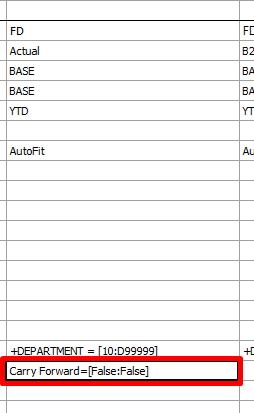
I was hoping that the attribute filter might help, however the filter doesn't work as I hoped it would
pastedimage1629279605714v2.png

Thanks,

Viktor

I have the same question (0)
  • Magda Nidecka Profile Picture
    5 on at

    Hi All,

    I have the same issue as in Victor's question.

    I'm trying to find out if there is a way to add the Fixed Asset Number to the "Attribute Filter" drop down.

    Thanks,

    Magda

  • EDJJR Profile Picture
    Microsoft Employee on at

    Hello Viktor, 

    The attribute codes are predefined within the code of Management Reporter. 

    Thank you, 

    Erik Johnson

    Microsoft

  • OsmanIstanbul Profile Picture
    2,820 on at

    Hi Viktor,

    try to create separate budget models for different budgets, then you will be able to select this model on the column type.

    Best Regards.

  • Ludwig Reinhard Profile Picture
    Microsoft Employee on at

    Hello Viktor,

    Can you share details what budget models you use for your current years and carry forward budget?

    Where and how did you record those budget data in AX?

    Best regards,

    Ludwig

Under review

Thank you for your reply! To ensure a great experience for everyone, your content is awaiting approval by our Community Managers. Please check back later.

Helpful resources

Quick Links

Season of Sharing Community Challenge Launch!

Jump in, show your community spirit, and win prizes!

Women in Power Builds Momentum

Expanding mentorship, skilling, and AI innovation

Congratulations to the April Top 10 Community Leaders

These are the community rock stars!

Leaderboard > Finance | Project Operations, Human Resources, AX, GP, SL

#1
Giorgio Bonacorsi Profile Picture

Giorgio Bonacorsi 671

#2
André Arnaud de Calavon Profile Picture

André Arnaud de Cal... 621 Super User 2026 Season 1

#3
Abhilash Warrier Profile Picture

Abhilash Warrier 589 Super User 2026 Season 1

Last 30 days Overall leaderboard

Product updates

Dynamics 365 release plans



