web
You’re offline. This is a read only version of the page.
close
Skip to main content

Notifications

Announcements

No record found.

Community site session details

Community site session details

Session Id :
Finance | Project Operations, Human Resources, ...
Answered

Activation of pending price(s) failed

(0) ShareShare
ReportReport
Posted on by 90

Hi everyone,

I'm facing below issue when trying to activate the new cost price for Item using STD.
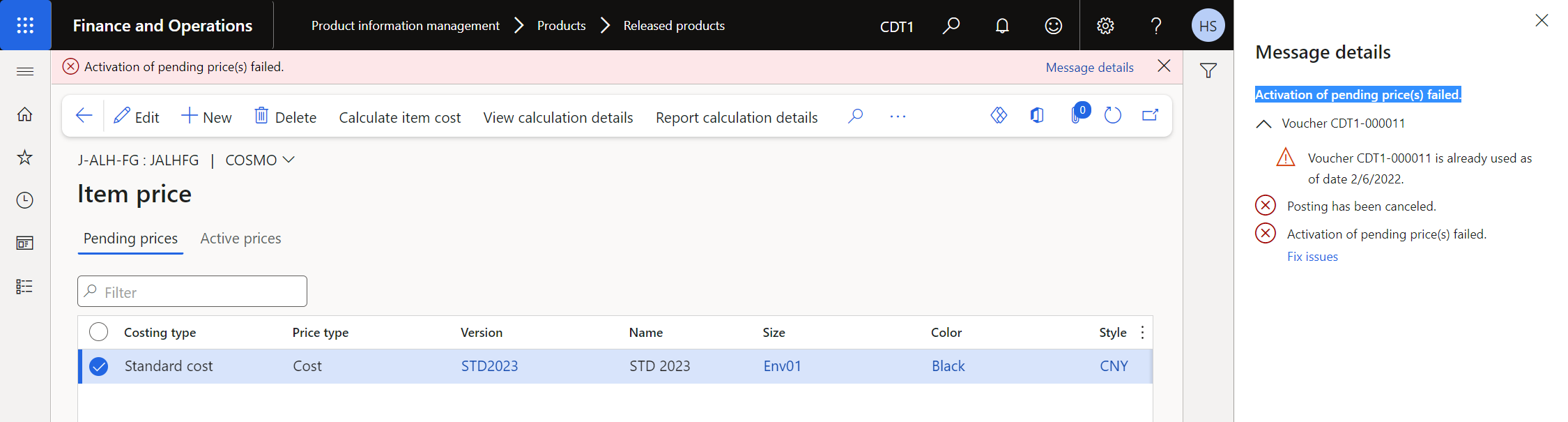
Let me explain the what i've done:

1. This is an product master item and has many product variant

2. I've already activated the cost price for all product variants using costing version A.

3. I'm going to post the packing slip for Product variant X in Sales order but system populated error "No cost rollup is found for this item. Activate the item cost price".

4. Then i checked the costing version but seem like it isn't activated since the "Last activation" column had no record. 

5. I created new costing version called B

6. I activated new cost price for Product variant X using Costing version B

7. System popout error: 

Activation of pending price(s) failed.
Voucher CDT1-000011
Voucher CDT1-000011 is already used as of date 2/6/2022.
Posting has been canceled.
Activation of pending price(s) failed.

8. I still can activate new cost price for another Product variant (called Y) for the new costing version. 

I'm very gratefull for your help. 

Huong Pham

I have the same question (0)
  • Verified answer
    André Arnaud de Calavon Profile Picture
    300,911 Super User 2025 Season 2 on at

    Hi Huong,

    The error means that it is trying to create a voucher (posting inventory value difference) and the voucher to be used for the transaction has been used already before. You can check the settings of the related number sequence and see if there is a status list where this number is set as "free". In that case, delete the status list entry.

  • Huong Pham Profile Picture
    90 on at

    Hi André Arnaud de Calavon,

    Thanks very much for your quick reply. I found the related number sequence (Inventory and warehouse management parameters > Number sequences > Revaluation vouchers ) and see that there is a status list where this number is set as "free". 

    But i don't see the delete button to delete the status list entry. Then i found a way and it work (hope it can help for everybode who meet this issue) 

    1. Select the line you want to delete

    2. Press Alt + Delete 

    3. Click OK.

    But after i delete this record, i still cannot active the new Standard cost. System still populated the same error with the next number sequence.

    Update: I try to asign new Number sequence code for revaluation voucher and try again. After many time trying, it work now. 

    Regards,

    Huong

Under review

Thank you for your reply! To ensure a great experience for everyone, your content is awaiting approval by our Community Managers. Please check back later.

Helpful resources

Quick Links

Responsible AI policies

As AI tools become more common, we’re introducing a Responsible AI Use…

Neeraj Kumar – Community Spotlight

We are honored to recognize Neeraj Kumar as our Community Spotlight honoree for…

Leaderboard > Finance | Project Operations, Human Resources, AX, GP, SL

#1
Martin Dráb Profile Picture

Martin Dráb 660 Most Valuable Professional

#2
André Arnaud de Calavon Profile Picture

André Arnaud de Cal... 549 Super User 2025 Season 2

#3
Sohaib Cheema Profile Picture

Sohaib Cheema 307 User Group Leader

Last 30 days Overall leaderboard

Product updates

Dynamics 365 release plans



