web
You’re offline. This is a read only version of the page.
close
Skip to main content

Notifications

Announcements

No record found.

Community site session details

Community site session details

Session Id :
Microsoft Dynamics AX (Archived)

Import / Export Security metadata customizations entities

(0) ShareShare
ReportReport
Posted on by

Hello everybody,

I am using Dynamics 365 fOps 1611 Release (Dynamics AX7) locally and in the cloud and I have got some issues with the import/export-framework regarding security metadata customizations. Locally for creating and exporting the security metadata, and the cloud for importing the metadata.I hope, someone can help me.

1) I am not able to export the security privilege metadata customizations entity locally, but the security role metadata customizations entity and the security privilege metadata customizations entity can be exported. The following picture shows the failure :
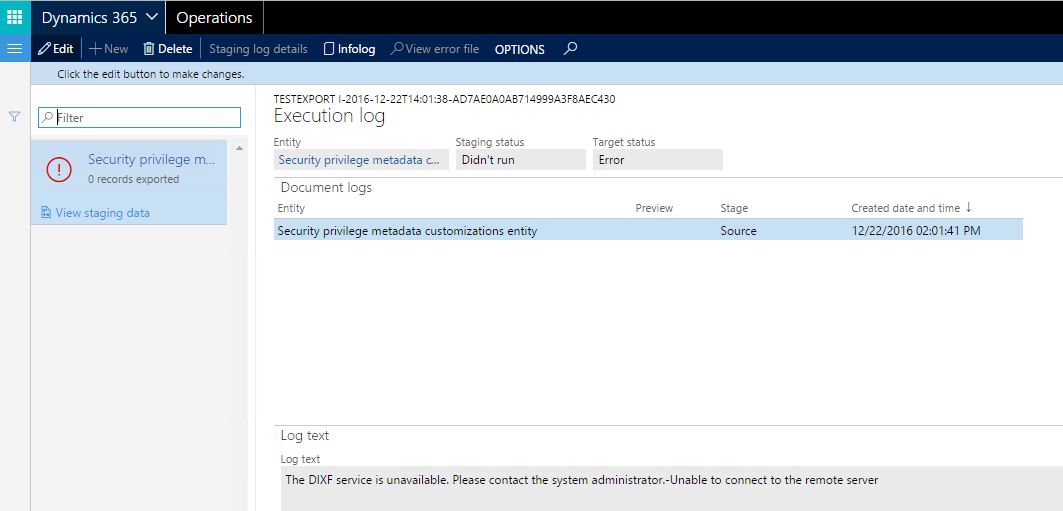
 error-message-export.JPG
When I try to download the package of this entity, the following error message is thrown:

error-message-download.JPG

I do not know, where to find that InnerException. The only solution I have found was to change the endpoint address from [...]localhost[...] to our real IP adress within the web config, but there was no endpoint address in there. The only config data in which I found the endpoint address was 'Microsoft.Dynamics.AX.Framework.Tools.DMF.ServiceProxy.dll', but changing the endpoint address there from localhost to our IP even got it worse. After that and before correcting back to standard, I was not able to export any of the security metadata customization enitites. Is there a way to fix the privilege metadata customizations entity export?

2) The import of roles and duties also does not work properly. It does not matter, if it is imported as a package or both as an Excel-file on their own. It does not matter either, if it is imported locally or to the cloud. When I try to import the security role metadata customizations entity or the security duty metadata customizations entity, I get the following error message, depending on which one is imported:

error-message-import.JPG

The only solution to solve this problem seems to be customizing the fields of the entities from 'Allow Edit - No' / 'Allow Edit on Create - No' to 'Allow Edit - Yes' / 'Allow Edit on Create - Yes' within the AOT via Visual Studio. But this also means that I have to customize the 'Application Foundation'-package. Is this the only way to solve this problem, or are there other possibilities to make these imports work?

I would also appreciate if I got the information that these problems are caught by a bug or by functions which are not built in completely yet.

Thanks for your help.

Christian

*This post is locked for comments

I have the same question (0)
  • Community Member Profile Picture
    on at

    Hello again,

    I hope you all had nice Christmas holidays and a beautiful New Year's Eve.  Meanwhile, the problems described above have not been solved, has someone an idea how to handle them? I would be thankful for any kind of information.

    Christian

  • Verified answer
    André Arnaud de Calavon Profile Picture
    301,053 Super User 2025 Season 2 on at

    Hi Christian,

    On the form Security Configuration there is a menu tab 'Data' which has the menu options for exporting and importing security configurations. You can use the export and import from this place which actually does work.

  • Community Member Profile Picture
    on at

    Hello André,

    thanks for your help. For any reason, I have not seen the menu tab with the export/import options. But it works as desired without error messages.

    Christian

  • PilgrimCZ Profile Picture
    572 on at

    Hello André,

    but by your suggested way, you can only export one security role at the time, right? If you want export more roles, you need to use data management? Sure, this mean, that there are entities for it...

    Thanks for clarifying.

    Marek

Under review

Thank you for your reply! To ensure a great experience for everyone, your content is awaiting approval by our Community Managers. Please check back later.

Helpful resources

Quick Links

Responsible AI policies

As AI tools become more common, we’re introducing a Responsible AI Use…

Neeraj Kumar – Community Spotlight

We are honored to recognize Neeraj Kumar as our Community Spotlight honoree for…

Leaderboard > 🔒一 Microsoft Dynamics AX (Archived)

#1
Martin Dráb Profile Picture

Martin Dráb 4 Most Valuable Professional

#1
Priya_K Profile Picture

Priya_K 4

#3
MyDynamicsNAV Profile Picture

MyDynamicsNAV 2

Last 30 days Overall leaderboard

Featured topics

Product updates

Dynamics 365 release plans



