web
You’re offline. This is a read only version of the page.
close
Skip to main content

Notifications

Announcements

No record found.

Community site session details

Community site session details

Session Id :
Microsoft Dynamics AX (Archived)

Turn off "Keep update objects..." for an AX2012 R3 instance

(0) ShareShare
ReportReport
Posted on by 393

As per the suggestion contained with the MSDN AX Support blog we have upgraded an AX2009 SP1 instance and have been running with the AX2013 R3 instance for three months now, and it's time to deactivate the 'Keep Update...' licence/configuration keys.  We have the following objectives for doing this:

  • An AX client will occasionally hit the Max Buffer limit, the same error as per these blog posts 1, 2.  Deleting the user cache/personalisations seems to resolve these issues.
  • Any improvement in performance would be most welcome.  We have had to increase the limit from the suggested 48KB.

In an attempt to mitigate the risks we have identified the tables and fields that are to be deleted from the database and have updated the field configuration keys or EDT types used for the customer-specific modifications.  We will next deselect the licence keys in an alternative environment and compile all...

Are there any further suggestions that forum users might have to mitigate data loss or later problems?
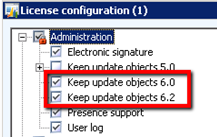
Many thanks.

*This post is locked for comments

I have the same question (0)
  • Verified answer
    Martin Dráb Profile Picture
    237,874 Most Valuable Professional on at

    You don't have to recompile code, because disabling configuration keys doesn't make code changes. But you have to synchronize database.

    It won't cause any problem as long as your code has been upgraded correctly. It shouldn't refer to any objects marked for deletion. It's something what should have been tested during code upgrade.

  • Ian Schofield Profile Picture
    393 on at

    I am now occasionally seeing the following exception fault in both of the AX 2012 R3 demo/dev environments (kernal && app 6.3.2000.326) after removing configuration keys AND reducing the service maximum buffer size.

    Nombre de la aplicación con errores: Ax32.exe, versión: 6.3.2000.326, marca de tiempo: 0x55723de2
    Nombre del módulo con errores: clr.dll, versión: 4.6.1055.0, marca de tiempo: 0x563c0f73
    Código de excepción: 0xc0000005
    Desplazamiento de errores: 0x004281a2
    Identificador del proceso con errores: 0x1228
    Hora de inicio de la aplicación con errores: 0x01d1bfc4d69d29cb
    Ruta de acceso de la aplicación con errores: C:\Program Files (x86)\Microsoft Dynamics AX\60\Client\Bin\Ax32.exe
    Ruta de acceso del módulo con errores: C:\Windows\Microsoft.NET\Framework\v4.0.30319\clr.dll
    Identificador del informe: 2f70aec5-2bbb-11e6-810f-005056ba656e
    Nombre completo del paquete con errores: 
    Identificador de aplicación relativa del paquete con errores: 


    I suspect deleting user customisations may also be necessary, as suggested here:

    "Delete all files with extension AUC on the user machine profile

    c:\users\Username\AppData\Local

    These files are recreated after application is open. This solution fixed issue of ax client crashing on one particular user only."

    I just thought I'd put it out there.  Regards.

    Edit: Martin's comment "...as long as your code has been upgraded correctly." is important.  Upon deselecting the configuration keys we can see a syncronization list of tables, views, fields etc. that are to be removed and we detected in the VAR layer for example some fields with 'ConfigId' EDTs that were both deprecated in AX2012 and actually in use by the current business logic.

  • Community Member Profile Picture
    on at

    Hi Ian,


    Taking as an example the CustTable table, when you disable configuration keys, the affected fields still exist in the tables.

    upgrade.png

    Although SQL these fields no longer appear...

    5148.sql.png

    ... when AX performs the query, if you use these fields. Consider the following debugging:

    deb.png

    If you look at the model they belong to these fields belong to the model code upgrade.

    upgrade.png

    If these models are not necessary because only used in the upgrade process and there is no reference in code to them, we can delete the models.

    modelos.jpg

    After removing these models, compile, resolve possible errors in code, compiled into CIL and synchronize the database, you notice that the fields no longer appear in the table.

    no-more.JPG

  • Ian Schofield Profile Picture
    393 on at

    Thanks for the update Daniel!

    I always assumed that in AX 2012, unlike AX 2009 and earlier, the underlying data remained in the table after deactivating the configuration keys associated with the field.  I wasn't aware of the 'SysDeletedObjects*' behaviour, however.  Edit: More info here.

    I owe you a beer orange juice the next time I see you...  Great photo amigo!

  • yanhui chen Profile Picture
    50 on at

    Hi Martin

    I want delete the DEL_ prefix code from my environment, i disabled the configuration keys, but  the DEL_ prefix code also still in AOT, how to delete the DEL_ code from AOT?

  • Martin Dráb Profile Picture
    237,874 Most Valuable Professional on at

    It's a different topic than "Turn off "Keep update objects..." for an AX2012 R3 instance", therefore please create a new thread and explain your problem in detail there. Or we can discuss it in your existing thread on another server. Please choose one place, so we don't have to repeat the same things elsewhere.

Under review

Thank you for your reply! To ensure a great experience for everyone, your content is awaiting approval by our Community Managers. Please check back later.

Helpful resources

Quick Links

Responsible AI policies

As AI tools become more common, we’re introducing a Responsible AI Use…

Neeraj Kumar – Community Spotlight

We are honored to recognize Neeraj Kumar as our Community Spotlight honoree for…

Leaderboard > 🔒一 Microsoft Dynamics AX (Archived)

#1
Priya_K Profile Picture

Priya_K 4

#1
Martin Dráb Profile Picture

Martin Dráb 4 Most Valuable Professional

#3
Ali Zaidi Profile Picture

Ali Zaidi 2

Last 30 days Overall leaderboard

Featured topics

Product updates

Dynamics 365 release plans



