web
You’re offline. This is a read only version of the page.
close
Skip to main content

Announcements

No record found.

News and Announcements icon
Community site session details

Community site session details

Session Id :
Finance | Project Operations, Human Resources, ...
Answered

CPOS https://migration_value/. error after db refresh from PROD to Sandbox.

(0) ShareShare
ReportReport
Posted on by

On Sandbox environment (Microsoft hosted), we did db refresh from PROD. We have Retail (Commerce) application in use.

We did Channel db config, device activation and ran full sync from Headquarter to RCSU. We created a new channel profile and provided required URLs for commerce server, media server and cloud POS.

However, during channel profile configuration, we could not change Default channel profile URLs as they are shown grayed out.  We created our own channel profile and set the URLs there. Now I don't understand one thing here is how this channel profile is linked with channel DB.
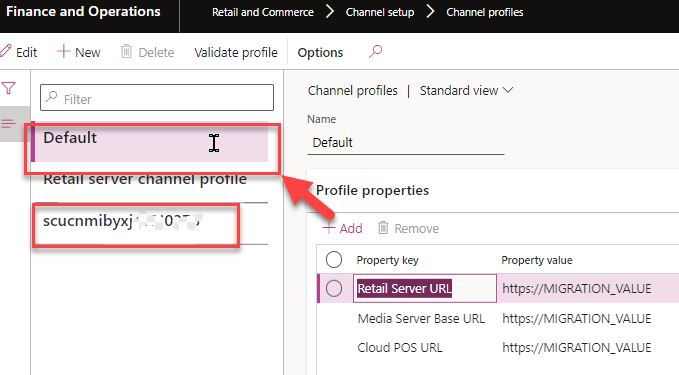
D365ChannelProfile.JPG

Look at the below CPOS connection issue.

We could login and active the device using CPOS, but it could not go further and failed at environment configuration step. I feel that this CPOS is still trying to connect to Default Channel DB and not to our newly created RCSU database.
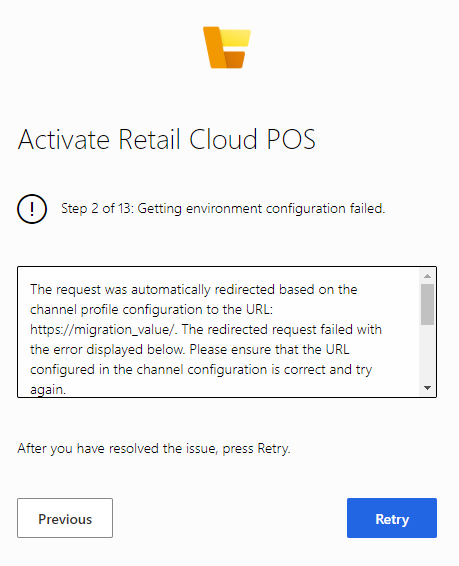
pastedimage1645525447115v4.png

Can someone please help to understand what is required here so that CPOS connects to our own RCSU database and not Default one?

I have the same question (0)
  • Verified answer
    VRD Profile Picture
    on at

    We just followed MS documentation that says that we need to deploy RCSU again if we refresh sand box DB from PROD Db.

    https://docs.microsoft.com/en-us/dynamics365/fin-ops-core/dev-itpro/deployment/initialize-retail-channels

    We did that and ran Full sync after that.

    It works fine now. Thanks.

  • Verified answer
    huijij Profile Picture
    19,811 on at

    This is fantastic, Thank you for sharing.

  • S Gopi Krishna Profile Picture
    665 Super User 2026 Season 1 on at

    Hi, this can be changed from the store configurations as well.

    Navigate to all stores and select the store which your register operates on.

    Under Profiles change the Channel Profile to the preferred ones and click on Save.

    2022_2D00_10_2D00_12_5F00_11h25_5F00_10.png

    Now you should be able to activate/access the CPOS without any issue.2022_2D00_10_2D00_12_5F00_11h25_5F00_10.png

Under review

Thank you for your reply! To ensure a great experience for everyone, your content is awaiting approval by our Community Managers. Please check back later.

Helpful resources

Quick Links

Introducing the 2026 Season 1 community Super Users

Congratulations to our 2026 Super Stars!

Meet the Microsoft Dynamics 365 Contact Center Champions

We are thrilled to have these Champions in our Community!

Congratulations to the March Top 10 Community Leaders

These are the community rock stars!

Leaderboard > Finance | Project Operations, Human Resources, AX, GP, SL

#1
Giorgio Bonacorsi Profile Picture

Giorgio Bonacorsi 616

#2
André Arnaud de Calavon Profile Picture

André Arnaud de Cal... 460 Super User 2026 Season 1

#3
Syed Haris Shah Profile Picture

Syed Haris Shah 331 Super User 2026 Season 1

Last 30 days Overall leaderboard

Product updates

Dynamics 365 release plans



