web
You’re offline. This is a read only version of the page.
close
Skip to main content

Announcements

News and Announcements icon
Community site session details

Community site session details

Session Id :
Customer experience | Sales, Customer Insights,...
Suggested Answer

Dynamics 365 Sales HUB | Disable Advanced Settings

(0) ShareShare
ReportReport
Posted on by

Hi Community,

as a Dynamics 365 Consultant i`m quite new to this job ;)

I have been working as an Account Manager for over 2 Years using Dynamics 365 Sales, but changed my Job since august 2019.

In my current company we are using the Dynamics 365 Sales HUB for our Account Manager.

I want to "disable" the advanced settings in the Sales HUB, but don`t know how to make it:
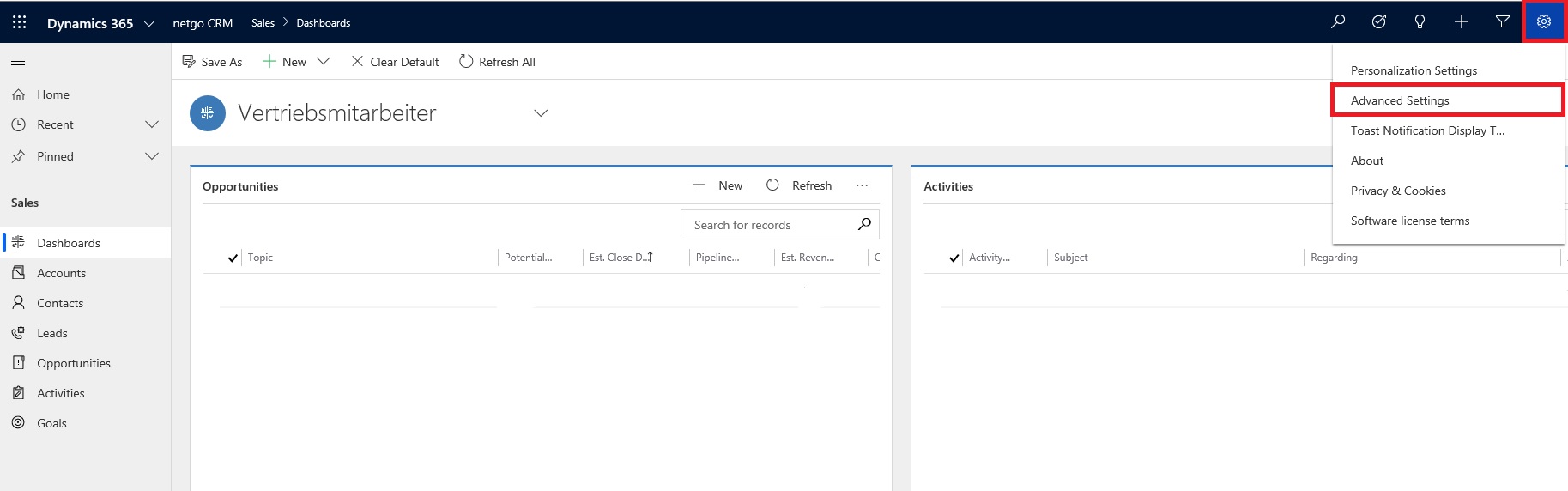
Sales-HUB.jpg

My 1st idea was to use the SiteMap Editor for the Sales HUB, but there i can`t find options to disable the advanced settings.

Can anybody please give me a tip, how to do it ? ;)

Greetings from Germany

Markus

I have the same question (0)
  • Community Member Profile Picture
    on at

    Hi Community,

    as a Dynamics 365 Consultant i`m quite new to this job ;)

    I have been working as an account manager for over 2 years using Dynamics 365 Sales, but changed my job since august 2019.

    In my current company we are using the Dynamics 365 Sales HUB for our account manager.

    I want to "disable" the advanced settings in the Sales HUB, but don`t know how to make it:

    0820.Sales-HUB.jpg

    My 1st idea was to use the SiteMap Editor for the Sales HUB, but there i can`t find any options to disable the advanced settings.

    Can anybody please give me a tip, how to do it ? ;)

    Greetings from Germany

    Markus

  • Suggested answer
    Naveen Ganeshe Profile Picture
    3,397 User Group Leader on at

    Hello Markuz,

    There is no out of the box way to achieve your requirement. However, you can remove the permissions from account manager role to access the Business Management entities.

  • Community Member Profile Picture
    on at

    Hi Naveen,

    thanks a lot for your fast reply. when i get you right, i have to customize the security role of our account manager role ?!

    Just looked inside that security role under "Business Management" but could not find "advanced settings" as an option.

    The only setting i can find ist called "User Settings" at the buttom of the list.

    Is this the correct point or are these the personal settings and the advanced settings have to be found somewhere else ? ;)

    Greetings Markus

  • ScheumanRJ Profile Picture
    76 on at

    Markus,

    Were you able to figure this out?  I have the same question and would appreciate it if you would share how you resolved this.

  • LuHao Profile Picture
    40,892 on at

    Hi Ron,

    Since it is a old thread, I would recommend you post a new question.

  • Community Member Profile Picture
    on at

    Hi Ron,

    i opened a Microsoft Support Case for that one.

    After a call with Microsoft i was told, that it is not possible to disable the advanced Settings from the Sales HUB.

    Not what i wanted to hear

    Markus

Under review

Thank you for your reply! To ensure a great experience for everyone, your content is awaiting approval by our Community Managers. Please check back later.

Helpful resources

Quick Links

Season of Sharing Community Challenge Launch!

Jump in, show your community spirit, and win prizes!

Women in Power Builds Momentum

Expanding mentorship, skilling, and AI innovation

Congratulations to the April Top 10 Community Leaders

These are the community rock stars!

Leaderboard > Customer experience | Sales, Customer Insights, CRM

#1
Nagaraju_Matta Profile Picture

Nagaraju_Matta 105

#2
Abhilash Warrier Profile Picture

Abhilash Warrier 66 Super User 2026 Season 1

#3
ManoVerse Profile Picture

ManoVerse 61 Super User 2026 Season 1

Last 30 days Overall leaderboard

Product updates

Dynamics 365 release plans



