Hi All,
Anyone can help on this. I am deploying the D365 from LCS and get this error during the reporting service installation.
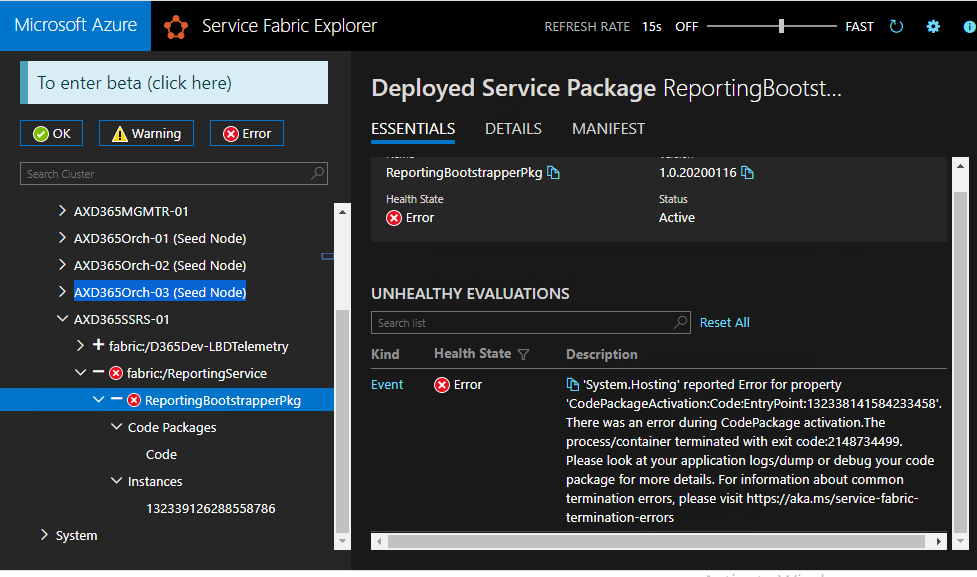
'System.Hosting' reported Error for property 'CodePackageActivation:Code:EntryPoint:132338141584233458'.
There was an error during CodePackage activation.The process/container terminated with exit code:2148734499. Please look at your application logs/dump or debug your code package for more details. For information about common termination errors, please visit https://aka.ms/service-fabric-termination-errors
Below is the error in event viewer when open the report URL in web browser:-
Application: ReportingServicesBootstrapper.exe
Framework Version: v4.0.30319
Description: The application requested process termination through System.Environment.FailFast(string message).
Message: RunAsync failed due to an unhandled exception causing the host process to crash: System.InvalidOperationException: Failed running script [Install] : [System.Management.Automation.RuntimeException: Error occurred when running AxReportVmRoleStartupTask.exe to install extension. Please see details in events for AX-ReportPVMSetup.
]
at ReportingServicesBootstrapper.ReportingServicesBootstrapper.<RunAsync>b__2_0()
at System.Threading.Tasks.Task.Execute()
--- End of stack trace from previous location where exception was thrown ---
at System.Runtime.ExceptionServices.ExceptionDispatchInfo.Throw()
at System.Runtime.CompilerServices.TaskAwaiter.HandleNonSuccessAndDebuggerNotification(Task task)
at ReportingServicesBootstrapper.ReportingServicesBootstrapper.<RunAsync>d__2.MoveNext()
--- End of stack trace from previous location where exception was thrown ---
at System.Runtime.ExceptionServices.ExceptionDispatchInfo.Throw()
at System.Runtime.CompilerServices.TaskAwaiter.HandleNonSuccessAndDebuggerNotification(Task task)
at Microsoft.ServiceFabric.Services.Runtime.StatelessServiceInstanceAdapter.<ExecuteRunAsync>d__18.MoveNext()
Stack:
at System.Environment.FailFast(System.String)
at System.Threading.Tasks.Task.Execute()
at System.Threading.ExecutionContext.RunInternal(System.Threading.ExecutionContext, System.Threading.ContextCallback, System.Object, Boolean)
at System.Threading.ExecutionContext.Run(System.Threading.ExecutionContext, System.Threading.ContextCallback, System.Object, Boolean)
at System.Threading.Tasks.Task.ExecuteWithThreadLocal(System.Threading.Tasks.Task ByRef)
at System.Threading.Tasks.Task.ExecuteEntry(Boolean)
at System.Threading.ThreadPoolWorkQueue.Dispatch()
Faulting application name: ReportingServicesBootstrapper.exe, version: 2.32.3.0, time stamp: 0x5e20659a
Faulting module name: mscorlib.ni.dll, version: 4.8.3928.0, time stamp: 0x5d3900b3
Exception code: 0x80131623
Fault offset: 0x00000000005dde07
Faulting process id: 0x1f28
Faulting application start time: 0x01d628e2cf8ec714
Faulting application path: C:\ProgramData\SF\AXD365SSRS-01\Fabric\work\Applications\ReportingService_App33\ReportingBootstrapperPkg.Code.1.0.20200116\ReportingServicesBootstrapper.exe
Faulting module path: C:\Windows\assembly\NativeImages_v4.0.30319_64\mscorlib\fe2524177eb3088c77be666722039f52\mscorlib.ni.dll
Report Id: 63264209-3bcc-4b37-88f5-25c4060059e9
Faulting package full name:
Faulting package-relative application ID:
Any help is much appreciated.
Thanks
Celine





