web
You’re offline. This is a read only version of the page.
close
Skip to main content

Announcements

News and Announcements icon
Community site session details

Community site session details

Session Id :
Microsoft Dynamics AX (Archived)

AOS services not starting after DB restored in new environment

(0) ShareShare
ReportReport
Posted on by

Hi All, 

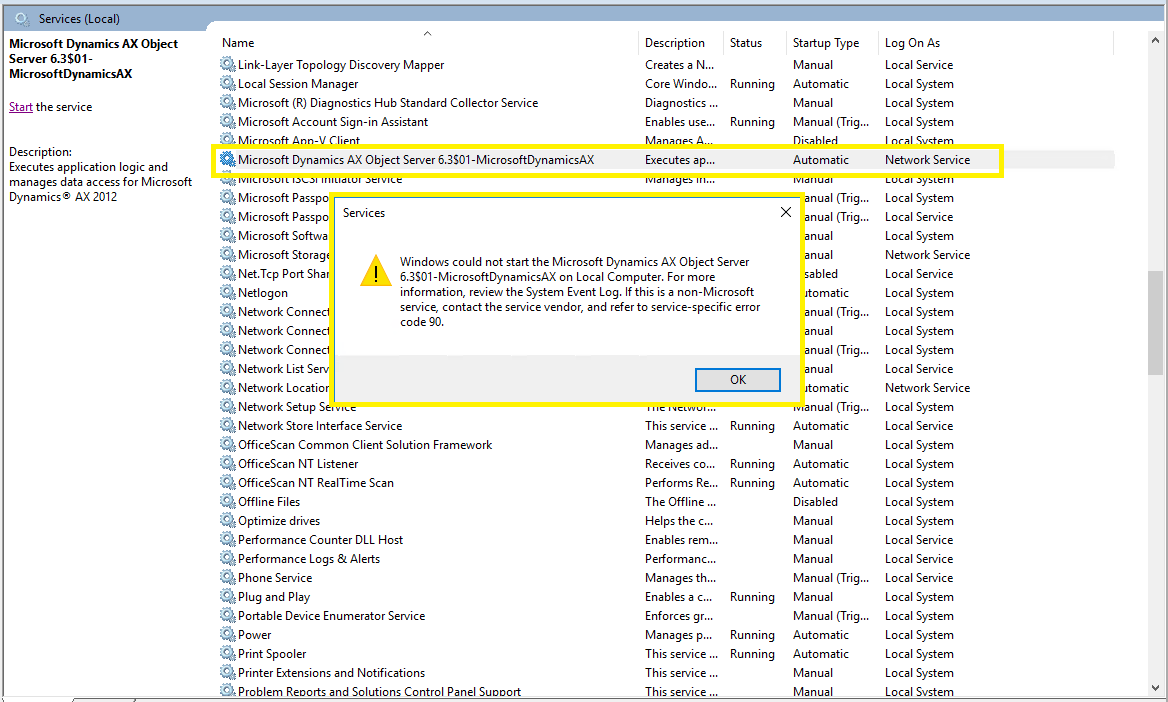
We have installed AX in one machine and installed SQL in another machine, we have successfully installed AX, and restored DB as well , but while AOS services and not getting started getting the below error : 

Kindly advise us how we can proceed with this error, there is no more information in the event logs as well. service account is "Network service".
0525.Service-error.png

*This post is locked for comments

I have the same question (0)
  • André Arnaud de Calavon Profile Picture
    305,751 Super User 2026 Season 1 on at

    Hi Akbarpasha,

    Can you tell if you only used the business database or also the corresponding model database? Is the AX service configuration correct? Also ensure the databases are not set to be read only.

  • Brandon Wiese Profile Picture
    17,790 on at

    Look in the Event log on the AOS server to get a better idea what's wrong.  There has to be something.

    There are a lot of little problems that could prevent an AOS from starting.  In your particular scenario, you could also have to delete all records from the SYSSERVERSESSIONS table, or if you changed domains you could have to reset the SID on the Admin record in the USERINFO table, and so on.

    More information required here.

  • Akbarpasha Profile Picture
    on at

    Hi Andre,

    There is a corresponding model database, do we need to restore Model Database as well? , we have verified the AX configuration and it is correct . is there anything related to user access issue in DB ?

  • Akbarpasha Profile Picture
    on at

    these are the errors in event log :

    Object Server 01:  Server terminated unexpectedly with 90 exitcode.

    Object Server 01:  The database ***\AX_DEV\MicrosoftDynamicsAX_model is not recognized as a model store.

    Object Server 01:  The database ***\AX_DEV\MicrosoftDynamicsAX_model is not recognized as a model store.

    Object Server 01:  Fatal SQL condition during login. Error message: "[Microsoft][SQL Server Native Client 11.0][SQL Server]Login failed for user '***\HOAPP92$'."

  • Akbarpasha Profile Picture
    on at

    Yes Brandon , we have updated the SID in userinfo table  in admin record with my account,

    below are the error logs from event log.

    Object Server 01:  Server terminated unexpectedly with 90 exitcode.

    Object Server 01:  The database ***\AX_DEV\MicrosoftDynamicsAX_model is not recognized as a model store.

    Object Server 01:  The database ***\AX_DEV\MicrosoftDynamicsAX_model is not recognized as a model store.

    Object Server 01:  Fatal SQL condition during login. Error message: "[Microsoft][SQL Server Native Client 11.0][SQL Server]Login failed for user '***\HOAPP92$'."

  • Akbarpasha Profile Picture
    on at

    below is the new error log :

    Object Server 01:  Server terminated unexpectedly with 90 exitcode.

    Object Server 01:  The database ***\AX_DEV\MicrosoftDynamicsAX_model is not recognized as a model store.

    "Object Server 01:  Dialog issued for client-less session 1: The program is unable to load and execute the class 'Model store init',

    which is essential in order to identify the database vendor and

    load the appropriate SQL system variables.

    This can be caused by insufficient access rights to the SQL Database, a missing or

    corrupted application file, or syntax error(s) within the class itself."

    Object Server 01:  SQL diagnostics: [Main Microsoft Dynamics Application Object Server Session]Unable to report problem. Attempted to open message 287.

    Object Server 01:  The database reported (session 1 (-AOS-)): [Microsoft][SQL Server Native Client 11.0][SQL Server]CREATE TABLE permission denied in database

    'MicrosoftDynamicsAX'.. The SQL statement was: "CREATE TABLE DBO.SQLSYSTEMVARIABLES(  PARM     NVARCHAR(30) NOT NULL, VALUE    NVARCHAR(254) NULL, IPARM  INT NULL, IVALUE   INT NULL)"

  • Suggested answer
    Rustem Galiamov Profile Picture
    8,072 on at

    Hi!

    Try to add service account as SecurityAdmin to *ModelDB, or, if this account is owner of that DB, try to change the owner of *Model DB to another account and add service account as securityadmin.

  • Akbarpasha Profile Picture
    on at

    Hi,

    We have added AOS service account in userInfo table with machine SID , we are able to start the AOS services now.

    Thank you all for your valuable inputs.

Under review

Thank you for your reply! To ensure a great experience for everyone, your content is awaiting approval by our Community Managers. Please check back later.

Helpful resources

Quick Links

Season of Sharing Community Challenge Launch!

Jump in, show your community spirit, and win prizes!

Women in Power Builds Momentum

Expanding mentorship, skilling, and AI innovation

Congratulations to the May Top 10 Community Leaders

These are the community rock stars!

Leaderboard > 🔒一 Microsoft Dynamics AX (Archived)

#1
CP04-islander Profile Picture

CP04-islander 16

#2
Nagendra Varma K Profile Picture

Nagendra Varma K 4

#2
Harisgillani Profile Picture

Harisgillani 4

Last 30 days Overall leaderboard

Featured topics

Product updates

Dynamics 365 release plans



