web
You’re offline. This is a read only version of the page.
close
Skip to main content

Announcements

News and Announcements icon
Community site session details

Community site session details

Session Id :
Customer experience | Sales, Customer Insights,...
Answered

Forms Dependencies

(0) ShareShare
ReportReport
Posted on by

I have a list of active 'main' forms  in the Contact entity that I am interrogating:

pastedimage1584125083494v1.png

I want to know where each of these forms are used.   'Show Dependencies' gives me nothing:

pastedimage1584125204924v2.png

How can I find where these forms are used??

I have the same question (0)
  • Verified answer
    Marco.P Profile Picture
    2,405 on at

    Hi @Andy Draus!

    You can find more informations about forms by querying the systemform Entity.

    Here's a quick codeless way to take a look at those informations:

    • paste this URL:   *YOURORG*/api/data/v9.0/systemforms?$select=formxml,name&$filter=objecttypecode%20eq%20%27contact%27

    formxml and name are just two of the systemform's properties that i choose to retrieve, i also filtered the form by retrieving only those related to contact entity.

    • This is what you should get:

    pastedimage1584226635413v1.png

    I've highlighted some useful informations such as type,name, roleid (which shows to what user role the form is available to) and formid.

    Here you can find the documentation about systemform entity and all properties that could help you to shed light on your form!

    docs.microsoft.com/.../systemform

    Hope it helps!

    Marco


    If you found the answer helpful for you or other readers, please mark as Verified.

  • Ajay  Dhingra Profile Picture
    on at

    Hi Andy,

    Hope you are well !!

    I understand what  you want to do but I am unsure why you want to find out this . Could you please provide more information  on the actual issue with screen shot and error which is troubling you ?

    Regards 

  • Community Member Profile Picture
    on at

    We're seeking to find how a field gets updated.  PowerMailChimp is sending e-mail blasts to people with "yes" in this field.

    We find the field is on the "Internal Employee Form"... but don't know how users get access to that form.

  • Suggested answer
    Marco.P Profile Picture
    2,405 on at

    Hi,

    Check if the fied has 'yes' as default value.

    Also take a look a this, it might be useful to help you solve your mistery:

    https://community.dynamics.com/365/b/dynamics365enterprisecloudfronts/posts/trick-to-find-the-fields-workflows-trigger-on

    Keep me posted!


    If you found the answer helpful for you or other readers, please mark as Verified.

  • Community Member Profile Picture
    on at

    I do have a workflow that updates the field and have reviewed that.   But since I also see the field on this form, I want to know where there are hooks to this form.  What users might be pulling open this form and where and how...

    There are six forms with form type of 'main'.  How do I know if each of these are being used somewhere?

  • Suggested answer
    Marco.P Profile Picture
    2,405 on at

    Check my previous answer, It Will give you information such as which security roles can access the form and what type of form it Is ( It Is displayed as a code but in the Microsoft documentation i've posted there's a decode table). I would do It myself, but unfortunately i have no access to your environment:).

    Also i don't understand if you're worry about the field being displayed (in that case Just hinding It) or that user can edit that field( try with field Security level)

  • Community Member Profile Picture
    on at

    Following the answer posted on Friday, I get this result:

    <DisplayConditions Order=\"3\"><Role Id=\"{3d3fb602-7894-e711-8104-c4346bdcf131}\" /><Role Id=\"{8e84ae08-7894-e711-8104-c4346bdcf131}\" /></DisplayConditions></form>","name":"New Form","objecttypecode":"contact","type":6,"formid":"d89686cd-9ee5-4c0d-ad17-495ead149913"},{"@odata.etag":"W/\"158625623\"","formxml":"<form showImage=\"true\">

    But there are multiple forms set up for contacts. I am not interested in "New Form". I AM interested in "Internal Employee Form":
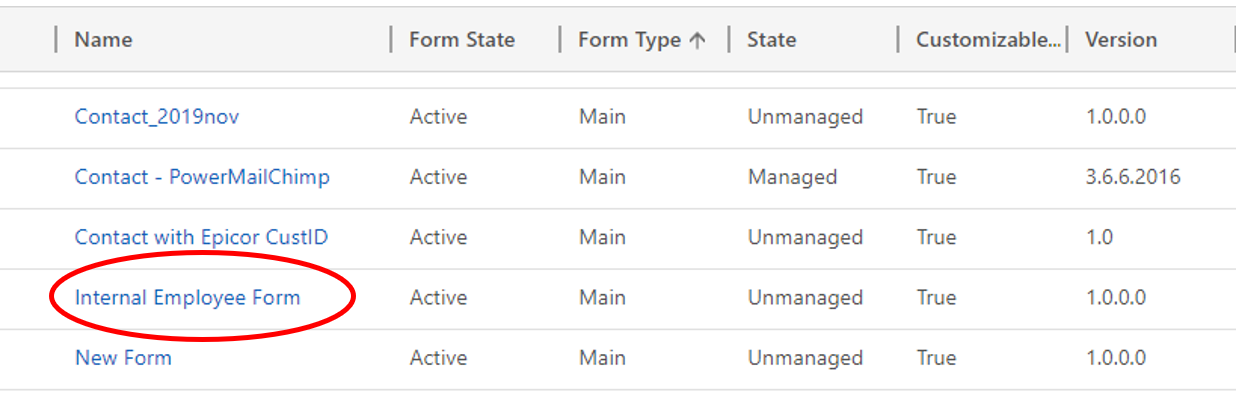
    pastedimage1584372086958v6.png

    Because it has the fields I am interested in:
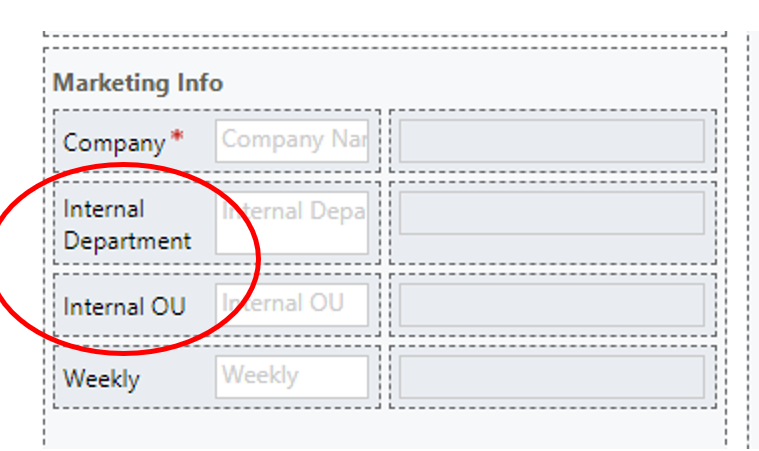
    pastedimage1584372186054v7.png

    I want to know what users have access to this form, and thus, access to these fields. I do find mention of "Internal Employee Form" in that output, but don't know if it's telling me anything:
    /></Titles></NavBarArea></NavBarAreas></Navigation><controlDescriptions /><formLibraries><Library name=\"msdyn_talkingpointsloader.js\" libraryUniqueId=\"{30d6d0a4-d097-b9be-cc6e-5722727be490}\" /></formLibraries><DisplayConditions FallbackForm=\"true\" Order=\"6\"><Role Id=\"{3d3fb602-7894-e711-8104-c4346bdcf131}\" /><Role Id=\"{8e84ae08-7894-e711-8104-c4346bdcf131}\" /></DisplayConditions></form>","name":"Internal Employee Form","objecttypecode":"contact","type":2,"formid":"0e18337b-26c5-45e9-92cd-d4b0bd88c380"},{"@odata.etag":"W/\"158625633\"","formxml":"<form showImage=\"true\"><ancestor id=\"{1fed44d1-ae68-4a41-bd2b-f13acac4acfa}\" /><hiddencontrols><data id=\"fullname\" datafieldname=\"fullname\" classid=\"{5546E6CD-394C-4bee-94A8-4425E17EF6C6}\" /><data id=\"address1_addressid\" datafieldname=\"address1_addressid\" classid=\"{5546E6CD-394C-4bee-94A8-4425E17EF6C6}\" /><data id=\"address2_addressid\" datafieldname=\"address2_addressid\" classid=\"{5546E6CD-394C-4bee-94A8-4425E17EF6C6}\"
  • Suggested answer
    Marco.P Profile Picture
    2,405 on at
    [quote user="Andy Draus"]

    Following the answer posted on Friday, I get this result:

    <DisplayConditions Order=\"3\"><Role Id=\"{3d3fb602-7894-e711-8104-c4346bdcf131}\" /><Role Id=\"{8e84ae08-7894-e711-8104-c4346bdcf131}\" /></DisplayConditions></form>","name":"New Form","objecttypecode":"contact","type":6,"formid":"d89686cd-9ee5-4c0d-ad17-495ead149913"},{"@odata.etag":"W/\"158625623\"","formxml":"<form showImage=\"true\">

    But there are multiple forms set up for contacts. I am not interested in "New Form". I AM interested in "Internal Employee Form":
    pastedimage1584372086958v6.png

    Because it has the fields I am interested in:
    pastedimage1584372186054v7.png

    I want to know what users have access to this form, and thus, access to these fields. I do find mention of "Internal Employee Form" in that output, but don't know if it's telling me anything:
    /></Titles></NavBarArea></NavBarAreas></Navigation><controlDescriptions /><formLibraries><Library name=\"msdyn_talkingpointsloader.js\" libraryUniqueId=\"{30d6d0a4-d097-b9be-cc6e-5722727be490}\" /></formLibraries><DisplayConditions FallbackForm=\"true\" Order=\"6\"><Role Id=\"{3d3fb602-7894-e711-8104-c4346bdcf131}\" /><Role Id=\"{8e84ae08-7894-e711-8104-c4346bdcf131}\" /></DisplayConditions></form>","name":"Internal Employee Form","objecttypecode":"contact","type":2,"formid":"0e18337b-26c5-45e9-92cd-d4b0bd88c380"},{"@odata.etag":"W/\"158625633\"","formxml":"<form showImage=\"true\"><ancestor id=\"{1fed44d1-ae68-4a41-bd2b-f13acac4acfa}\" /><hiddencontrols><data id=\"fullname\" datafieldname=\"fullname\" classid=\"{5546E6CD-394C-4bee-94A8-4425E17EF6C6}\" /><data id=\"address1_addressid\" datafieldname=\"address1_addressid\" classid=\"{5546E6CD-394C-4bee-94A8-4425E17EF6C6}\" /><data id=\"address2_addressid\" datafieldname=\"address2_addressid\" classid=\"{5546E6CD-394C-4bee-94A8-4425E17EF6C6}\"
    [/quote]

    Hi,

    here's the roles that have access to the form:

    <Role Id=\"{3d3fb602-7894-e711-8104-c4346bdcf131}\" /><Role Id=\"{8e84ae08-7894-e711-8104-c4346bdcf131}\" />

    go to:

    *yourORG*/biz/roles/edit.aspx?id={*place here the guid*}


  • Community Member Profile Picture
    on at

    Thank you again!  I'm understanding what we're doing there...

    Those ids point to the System Customizer and System Administrator (me).  So... that doesn't tell me much.

    I have identified a form that has two fields of concern.  What app, subgrid, field, sitemap link... or whatever... opens that form so a user can edit the fields??

  • Suggested answer
    Marco.P Profile Picture
    2,405 on at

    I still don't really get what you're trying to fix...

    Anyway i will use as an example the "Internal Employee Form":

    <Library name=\"msdyn_talkingpointsloader.js\" libraryUniqueId=\"{30d6d0a4-d097-b9be-cc6e-5722727be490}\" />
    </formLibraries><DisplayConditions FallbackForm=\"true\" Order=\"6\"><Role Id=\"{3d3fb602-7894-e711-8104-c4346bdcf131}\" />
    <Role Id=\"{8e84ae08-7894-e711-8104-c4346bdcf131}\" /></DisplayConditions></form>",
    "name":"Internal Employee Form",
    "objecttypecode":"contact","type":2,"formid":"0e18337b-26c5-45e9-92cd-d4b0bd88c380"},
    • I can see that it has a type properties: 2 meanings Main form,so it's displayed as main form for contact record, it will appear in any app that use contact entity. 

    https://docs.microsoft.com/en-us/dynamics365/customerengagement/on-premises/customize/main-form-presentations

    • "order" and "enable for fallback": The relative order in which to display the form and the property that indicates if this form represents a fallback form for the entity.
    • and the "role" property that we already discussed: Specifies a security role that a user must be associated with to view a form.

    So, gathering this information you can try to point out that this form is displayed when someone open a contact entity but with a 6 order it's probably sure that you have to manually swith the form and choose this one.

    If you have another form which you are suspicious about, those are the step's i would do if i were you (Note that as I told you in one of my previous answer: "formxml and name are just two of the systemform's properties that i choose to retrieve, i also filtered the form by retrieving only those related to contact entity" you can retrieve other properties such as  isdefault which shows if a form is the default one).

    P.s. why don't you check which user role have edit permission on contact entity?

    I do really hope that i've helped you .

    Marco

Under review

Thank you for your reply! To ensure a great experience for everyone, your content is awaiting approval by our Community Managers. Please check back later.

Helpful resources

Quick Links

Season of Sharing Community Challenge Launch!

Jump in, show your community spirit, and win prizes!

Women in Power Builds Momentum

Expanding mentorship, skilling, and AI innovation

Congratulations to the May Top 10 Community Leaders

These are the community rock stars!

Leaderboard > Customer experience | Sales, Customer Insights, CRM

#1
Hamza H Profile Picture

Hamza H 140 Super User 2026 Season 1

#2
Nagaraju_Matta Profile Picture

Nagaraju_Matta 128

#3
Abhilash Warrier Profile Picture

Abhilash Warrier 70 Super User 2026 Season 1

Last 30 days Overall leaderboard

Product updates

Dynamics 365 release plans



