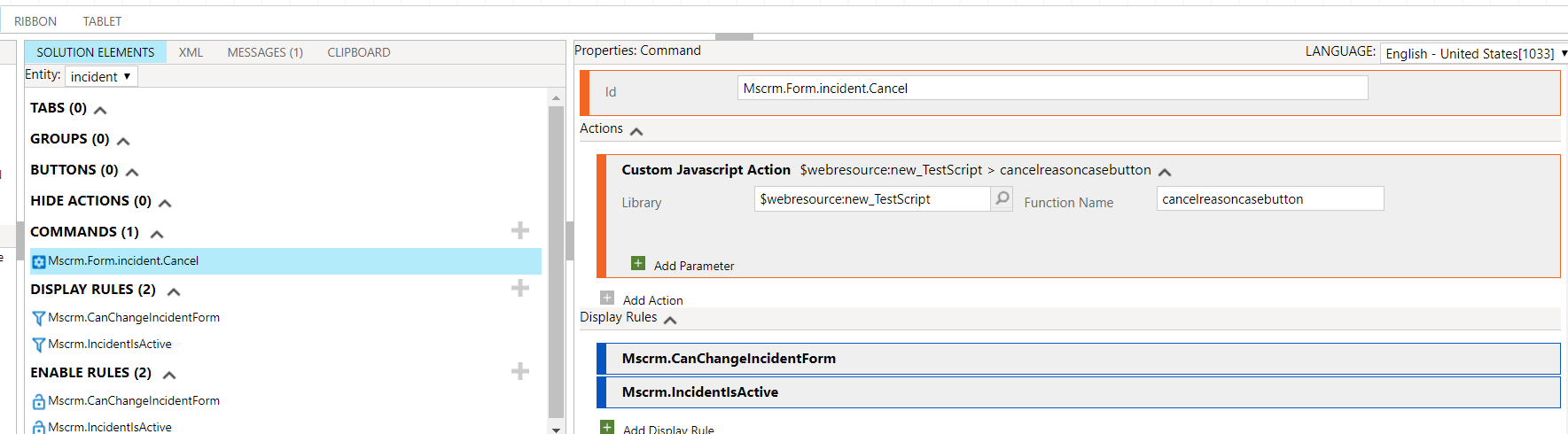
Hi,
You need to first validate if the function is tied up with the command r not. You can check this by putting just an alert in the function and then see if you get an alert or not. If youa re not getting an alert then the problem is within the command. If you are getting the alert but then the other code is not working then its the code issue. Few things which I noticed that you have break statement added which is not correct. remove that. Also ensure that the field is on the form and is visible.
I tried the same implementation on my test org for the description field and it worked as expected. On Ribbon workbench, i clicked on edit command and then instead of system javascript web resource and function, I used my custom.
Refer below-
===================
function cancelreasoncasebutton() {
alert("start12345");
debugger;
Xrm.Page.getControl("description").setVisible(true);
var casereason = Xrm.Page.getAttribute("description").getValue();
if (casereason == null) {
Xrm.Page.ui.setFormNotification("Please fill Cancel Reason Field !!.", "INFO", "emailCheckNotification");
Xrm.Page.getControl("description").setNotification("Please Write the reason to cancel the case.");
}
else {
CrmService.IncidentRibbon.CommandBarActions.cancel();
}
}
==========================