web
You’re offline. This is a read only version of the page.
close
Skip to main content

Notifications

Announcements

No record found.

Community site session details

Community site session details

Session Id :
Customer experience | Sales, Customer Insights,...
Answered

Data from API differs in cURL and Power BI

(0) ShareShare
ReportReport
Posted on by 15

I am trying to get data from CRM via the REST API. I am able to authenticate and retrieve data from CRM, but the data I receive looks different from the same data collected in Power BI.

I am trying to retrieve data from oppertunityproducts. When running the query in Power BI I get this:
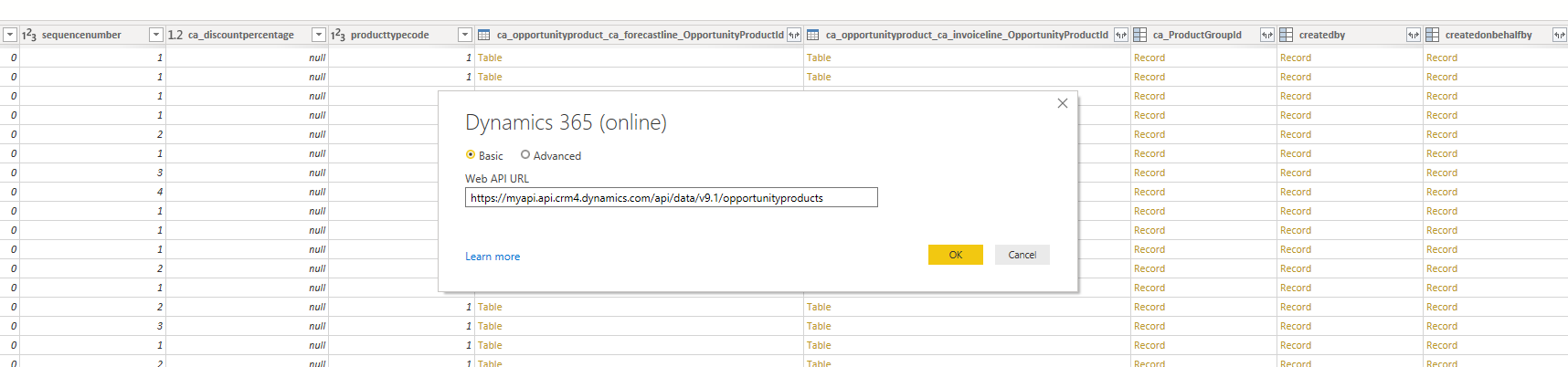
pastedimage1589897550903v1.png

But when running the query in cURL I only get these attributes:

@odata.etag
baseamount
baseamount_base
ca_amountexclcloudlicensingcalc
ca_amountexclcloudlicensingcalc_base
ca_cm
ca_cm_base
ca_costamount
ca_costamount_base
ca_costperunit
ca_costperunit_base
ca_discountpercentage
ca_enddate
ca_extendedcostamount
ca_extendedcostamount_base
ca_forecastproduct
ca_months
ca_oppidproductidcalc
ca_opportunityidcalc
ca_productid
ca_startdate
ca_targetamount
ca_targetamount_base
createdon
description
entityimage
entityimageid
entityimage_timestamp
entityimage_url
exchangerate
extendedamount
extendedamount_base
importsequencenumber
ispriceoverridden
isproductoverridden
lineitemnumber
manualdiscountamount
manualdiscountamount_base
modifiedon
msdyn_billingmethod
msdyn_budgetamount
msdyn_budgetamount_base
msdyn_costamount
msdyn_costamount_base
msdyn_costpriceperunit
msdyn_costpriceperunit_base
msdyn_duration
msdyn_enddate
msdyn_linetype
msdyn_startdate
opportunityproductid
opportunityproductname
opportunitystatecode
overriddencreatedon
parentbundleid
priceperunit
priceperunit_base
pricingerrorcode
productassociationid
productdescription
productname
producttypecode
propertyconfigurationstatus
quantity
sequencenumber
skippricecalculation
tax
tax_base
timezoneruleversionnumber
utcconversiontimezonecode
versionnumber
volumediscountamount
volumediscountamount_base
_ca_productgroupid_value
_createdby_value
_createdonbehalfby_value
_modifiedby_value
_modifiedonbehalfby_value
_msdyn_pricelist_value
_msdyn_project_value
_msdyn_serviceaccount_value
_opportunityid_value
_ownerid_value
_owningbusinessunit_value
_owningteam_value
_owninguser_value
_parentbundleidref_value
_productid_value
_transactioncurrencyid_value
_uomid_value

I am missing the interesting ones with the reference data.

When running fiddler I can see, that Power BI does some batch lookups, when the tables and lists are expanded.

Is there an easy way to get the exact same query that Power BI makes running via cURL?

I have the same question (0)
  • Suggested answer
    Johao Larios Profile Picture
    1,795 on at

    Hello there,

    what kind of fields are you missing?

    have you tried use this docs.microsoft.com/.../use-power-bi

    regards,

  • Axel B. Andersen Profile Picture
    15 on at

    All the ones that contains Record or Table in the image. Tables like: ca_opportunityproduct_ca_forecastline_OpportunityProductId, ca_opportunityproduct_ca_invoiceline_OpportunityProductId and ca_ProductGroupId.

    The thing is, that it works in Power BI, but I would like the API call to return the same data in a REST API call without using Power BI. I need the data for further automation elsewhere.

  • Suggested answer
    Johao Larios Profile Picture
    1,795 on at

    So,

    You will need to create your own webapi query as needed, to retrieve related records you could use expand:

    docs.microsoft.com/.../query-data-web-api

    Also, there are some 3rd party apps such community.dynamics.com/.../crm-rest-builder-v2-6-0-0

  • Axel B. Andersen Profile Picture
    15 on at

    I have actually been looking into expand, but got stuck on how to direct the lookup to the correct table. I can only find documentation on valued navigation.

    FetchXML seems to be a way to define a schema for the query I need to build, but like with expand it seems a little blurry how to get the data from all the sources I need.

  • Suggested answer
    Johao Larios Profile Picture
    1,795 on at

    So,

    In that case you can create a view inside of CRM to retrieve the data needed. Then download the fetchxml for that view and then you can use the fetchXML api query:  docs.microsoft.com/.../retrieve-and-execute-predefined-queries

  • Axel B. Andersen Profile Picture
    15 on at

    I will definitely give that a try. Thanks!

  • Verified answer
    Johao Larios Profile Picture
    1,795 on at

    Awesome! If helps you to resolve this, please mark the thread as answered.

    regards,

Under review

Thank you for your reply! To ensure a great experience for everyone, your content is awaiting approval by our Community Managers. Please check back later.

Helpful resources

Quick Links

Responsible AI policies

As AI tools become more common, we’re introducing a Responsible AI Use…

Neeraj Kumar – Community Spotlight

We are honored to recognize Neeraj Kumar as our Community Spotlight honoree for…

Leaderboard > Customer experience | Sales, Customer Insights, CRM

#1
Tom_Gioielli Profile Picture

Tom_Gioielli 70 Super User 2025 Season 2

#2
Gerardo Rentería García Profile Picture

Gerardo Rentería Ga... 43 Most Valuable Professional

#3
Daniyal Khaleel Profile Picture

Daniyal Khaleel 32 Most Valuable Professional

Last 30 days Overall leaderboard

Product updates

Dynamics 365 release plans
