web
You’re offline. This is a read only version of the page.
close
Skip to main content

Notifications

Announcements

No record found.

Community site session details

Community site session details

Session Id :
Microsoft Dynamics AX (Archived)

Security role setup - Add back standard button "Create released products" to security role

(0) ShareShare
ReportReport
Posted on by

I am handling the project's security setup. 

When i use "System admin" to enter Released products page, the standard function "New product" is existing. 
1440.Capture1.JPG

When i assign user for following security role, the user can be still able to access "Product information management" module, but the button disappears. 

6330.Capture2.JPG

2110.Capture3.JPG

Therefore, i try to trace the menu items. 

5734.Capture4.JPG

By the menu items, i found the [privilege] EcoResProductReleaseMaintain related to the menu item. 
Then i assign this privilege back to [role] Product designer. 
However, it still cannot access / see the create button. 
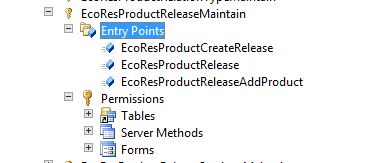
7801.Capture5.JPG

*This post is locked for comments

I have the same question (0)
  • Suggested answer
    Khaled Alloud Profile Picture
    3,658 on at

    Hello,

    Please try to add this role: 'Product design manager'

    Thank you,

  • Suggested answer
    André Arnaud de Calavon Profile Picture
    301,069 Super User 2025 Season 2 on at

    Hi Ko,

    The privilege you used is for releasing products from the global products. You can actually use EcoResProductCreateMaintain or EcoResProductDetailsExtendedMaintain.

  • Suggested answer
    Community Member Profile Picture
    on at

    Hi Ko,

    Try to add privilege "Maintain products for release" for your current "Product designer" role. It should enable the button on top action pane and allow user to maintain/create released products.

    Kind Regards,

    Viesturs

  • Community Member Profile Picture
    on at

    Actually i have tried as your statement before.
    When i use "Product design manager", it does not work as well. 

    5861.Capture7.JPG

    The function is even becoming less. 

    8585.Capture8.JPG

  • Community Member Profile Picture
    on at

    [quote user="André Arnaud de Calavon"]

    Hi Ko,

    The privilege you used is for releasing products from the global products. You can actually use EcoResProductCreateMaintain or EcoResProductDetailsExtendedMaintain.

    [/quote]


    For your suggestion, it makes sense. 
    I have tried this method before as well.
    For the similar case before, i also try to assign corresponding privileges to the security role.
    The action is as below: 


    3324.Capture9.JPG

    The "Released Product" page is still like that. 

    Capture10.JPG

    By the way, will it be related to button setup on the form? 

    I go to AOT. and open the button located on that form.

    0601.Capture12.JPG

    The field "NeededPermission" is set up as "Manual" 

    If I set as "None", it should be able to see.
    But it means that no security setup is used this issue?
    If no security limitation, then this is not wanted way.  

    3324.Capture9.JPG

  • André Arnaud de Calavon Profile Picture
    301,069 Super User 2025 Season 2 on at

    Hi Ko,

    The default value of this property for this button is 'None'. Then the standard privilege will work. If you insist having the value 'Manual', you have to alter the privilege or create a new privilege. The privilege should then get a form control permission allowing to use/see the 'New' button. This can also be managed on security role level.

Under review

Thank you for your reply! To ensure a great experience for everyone, your content is awaiting approval by our Community Managers. Please check back later.

Helpful resources

Quick Links

Responsible AI policies

As AI tools become more common, we’re introducing a Responsible AI Use…

Neeraj Kumar – Community Spotlight

We are honored to recognize Neeraj Kumar as our Community Spotlight honoree for…

Leaderboard > 🔒一 Microsoft Dynamics AX (Archived)

#1
Martin Dráb Profile Picture

Martin Dráb 4 Most Valuable Professional

#1
Priya_K Profile Picture

Priya_K 4

#3
MyDynamicsNAV Profile Picture

MyDynamicsNAV 2

Last 30 days Overall leaderboard

Featured topics

Product updates

Dynamics 365 release plans



