web
You’re offline. This is a read only version of the page.
close
Skip to main content

Notifications

Announcements

Community site session details

Community site session details

Session Id :
Customer Service forum

Knowledge Embed Search Control Interactive Case Form

(0) ShareShare
ReportReport
Posted on by

Hi everyone, I added a new tab for the interactive case form and I placed the Knowledge Embed Search here. My goal of this was to allow our users to view Knowledge articles within Dynamics but on a large screen (the out of box version is very small). Can anyone tell me how to expand the Article Content field so that a larger portion of the screen is taken up.

I have placed a screenshot below demonstrating what I mean. Thanks for any help.
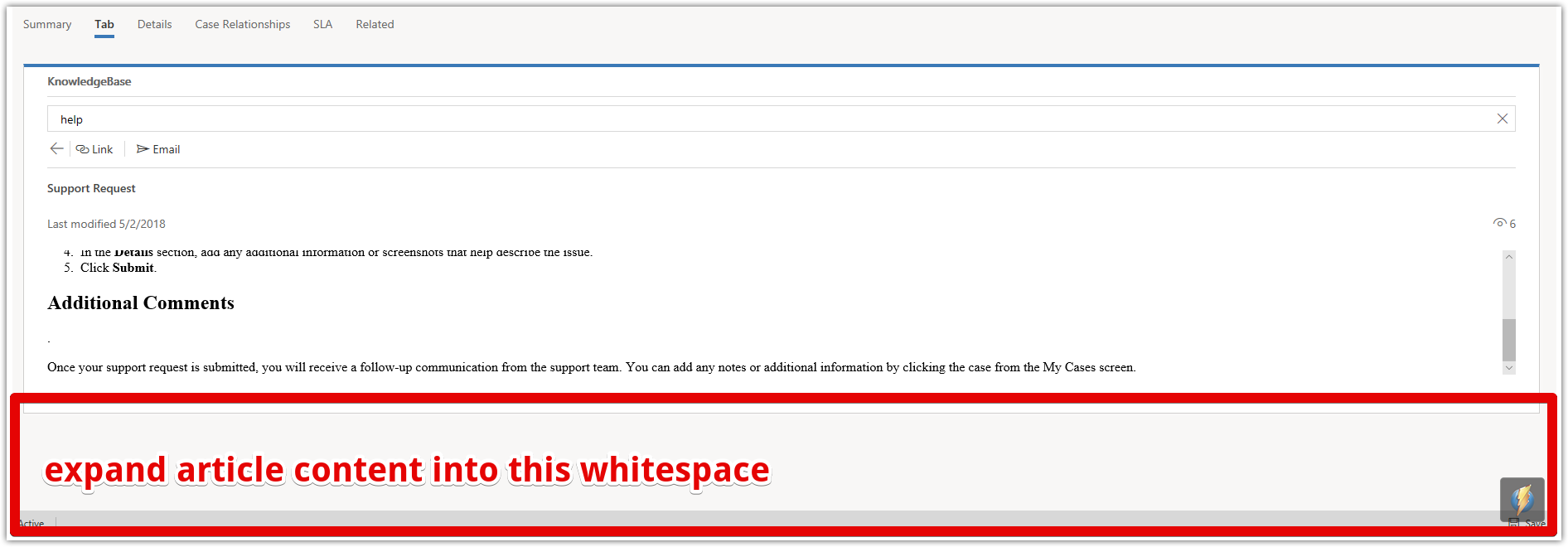
Microsoft-Edge-2018_2D00_06_2D00_26-16.41.46.png

Categories:
I have the same question (0)
  • John Holmes Profile Picture
    260 on at

    did you ever get any answers on this - I have the same issue

  • Suggested answer
    Moon Boy Profile Picture
    15 on at

    Create a separate Tab on the Form, Add a 1 Column Section to that tab and add the knowledge Search to that section.

Under review

Thank you for your reply! To ensure a great experience for everyone, your content is awaiting approval by our Community Managers. Please check back later.

Helpful resources

News and Announcements

Season of Giving Solutions is Here!

Quick Links

November Spotlight Star - Khushbu Rajvi

Congratulations to a top community star!

Forum Structure Changes Coming on 11/8!

In our never-ending quest to help the Dynamics 365 Community members get answers faster …

Dynamics 365 Community Platform update – Oct 28

Welcome to the next edition of the Community Platform Update. This is a status …

Leaderboard > Customer Service

Last 30 days Overall leaderboard

Featured topics

Product updates

Dynamics 365 release plans
