web
You’re offline. This is a read only version of the page.
close
Skip to main content

Announcements

News and Announcements icon
Community site session details

Community site session details

Session Id :
Finance | Project Operations, Human Resources, ...
Suggested Answer

Vendor disbursesment workflow - allow edit and review

(0) ShareShare
ReportReport
Posted on by

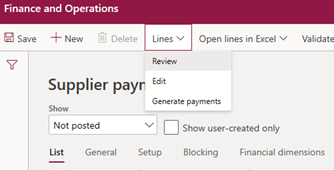
I have created a supplier/vendor disbursement workflow with two stage approval.  However, the approvers at each stage would like the ability to view the invoice images attached to the invoice journals.

You can view the images from the 'Settle transactions' menu item within the payment journal, but once the journal is submitted to workflow the 'Settle transactions' button is greyed out.

Does anyone know if you can enable the 'Review/Edit' functionality within the workflow, therefore allowing the approvers to easily navigate to the invoice images?
5483.pastedimage1571672499347v1.png

I have the same question (0)
  • Suggested answer
    SouravDam Profile Picture
    11,732 on at

    Hi Gerard Cabral,

    In vendor disbursement workflow configuration, no edit or review option is available. Therefore; approver can only view the submitted journal and decide the action on this.

    What you can do is;

    --- Either you can add the same invoice image in vendor payment journal creation form.

    28266.JPG

    --- Or you can add this in vendor payment journal line form.

    63571.JPG

    --- Else, you can add the same image in Workflow > View history form.

    6661.JPG

    I think, if you add the image in any of these area; the approver would be able to view the image when the work item triggered to them for approval.

    Above screen shots have been taken from D365 for your understanding.

    Kindly check from your end and update in this forum.

    Best regards,
    Sourav Dam

    Please take time to click 'Yes' against the answers that help you guide in right direction to help other community members.

  • Suggested answer
    Ludwig Reinhard Profile Picture
    Microsoft Employee on at

    Hello Gerard,

    From the settlement form you should be able to drill down to the original invoice document where you can see the image attached. This requires, however, a couple of clicks for each and every settlement line / invoice that you want to pay.

    Do you have a workflow in place for approving incoming vendor invoices?

    Best regards,

    Ludwig

  • André Arnaud de Calavon Profile Picture
    305,624 Super User 2026 Season 1 on at

    Hi Gerard,

    As the settlement form has been disabled you can use a workaround to first go to the vendor; then find the open transactions. If you need more convenience, you can consider a customization.

  • Suggested answer
    SouravDam Profile Picture
    11,732 on at

    Hi Gerard Cabral,

    Have you got chance to check the comments shared in this thread? Is this sorted out or still any challenges left?

    Appreciate if you kindly update.

    Best regards,
    Sourav Dam

    Please take time to click 'Yes' against the answers that help you guide in right direction to help other community members.

Under review

Thank you for your reply! To ensure a great experience for everyone, your content is awaiting approval by our Community Managers. Please check back later.

Helpful resources

Quick Links

Season of Sharing Community Challenge Launch!

Jump in, show your community spirit, and win prizes!

Women in Power Builds Momentum

Expanding mentorship, skilling, and AI innovation

Congratulations to the May Top 10 Community Leaders

These are the community rock stars!

Leaderboard > Finance | Project Operations, Human Resources, AX, GP, SL

#1
Abhilash Warrier Profile Picture

Abhilash Warrier 658 Super User 2026 Season 1

#2
André Arnaud de Calavon Profile Picture

André Arnaud de Cal... 632 Super User 2026 Season 1

#3
Giorgio Bonacorsi Profile Picture

Giorgio Bonacorsi 570

Last 30 days Overall leaderboard

Product updates

Dynamics 365 release plans



