web
You’re offline. This is a read only version of the page.
close
Skip to main content

Notifications

Announcements

No record found.

Community site session details

Community site session details

Session Id :
Dynamics 365 Community / Forums / Finance forum / User cannot attach Doc...
Finance forum

User cannot attach Documents

(0) ShareShare
ReportReport
Posted on by 4

We have a single user that cannot attach documents to a general journal.  It seems to be limited to the general journal.  The problem is that the New button is disabled.  We have occasionally had other users with this issue and it has been resolved by having them clear their usage data.  This trick as not worked.  We've also tried different browsers, clearing cookies, and granting system admin access.  We currently have a ticket with Microsoft but we are not getting much back.  

Has anyone experienced anything similar?

I have the same question (0)
  • Jie G Profile Picture
    on at

    Hi Mark,

    Please check whether you can attach documents to a new created general journal with this account.

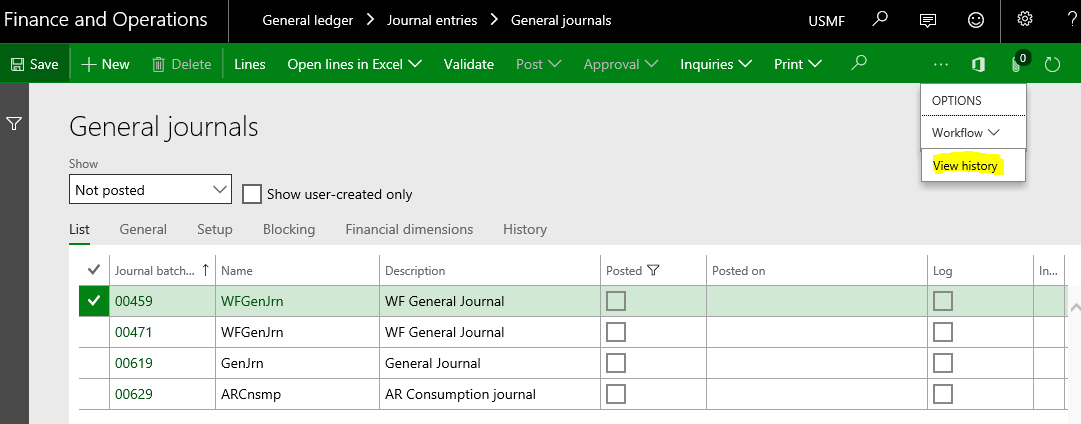
    Please check whether the general journal is in a workflow. Usually we can tell from the journal name:

    6685.1.PNG

    If the general journal is in a workflow and it was submitted, we cannot attach a document.

    If the general journal is in a workflow and it is not submitted, we can attach a document.

    You can refer to following screenshots:
    6685.1.PNG1588.2.PNG

    So documents can be attached for 00471, while cannot be attached for  00459.

  • Jie G Profile Picture
    on at

    Hi Mark,

    Would you please let us know whether you can attach documents to the general journal now?

  • Mark Schurmann Profile Picture
    4 on at

    No.  Problem persists regardless of whether the journal name has workflow or not.  While logged in as sys admin, we discovered that after creating the GJ header record and then immediately going to attachements, the New buttons is enabled, however if you return to the GJ screen and then return to the attachment screen, New is disabled.  It appears that New remains disabled for all general journals unless you logout and log back in.  If you create a new GJ, immediately go to attachments, and attache a file.  The paperclip will register that there is one attachment on the the GJ, however when you return to the attachment screen you cannot see it.

    We are currently in the middle of upgrading to 8.0.  Production is currently running 7.3/PU15.  The behavior described above is from our test environment which has been upgraded.  Production does not exactly match what is described, but also has problems attaching documents.

  • Mark Schurmann Profile Picture
    4 on at

    Ugh.  Ignore the last posting.  I am now unable to recreate this behavior in our test environment.

  • S Shambhu Profile Picture
    444 on at

    Hi Mark,

    I am facing a similar issue. Can you please let me know what is the resolution for this?

  • Suggested answer
    BillurSamdancioglu Profile Picture
    19,703 Most Valuable Professional on at

    Hi,

    Please check user options for document handling.

    https://docs.microsoft.com/en-us/dynamics365/fin-ops-core/fin-ops/organization-administration/configure-document-management

  • S Shambhu Profile Picture
    444 on at

    Hi Bilur,

    Thank you for the update, I can attach and detach files. My friend has similar user rights and privileges but he is not able to attach documents to general journals. The issue is that the New button is disabled.

    pastedimage1655374487055v1.png

  • Suggested answer
    BillurSamdancioglu Profile Picture
    19,703 Most Valuable Professional on at

    This may happen if in the user options enable document handling is not selected.  Check your friends users options please. 

  • Suggested answer
    S Shambhu Profile Picture
    444 on at

    Hi Billur Samdancioglu,

    Thank you for your suggestion.

    We have resolved this issue by activating the document table.

    pastedimage1659440770692v1.pngpastedimage1659440801008v2.png

Under review

Thank you for your reply! To ensure a great experience for everyone, your content is awaiting approval by our Community Managers. Please check back later.

Helpful resources

Quick Links

November Spotlight Star - Khushbu Rajvi

Congratulations to a top community star!

Forum Structure Changes Coming on 11/8!

In our never-ending quest to help the Dynamics 365 Community members get answers faster …

Dynamics 365 Community Platform update – Oct 28

Welcome to the next edition of the Community Platform Update. This is a status …

Leaderboard > Finance

Last 30 days Overall leaderboard

Featured topics

Product updates

Dynamics 365 release plans



