web
You’re offline. This is a read only version of the page.
close
Skip to main content

Announcements

News and Announcements icon
Community site session details

Community site session details

Session Id :
Dynamics 365 Community / Forums / Finance forum / Workflow approval edit...
Finance forum

Workflow approval editable

(0) ShareShare
ReportReport
Posted on by 125

Dear All,

I have been working on workflow development for Dynamics 365 F&O. In Purchase order workflow while configuring there are 2 Approval elements available(Same as AX 2012 R3). One is workflow Approve purchase order and other one is Approve purchase order, editable. My query is about the development of the 2nd one which says Editable (highlighted below as well). As per my testing if I associate this element while configuration, system allows the Approvers to edit the purchase order and then take the approval action afterwards.
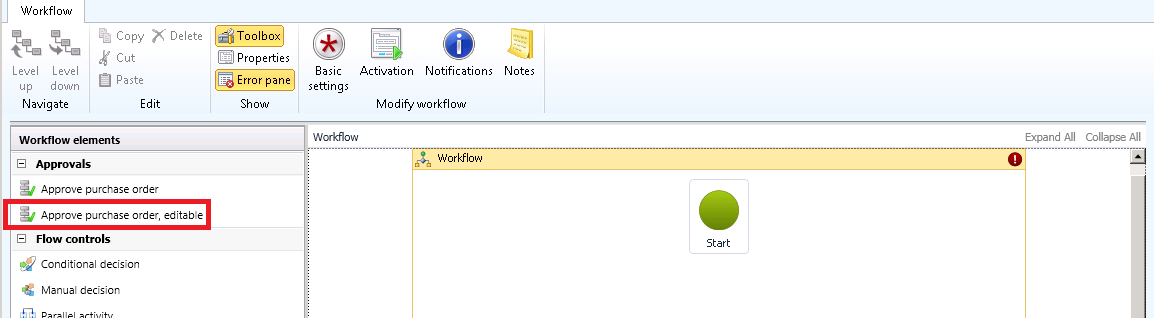
3515.editable-WF.png


I am developing a custom workflow and want to have the same feature mentioned above with my custom workflow. I have tried to look into some of the system default code but couldn’t managed to get some deeper and identify the area where certain validation are being applied for Approval editable element at the time of purchase order workflow execution.

Let me clear once again that I have looked into the related classes for Purchase order workflow like event handler and document classes. If anyone has worked on this then kindly share Ideas which classes should I look into for such validation of editable on the basis of Workflow approval element and replicate the same for my workflow.

I have the same question (0)
  • André Arnaud de Calavon Profile Picture
    306,232 Super User 2026 Season 1 on at

    HI Muhammad,

    I haven't looked into this myself, but also have a look at possible coding on the table, form and form/table related classes (PurchTableType, PurchTableForm)

  • ahmad.hassan.afzal Profile Picture
    30 on at

    Hi Luqman 

    Did you get your way around this, I have to do the exact same thing.

    Regards,

    Ahmad

  • Suggested answer
    ahmad.hassan.afzal Profile Picture
    30 on at

    Editable Approvals just allow approvers to edit the selected record (that they are approving) You can implement same by following steps:

    • Duplicate Workflow Approval artifact and change its name appropriately [e.g. "CaseDetailBaseApprovalEdit" in my case and add it to supported elements along with simple approval.
    • Create a method() in table [e.g. "editAllowed()" in my case
    • public boolean editAllowed()
         {
             WorkflowElementTable workflowElementTable;
             WorkflowWorkItemTable workflowWorkItemTable;
      
             select * from workflowWorkItemTable
                 where   workflowWorkItemTable.RefRecId      == this.RecId
                    &&  workflowWorkItemTable.Status        == WorkflowWorkItemStatus::Pending
                     &&  workflowWorkItemTable.UserId        == curUserId()
                     &&  workflowWorkItemTable.CompanyId     == this.DataAreaId;
      
             select * from workflowElementTable
                 where workflowElementTable.ElementId == workflowWorkItemTable.ElementId;
                 
             return workflowElementTable.ElementName == workflowApprovalStr(CaseDetailBaseApprovalEdit)
                 ||  this.CaseWFStatus == CaseWFStatus::Draft;
      
         }
      
      }
    • Override active() method of form DataSource [in my case I made a CoC of OOTB Form DataSource
    • public int active()
      {
         FormRun formRun = this.formRun() as FormRun;
         FormDataSource ds = formRun.dataSource();
         CaseDetailBase table = ds.cursor();
         
         boolean allowEdit = table.editAllowed();
      
         ds.allowEdit(allowEdit);
      
         if(allowEdit)
         {
             formRun.design().viewEditMode(ViewEditMode::Edit);
         }
         else
         {
             formRun.design().viewEditMode(ViewEditMode::View);
         }
      
         return next active();
      }

  • Muhammad Shahid Profile Picture
    75 on at

    Thanks ahmad.hassan.afzal It worked for me..

  • Suggested answer
    Luqman Profile Picture
    125 on at

    Thanks everyone for responses. It is resolved. I was able to dig down and find the method written on table PurchTable in AOT

    Through this we can achieve the requirement by calling it on Form Activate event or whatever the event you want the fields to be disabled or enabled. Basically this returns true if Current user has been assigned with approval work item in workflow. and False in case not.

        /// <summary>
        /// Indicates whether the user can modify the record when an active workflow is running.
        /// </summary>
        /// <returns>
        /// true if the user has rights to modify the record; false.
        /// </returns>
        public boolean  editableInWorkflow()
        {
            WorkflowElementTable    workflowElementTable;
            WorkflowWorkItemTable   workflowWorkItemTable;         select firstonly ElementId from workflowWorkItemTable
                        where   workflowWorkItemTable.RefTableId == this.TableId
                          &&    workflowWorkItemTable.RefRecId   == this.RecId
                          &&    workflowWorkItemTable.UserId     == curUserId()
                          &&    workflowWorkItemTable.Status     == WorkflowWorkItemStatus::Pending
                    join ElementId, ElementType from workflowElementTable
                        where   workflowElementTable.ElementId   == workflowWorkItemTable.ElementId
                           &&   (workflowElementTable.ElementName == workFlowApprovalStr(PurchTableApprovalEdit)
                                || workflowElementTable.ElementName == workFlowTaskStr(PurchTableTaskEdit));        


             return workflowWorkItemTable.RecId != 0;
        }

  • Frank Hamelly | MVP, MCP, CSA Profile Picture
    46,633 Moderator on at

    Would this work to enable editing of Procurement category in a Purchase requisition or Purchase order workflow?  I have a client with this requirement.  Thanks!

  • Frank Hamelly | MVP, MCP, CSA Profile Picture
    46,633 Moderator on at

    Up.

  • Jo-Anne Profile Picture
    8 on at
    I seem to be having a similar issue, but we have found that our user can edit data on the purchase requisition while approving, which is not what we want the lines should all be locked for editing,
     
    One question is, is this standard or has something changed in an upgrade that we missed?  Our workflow is very project driven, and to have project changed during work flow does not work for us.  
     
    If the above is standard, are you saying we need to add custom code to diable all the lines while in workflow?
     
    You comments are appreciated.

Under review

Thank you for your reply! To ensure a great experience for everyone, your content is awaiting approval by our Community Managers. Please check back later.

Helpful resources

Quick Links

November Spotlight Star - Khushbu Rajvi

Congratulations to a top community star!

Forum Structure Changes Coming on 11/8!

In our never-ending quest to help the Dynamics 365 Community members get answers faster …

Dynamics 365 Community Platform update – Oct 28

Welcome to the next edition of the Community Platform Update. This is a status …

Leaderboard > Finance

Last 30 days Overall leaderboard

Featured topics

Product updates

Dynamics 365 release plans
