web
You’re offline. This is a read only version of the page.
close
Skip to main content

Announcements

News and Announcements icon
Community site session details

Community site session details

Session Id :
Customer experience | Sales, Customer Insights,...
Suggested Answer

Business Process Flow - "Finish" Button ignoring Mandatory fields of that Stage

(0) ShareShare
ReportReport
Posted on by 230

Greetings !

I am on Dynamics 365 v9.0, I have a business process flow with multiple paths and stages and each stage ends up to Opportunity Close stage.

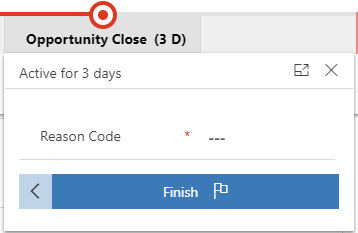
Upon reaching Opportunity Close stage, I want my users to select "Reason Code" (mandatory) before clicking on the Finish button, based on the reason code selected the Opportunity will close as Won or Lost.
pastedimage1591621931955v1.png

Issue is, even though Reason Code is a Mandatory field in the business process flow, the user is able to click "Finish" button without having to select Reason Code.

Is there a way to enforce user to select this field before hitting the Finish button?

Thanks,

Shyam

I have the same question (0)
  • dxshyam Profile Picture
    230 on at

    Edit: One observation is that the Reason Code field gets a green tick on its left side even though value is not populated.

    We have a Javascript that dynamically shows only the subset of Reason Codes based on certain conditions that were met/not met during the course of Business Process Flow

    pastedimage1591760399101v2.png

  • Suggested answer
    Bipin D365 Profile Picture
    28,985 Moderator on at

    Hi,

    Add javascript code onStageChnge and then check for Stage name and field value. If field value is null show error message.

    docs.microsoft.com/.../onstagechange

    Also prevent user to moving to next stage

    goutamdascrm.wordpress.com/.../

    Please mark my answer verified if I were helpful!

Under review

Thank you for your reply! To ensure a great experience for everyone, your content is awaiting approval by our Community Managers. Please check back later.

Helpful resources

Quick Links

Season of Sharing Community Challenge Launch!

Jump in, show your community spirit, and win prizes!

Women in Power Builds Momentum

Expanding mentorship, skilling, and AI innovation

Congratulations to the May Top 10 Community Leaders

These are the community rock stars!

Leaderboard > Customer experience | Sales, Customer Insights, CRM

#1
Hamza H Profile Picture

Hamza H 140 Super User 2026 Season 1

#2
Nagaraju_Matta Profile Picture

Nagaraju_Matta 128

#3
Abhilash Warrier Profile Picture

Abhilash Warrier 70 Super User 2026 Season 1

Last 30 days Overall leaderboard

Product updates

Dynamics 365 release plans



