web
You’re offline. This is a read only version of the page.
close
Skip to main content

Announcements

No record found.

News and Announcements icon
Community site session details

Community site session details

Session Id :
Service | Customer Service, Contact Center, Fie...
Suggested Answer

Enhancements to Full-Text Search in MS Dynamics 365 On Premise

(0) ShareShare
ReportReport
Posted on by 5

I work in Korea as an MS Dynamics CRM (On premium) developer.

How can I make my full-text search options more efficient?
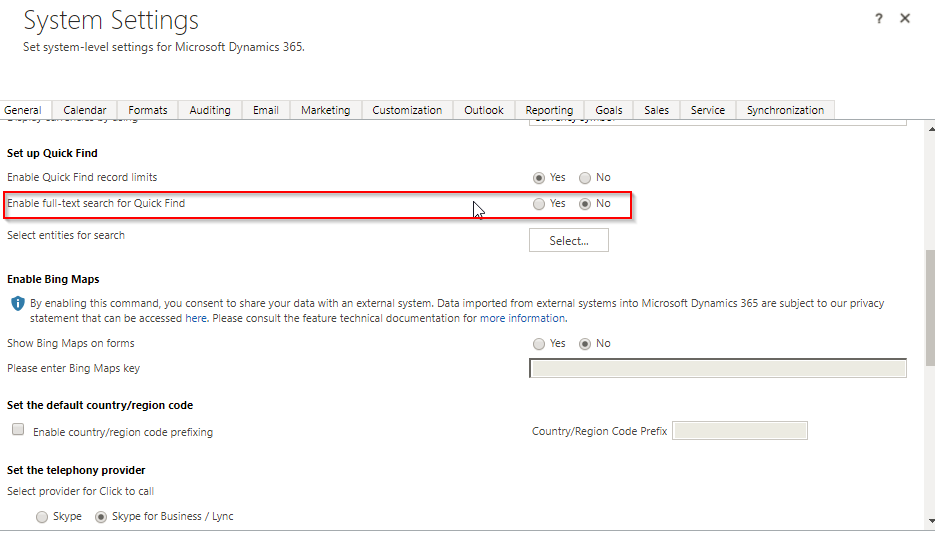
2018_2D00_01_2D00_07_2D00_12_5F00_42_5F00_22_2D00_Administration_2D00_Microsoft_2D00_Dynamics_2D00_365.png

In addition to the above image method, what are the additional setup options?

Currently, when searching for certain words in Korean, searches for middle words do not work well.

Please, please show me a good way.

Thank you.

I have the same question (0)
  • LeoAlt Profile Picture
    16,331 Moderator on at

    Hi partner,

    Unfortunately, On-premise only has this search feature.  "Relevance Search" is only available in online instance.

    You could refer to this doc for more details.

    docs.microsoft.com/.../search-records

    Since you are using on-premise, I suggest that you could search for data directly with database, You can configure the query according to your requirements and show the results as report or other forms.

    Hope it helps.

    Best Regards,

    Leo

  • Suggested answer
    TrueInfo Profile Picture
    5 on at

    Hi Leo

    Thank you for your answer.

    I've already set the Full text quick find option. But the search results don't seem to be good. Is there any way to set up additional options that can make search results better?

    If you know how, please let me know.

    Best Regards,

    Brandon

  • LeoAlt Profile Picture
    16,331 Moderator on at

    Hi partner,
    As far as I konw, on-premise environment only has this searching feature. You could custom show what fields in the results, as you can see there are 3 fields showed in each result records. The top 3 fields of the entity's quick find view will show in the result.

    pastedimage1573549576596v1.png

    pastedimage1573549611308v2.png

    This may help you show the information more vaulable.

    In additional, Advanced Find is also available to search for data.

    https://docs.microsoft.com/en-us/dynamics365/customerengagement/on-premises/basics/save-advanced-find-search

    I'm sorry that there is no other way to do searching in D365 OP.

    Hope it helps.

    Best Regards,

    Leo

  • Suggested answer
    TrueInfo Profile Picture
    5 on at

    Leo!

    Thank you for your sincere advice.

    It wasn't about the Advanced Finder feature, but it was a question that I hoped the Full Text Search feature would show more effectively.

    Let's search for more related features.

    Thank you.

Under review

Thank you for your reply! To ensure a great experience for everyone, your content is awaiting approval by our Community Managers. Please check back later.

Helpful resources

Quick Links

Introducing the 2026 Season 1 community Super Users

Congratulations to our 2026 Super Stars!

Meet the Microsoft Dynamics 365 Contact Center Champions

We are thrilled to have these Champions in our Community!

Congratulations to the April Top 10 Community Leaders

These are the community rock stars!

Leaderboard > Service | Customer Service, Contact Center, Field Service, Guides

#1
FSRon Profile Picture

FSRon 70

#2
Gerardo Rentería García Profile Picture

Gerardo Rentería Ga... 32 Most Valuable Professional

#3
Jimmy Passeti Profile Picture

Jimmy Passeti 29 Most Valuable Professional

Last 30 days Overall leaderboard

Featured topics

Product updates

Dynamics 365 release plans



