web
You’re offline. This is a read only version of the page.
close
Skip to main content

Notifications

Announcements

No record found.

Community site session details

Community site session details

Session Id :
Finance | Project Operations, Human Resources, ...
Suggested Answer

Excel Add-in - Is there a way to filter for multiple values?

(2) ShareShare
ReportReport
Posted on by

Hello,

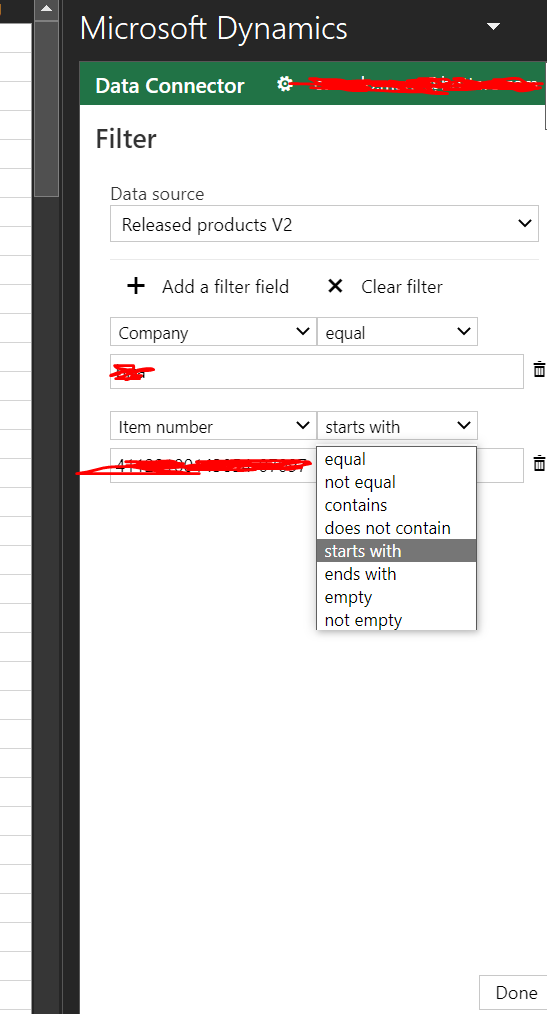
I'm wondering if there's a way to filter for multiple values in the excell Add-in

example: let's say we need to change policy and primary vendor, on 12 items.

In the addin filters there's no "is one of" option.

I've also tried using equal and separate items like 'item1', 'item2' etc or using semicolon but had no luck.

I know I can just leave the filter in the addin and then filter later with excel, but that causes to read all the items for that company and really seems a waste of resources.

It's also a lot slower
pastedimage1675242168398v2.png

Any ideas?

Am I missing something or the feature is just not there?

Seems preatty easy to implement microsoft's side.

I have the same question (0)
  • Suggested answer
    GirishS Profile Picture
    27,827 Moderator on at

    Hi Supp,

    I don't think you have option to filter multiple values on one column. There is no "is one of" filters available in excel as you already said. Only way will be using the excel filters where you can select the required item numbers - Update the data - Remove the filter - Publish the data.

    Thanks,

    Girish S.

  • Suggested answer
    Jose Azevedo Profile Picture
    4 on at
    This option is not available.
     
    I suggested as a new Idea to be implemented by MSFT in one of the next version.
     
    If you agree, please vote here https://experience.dynamics.com/ideas/idea/?ideaid=a7009be7-6c44-ef11-b4ac-6045bdb1d100

    Same idea was proposed when connecting with D365 Business Central. If you agree, please vote here -> https://experience.dynamics.com/ideas/idea/?ideaid=df6677a1-6c44-ef11-b4ad-6045bdb983a7

    Thanks
  • Suggested answer
    Adis Profile Picture
    6,048 Super User 2025 Season 2 on at
    Hey,
     
    Unfortunately thats not possible.
     
    I would suggest the following features, depending on your scenario\requirement:
     
    1.: Excel Add-in
    For smaller changes, use the excel add-in. As you can see, its limited, but designed for users to use it
     
    2.: DMF
    For bigger changes, you may consider the Data export\import framework. A bit of setup is necessary here, so it pays off if it is a tasks that you will be doing periodically. Changing the data is based on your input and not on a logic\algorithm,
     
    3.: Custom scripts
    Coding is necessary, but you can do it without downtime or a necessary release. If the logic\algorithm is still valid, you can re-use it multiple times - although you need to do it from different companies 
     
    Kind regards, Adis

Under review

Thank you for your reply! To ensure a great experience for everyone, your content is awaiting approval by our Community Managers. Please check back later.

Helpful resources

Quick Links

Responsible AI policies

As AI tools become more common, we’re introducing a Responsible AI Use…

Neeraj Kumar – Community Spotlight

We are honored to recognize Neeraj Kumar as our Community Spotlight honoree for…

Leaderboard > Finance | Project Operations, Human Resources, AX, GP, SL

#1
Martin Dráb Profile Picture

Martin Dráb 660 Most Valuable Professional

#2
André Arnaud de Calavon Profile Picture

André Arnaud de Cal... 549 Super User 2025 Season 2

#3
Sohaib Cheema Profile Picture

Sohaib Cheema 307 User Group Leader

Last 30 days Overall leaderboard

Product updates

Dynamics 365 release plans
