web
You’re offline. This is a read only version of the page.
close
Skip to main content

Announcements

News and Announcements icon
Community site session details

Community site session details

Session Id :
Customer experience | Sales, Customer Insights,...
Suggested Answer

Filter / Query in m:n with field values from related entity

(0) ShareShare
ReportReport
Posted on by 35

Hello,

I am an absolute newbie to dynamics 365 with some probably ridiculously easy to solve problem, so pardon me if I can't see the blatantly obvious:
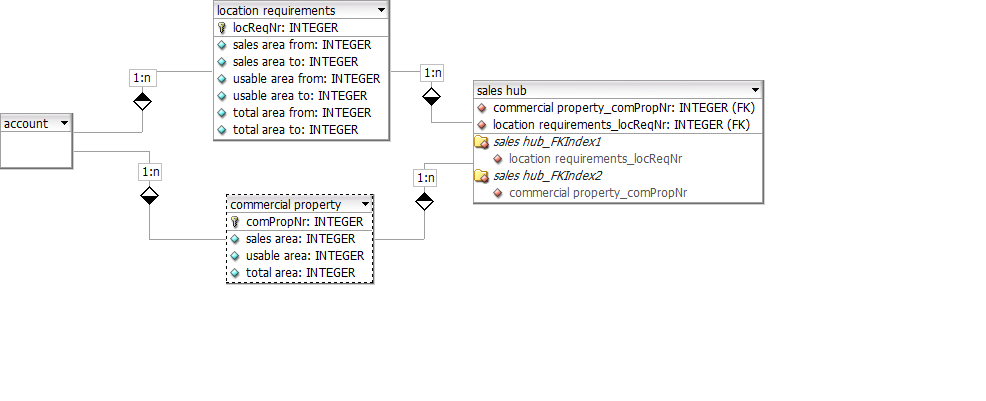
reduced database

I created the above db model to be able to query/filter commercial properties according to the account's location requirements i.e. selecting a property with a sales area that matches the according from/to range in the location requirements.

So, in the sales hub as my custom m:n entity with a many to 1 relationship to both the requirements and properties i was hoping to achieve exactly that through access to both entities' field values but to no avail. I just can't seem to compare the according fields in views, advanced find or anywhere as they belong to different entities.

Is my database model wrongly constructed?
Is there a native method to solve my problem?

I am currently working on a flow in Power Automate with very nested conditionals but would like to check first if there really isn't an easier way for a problem which I perceived as none on first sight.

Best regards and thanks in advance,

Andreas

I have the same question (0)
  • Suggested answer
    Paul_Owen Profile Picture
    2,027 on at

    Hi, I'm not really sure what you are saying, you want a view of which entity to show what? Did you create manual 1:N relationships? because you just need to create a lookup field to the entities you want and it will create the relationship for you which you can then use in a view.

    Regards

    Paul

  • polyester Profile Picture
    35 on at

    Hello,

    yes, i've manually created those 1:n relationships in order to have access to the intersection entity automatically created by creating an n:m relationship through lookup fields.

    My aim is to list properties that match the according location requirements (for example a sales area of 100 m² would match a location requirement of a sales area range between 50 m² and 150 m²) as a view, grid or any other way possible or vice versa list matching location requirements in the according property dataset.

    I thought i'd be able to relate two records that match these conditions in the sales hub but i can't see how.

    Hope that was a better explanation.

    Best regards,

    Andreas

  • Suggested answer
    Paul_Owen Profile Picture
    2,027 on at

    When you say relate do you mean you want to see a list of all related records against a particular record lik eAccount for example? If so then you need to add a subgrid to the Account form and tick related records and then the entity for the records you want to display.

    Regards

    Paul

  • polyester Profile Picture
    35 on at

    My problem isn't to relate the records rather than filtering them to the criteria in location requirements.

    For example, I'd like a subgrid or view for a location requirement with all the matching commercial property records.

    The problem with that is that I can't seem to filter the records across entities. In advanced find or any filter I can only compare a sales area with a fixed numerical value and not let it select records greater or lesser than the location requirement fields values.

    Best regards,

    Andreas

Under review

Thank you for your reply! To ensure a great experience for everyone, your content is awaiting approval by our Community Managers. Please check back later.

Helpful resources

Quick Links

Season of Sharing Community Challenge Launch!

Jump in, show your community spirit, and win prizes!

Women in Power Builds Momentum

Expanding mentorship, skilling, and AI innovation

Congratulations to the May Top 10 Community Leaders

These are the community rock stars!

Leaderboard > Customer experience | Sales, Customer Insights, CRM

#1
Nagaraju_Matta Profile Picture

Nagaraju_Matta 123

#2
Hamza H Profile Picture

Hamza H 112 Super User 2026 Season 1

#3
Abhilash Warrier Profile Picture

Abhilash Warrier 70 Super User 2026 Season 1

Last 30 days Overall leaderboard

Product updates

Dynamics 365 release plans



