Throughout this ten-part series, we have explored every major capability of the Quality Management module in Microsoft Dynamics 365 Business Central - from initial setup and configuration to inspection execution, corrective actions, reporting, and implementation best practices. While each feature plays an important role individually, the true strength of Quality Management lies in how all these components work together as part of a unified business process.
In this final article, we'll follow the complete lifecycle of a product as it moves through purchasing, warehouse operations, production, quality inspections, inventory management, and customer delivery. This real-world scenario demonstrates how Business Central enables organizations to maintain product quality while ensuring complete traceability and operational efficiency.
Business Scenario
Imagine a manufacturing company that produces industrial pumps. The company purchases raw materials from multiple suppliers, manufactures finished products, performs quality inspections at different stages of production, and finally delivers certified products to customers.
The organization wants to ensure that only materials meeting predefined quality standards enter production and that every finished product shipped to customers complies with internal specifications and regulatory requirements.
Let's follow this process step by step.
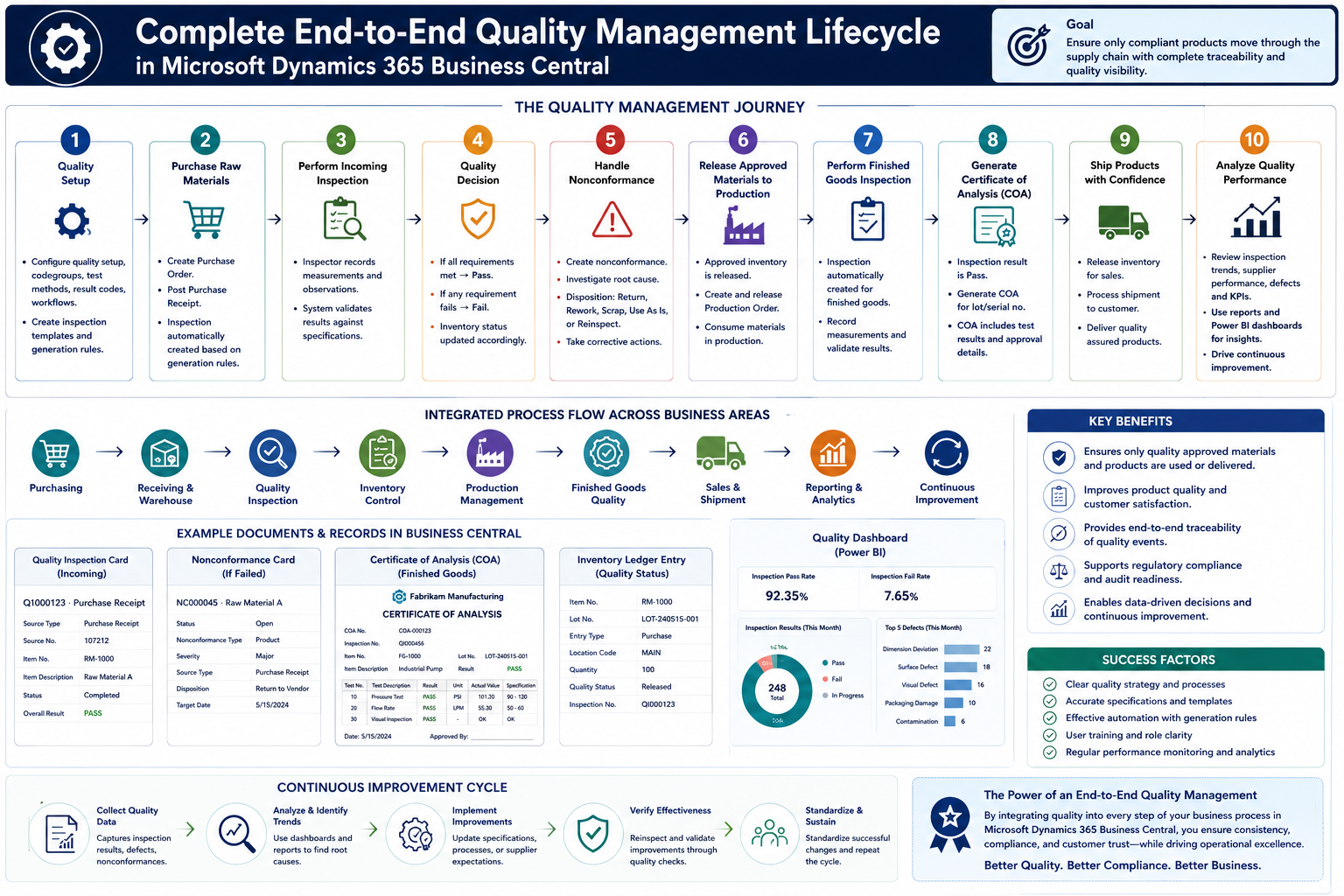
Step 1 - Configure the Quality Management Foundation
Every successful implementation begins with proper configuration.
The Quality Management extension is installed, appropriate permission sets are assigned, and the organization configures its quality setup. Quality code groups, test methods, defect codes, nonconformance codes, inspection results, and quality workflows are established based on business requirements.
Inspection templates are created for incoming raw materials and finished products, while generation rules define when inspections should be automatically created.
With the foundation in place, the organization is ready to manage quality across its operations.
Step 2 - Purchase Raw Materials
The purchasing department creates a Purchase Order for raw materials from an approved supplier.
Once the supplier delivers the materials, the warehouse team posts the Purchase Receipt.
According to the configured Inspection Generation Rules, Business Central automatically creates a Quality Inspection linked to the purchase receipt.
Instead of manually initiating quality activities, the inspection becomes part of the receiving process, ensuring that no incoming material bypasses quality verification.
Step 3 - Perform Incoming Goods Inspection
The assigned quality inspector opens the newly created inspection.
Using the predefined inspection template, the inspector verifies dimensions, weight, appearance, packaging condition, and other required quality characteristics. Measurements and observations are recorded directly within Business Central.
The system compares the entered values with the configured specifications and tolerance limits, ensuring objective and consistent evaluation.
Once all mandatory tests are completed, the inspection is ready for evaluation.
Step 4 - Quality Decision
After reviewing the inspection results, Business Central determines the inspection outcome.
If every quality requirement is satisfied, the inspection receives a Pass result. The inventory is approved and becomes available for warehouse operations and production consumption.
If one or more quality characteristics fall outside the acceptable limits, the inspection receives a Fail result. The affected inventory is prevented from entering normal operational processes until an appropriate quality decision has been made.
This controlled decision-making process protects downstream operations from defective materials.
Step 5 - Handle Nonconforming Inventory
When materials fail inspection, the organization records a nonconformance.
The quality team investigates the issue and determines the appropriate disposition. Depending on the situation, the material may be quarantined, returned to the supplier, reworked, scrapped, or scheduled for reinspection after corrective actions have been completed.
Every decision is documented, creating complete traceability for future audits and quality investigations.
Step 6 - Release Approved Materials to Production
Approved raw materials are issued to production.
Production Orders are released, and manufacturing begins according to the defined routing and production processes.
Because only approved inventory is consumed, production quality becomes more consistent, reducing scrap, rework, and customer complaints.
Quality assurance now extends beyond purchasing and becomes part of the manufacturing process.
Step 7 - Perform Finished Goods Inspection
After production output is posted, another Inspection Generation Rule automatically creates a Finished Goods Inspection.
The quality team performs final product verification using a different inspection template designed specifically for finished products.
Measurements such as dimensions, functionality, appearance, pressure testing, or performance validation are recorded according to the organization's quality standards.
This final inspection confirms that the manufactured product satisfies customer requirements before shipment.
Step 8 - Generate the Certificate of Analysis
Once the finished product successfully passes inspection, Business Central can generate a Certificate of Analysis (COA).
The certificate summarizes inspection information, recorded measurements, quality results, and approval status for the inspected lot or serial number.
The COA serves as documented evidence that the product complies with quality specifications and can accompany customer shipments when required.
For regulated industries, this document becomes an important part of customer and regulatory compliance.
Step 9 - Ship Products with Confidence
After the inspection is approved and all quality requirements are satisfied, inventory is released for sales fulfillment.
The warehouse team processes the shipment, confident that every product delivered to the customer has successfully completed the organization's quality procedures.
This structured approach significantly reduces the risk of customer complaints, warranty claims, product recalls, and compliance issues.
Step 10 - Analyze Quality Performance
Quality management does not end when products are shipped.
Business Central stores inspection history, measurements, defect information, nonconformance records, corrective actions, and Certificates of Analysis for future analysis.
Management teams review inspection trends, supplier performance, production quality, defect frequencies, and quality KPIs through standard reports and Power BI dashboards.
These insights support continuous improvement initiatives and help organizations make informed operational decisions.
Bringing Everything Together
The true value of Quality Management lies in the integration of every stage rather than any single feature.
A typical end-to-end process follows this sequence:
Quality Setup > Inspection Templates > Generation Rules > Purchase Receipt > Automatic Inspection > Quality Inspection > Record Measurements >Pass/Fail Decision > Nonconformance (if required) > Corrective Action > Reinspection > Inventory Release > Production > Finished Goods Inspection > Certificate of Analysis >Customer Shipment > Reporting & Analytics > Continuous Improvement
Each stage builds upon the previous one, creating a connected quality management system that supports purchasing, warehousing, manufacturing, inventory management, and customer fulfillment.
Key Benefits of an End-to-End Quality Management Process
Organizations implementing Quality Management in Microsoft Dynamics 365 Business Central gain far more than automated inspections. They establish a standardized quality framework that improves product consistency, strengthens regulatory compliance, increases inventory traceability, and enables data-driven decision-making.
By integrating quality activities directly into operational processes, businesses reduce manual effort, minimize the risk of defective products reaching customers, and create a culture of continuous improvement supported by accurate and reliable quality data.
Final Thoughts
Quality Management is not a standalone process - it is a core business function that connects purchasing, warehouse operations, manufacturing, inventory, and customer delivery.
Microsoft Dynamics 365 Business Central provides a comprehensive framework that enables organizations to plan inspections, automate quality checks, evaluate results, manage nonconformances, generate compliance documentation, and continuously improve operational performance.
When implemented with well-defined processes and best practices, Quality Management becomes more than a compliance requirement—it becomes a strategic capability that protects product quality, strengthens customer trust, and supports long-term business success.
Thank you for following this 10-part Quality Management in Microsoft Dynamics 365 Business Central series.
Over the course of this series, we've explored:
- Part 1 - Introduction to Quality Management & Process Flow
- Part 2 - Quality Management Setup & Configuration
- Part 3 - Configuring Quality Inspection Results & Evaluation Logic
- Part 4 - Creating & Managing Quality Inspection Templates
- Part 5 - Automating Quality Control with Inspection Generation Rules
- Part 6 - Executing Quality Inspections & Recording Inspection Results
- Part 7 - Managing Nonconformances, Corrective Actions & Inventory Disposition
- Part 8 - Quality Reporting, Certificates of Analysis & Quality Analytics
- Part 9 - Best Practices for Implementing Quality Management
- Part 10 - Complete End-to-End Quality Management Lifecycle
I hope this series serves as a practical resource for Business Central consultants, implementation partners, developers, and business users looking to implement or enhance Quality Management in their organizations.


