Throughout this series, we have explored every major component of Quality Management in Microsoft Dynamics 365 Business Central - from setting up the application and configuring inspection templates to automating inspections, recording quality results, managing nonconformances, and analyzing quality performance through reports and analytics.
However, successful implementation is not just about understanding individual features. The real challenge lies in designing a quality management solution that aligns with business processes, remains easy to maintain, and supports future growth. Organizations that carefully plan their implementation often experience higher user adoption, improved operational efficiency, and more reliable quality outcomes.
In this final implementation-focused article, we will discuss best practices that can help consultants and organizations successfully implement Quality Management while avoiding common configuration and operational mistakes.
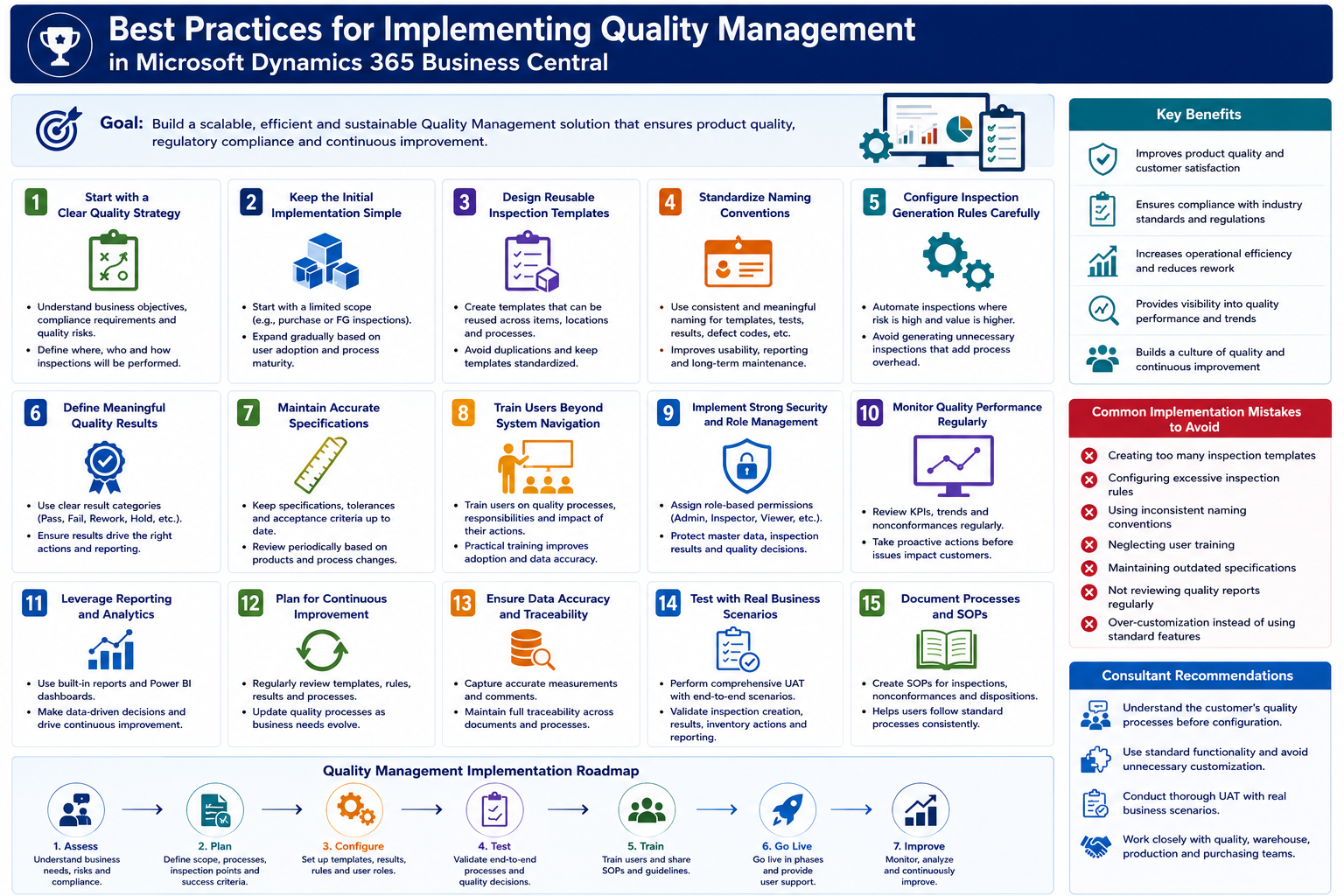
Start with a Clear Quality Strategy
Before configuring any setup pages or creating inspection templates, organizations should first define their overall quality objectives.
Every business has different quality requirements depending on its industry, products, regulatory obligations, and operational processes. Some organizations inspect every incoming shipment, while others focus only on high-risk materials or critical production stages.
A clear quality strategy should identify where inspections are required, who is responsible for performing them, how quality decisions are made, and what actions should follow when products fail inspection. Establishing these guidelines early ensures that the system configuration accurately reflects the organization's quality policies.
Keep the Initial Implementation Simple
One of the most common implementation mistakes is attempting to automate every possible quality scenario from the beginning.
Instead, organizations should begin with a limited scope, such as purchase receipt inspections or finished goods inspections. Once users become familiar with the process and operational confidence increases, additional inspection scenarios can be introduced gradually.
A phased implementation reduces complexity, minimizes user resistance, and allows quality teams to refine processes before expanding the solution across the organization.
Design Reusable Inspection Templates
Inspection templates are the foundation of every quality inspection. Poorly designed templates often lead to duplicated configurations and increased maintenance effort.
Organizations should create reusable templates that can support multiple inspection scenarios whenever possible. Similar products or processes can often share the same inspection structure with minor variations applied through configuration rather than creating entirely new templates.
Standardized templates improve consistency while reducing administrative overhead.
Standardize Naming Conventions
As the number of inspection templates, tests, result codes, and generation rules increases, maintaining consistency becomes increasingly important.
Organizations should establish naming standards for quality-related master data. Using meaningful codes and descriptions makes the system easier to understand for administrators, inspectors, and business users.
Consistent naming conventions also simplify reporting, troubleshooting, and future enhancements.
Configure Inspection Generation Rules Carefully
Inspection Generation Rules should automate quality activities without creating unnecessary inspections.
Rather than generating inspections for every transaction, organizations should evaluate operational risk and configure rules where they provide the greatest business value.
High-risk suppliers, regulated products, critical manufacturing stages, or customer-specific requirements often justify automated inspections, while low-risk transactions may not require the same level of quality control.
A balanced approach helps maintain operational efficiency while ensuring adequate quality oversight.
Define Meaningful Quality Results
Inspection results should clearly communicate the quality status of inspected products.
Although the default results of Pass, Fail, and In Progress are sufficient for many businesses, organizations may benefit from additional result categories such as Rework Required, Conditional Approval, or Customer Hold.
Well-defined result structures improve reporting, support operational decision-making, and provide better visibility into quality performance.
Maintain Accurate Specifications
Inspection decisions are only as reliable as the specifications used to evaluate them.
Organizations should regularly review tolerance values, measurement ranges, and acceptance criteria to ensure they remain aligned with current manufacturing processes, supplier capabilities, and customer expectations.
Outdated specifications can lead to unnecessary inspection failures or allow defective products to pass quality validation.
Maintaining accurate specifications is essential for consistent quality evaluation.
Train Users Beyond System Navigation
User training should extend beyond explaining how to enter data into Business Central.
Inspectors should understand why inspections are performed, how measurements should be recorded, how inspection results affect inventory, and when corrective actions are required.
Similarly, warehouse staff, production personnel, and purchasing teams should understand how quality decisions influence their daily operations.
Well-trained users are more likely to follow standardized processes and contribute to successful implementation.
Implement Strong Security and Role Management
Quality data should be protected through appropriate security roles and permissions.
Business Central provides separate permission sets for quality administrators, inspectors, and auditors, allowing organizations to control who can configure the system, perform inspections, or review quality records.
Assigning users only the permissions they require improves data integrity and reduces the risk of unauthorized changes.
A well-designed security model also supports regulatory compliance and audit requirements.
Monitor Quality Performance Regularly
Implementing Quality Management is not the end of the journey. Organizations should continuously monitor inspection results and quality performance.
Regularly reviewing quality KPIs, supplier performance, defect trends, inspection completion times, and nonconformance reports enables management to identify opportunities for improvement before issues become widespread.
Continuous monitoring helps organizations evolve their quality processes as business requirements change.
Leverage Reporting and Analytics
Quality inspections generate valuable operational data that should be actively used to improve business performance.
Business Central reports and Power BI dashboards can provide visibility into inspection pass rates, recurring defects, supplier quality, production performance, and inventory quality trends.
Using analytics to support management decisions transforms Quality Management from a compliance activity into a strategic business function.
Plan for Continuous Improvement
Quality Management should be viewed as an ongoing process rather than a one-time implementation project.
Organizations should periodically review inspection templates, generation rules, specifications, workflows, and reporting requirements to ensure they continue to support business objectives.
Operational changes, new product introductions, customer requirements, and regulatory updates often require adjustments to the quality management system.
A commitment to continuous improvement ensures that the solution remains effective over time.
Common Implementation Mistakes to Avoid
Many implementation challenges arise not because of system limitations, but because of poor planning or inconsistent processes.
Common mistakes include creating too many inspection templates, configuring excessive inspection rules, using inconsistent naming conventions, neglecting user training, maintaining outdated specifications, and failing to review quality reports after go-live.
Avoiding these issues significantly improves user adoption and reduces long-term maintenance effort.
Consultant Recommendations
For implementation partners and Business Central consultants, understanding the customer's operational quality process is just as important as understanding the software itself.
Before beginning configuration, spend time with quality managers, production teams, warehouse users, and purchasing departments to understand how quality decisions are made today. Map those business processes before translating them into Business Central.
Avoid over-customization whenever standard functionality can meet the requirement. Standard features are easier to maintain, benefit from future Microsoft updates, and reduce implementation risk.
Finally, conduct thorough User Acceptance Testing (UAT) using real business scenarios. Testing should validate not only that inspections are created correctly but also that inventory behavior, reporting, corrective actions, and operational workflows function as expected.
Final Thoughts
A successful Quality Management implementation is not measured by the number of configured templates or inspection rules - it is measured by how effectively the solution helps an organization deliver consistent, high-quality products while improving operational efficiency.
Microsoft Dynamics 365 Business Central provides a flexible and comprehensive Quality Management framework, but its success depends on thoughtful planning, standardized processes, user adoption, and continuous improvement.
By following the best practices discussed in this article, organizations can build a scalable quality management solution that supports compliance, strengthens customer confidence, and drives long-term operational excellence.
In the final article of this series, I'll bring everything together through a complete real-world business scenario. We'll follow the journey of a product from purchase receipt through inspection, quality evaluation, inventory disposition, production, finished goods inspection, Certificate of Analysis generation, and reporting, demonstrating how every component of Quality Management works together in an end-to-end Business Central implementation.


