In the previous article, we discussed how organizations can manage nonconforming inventory, implement corrective actions, and ensure defective products do not continue through the supply chain. While resolving quality issues is essential, an effective Quality Management System should also provide meaningful insights into quality performance. Organizations need visibility into inspection outcomes, supplier performance, recurring defects, and overall product quality to make informed business decisions.
Microsoft Dynamics 365 Business Central provides comprehensive reporting capabilities that enable organizations to analyze inspection activities, monitor quality trends, generate compliance documents, and support data-driven continuous improvement initiatives. Instead of viewing quality inspections as isolated events, businesses can use quality data to evaluate operational performance and strengthen their quality management strategy.
Why Quality Reporting Matters
Quality reporting transforms inspection data into actionable business information.
Every inspection performed within Business Central generates valuable operational data, including measurements, inspection outcomes, defect information, inspector activities, and inventory status. When this information is analyzed collectively, organizations gain visibility into product quality, manufacturing consistency, supplier reliability, and process effectiveness.
Quality reports help management identify recurring problems before they become larger operational issues and provide the evidence required for customer audits and regulatory compliance.
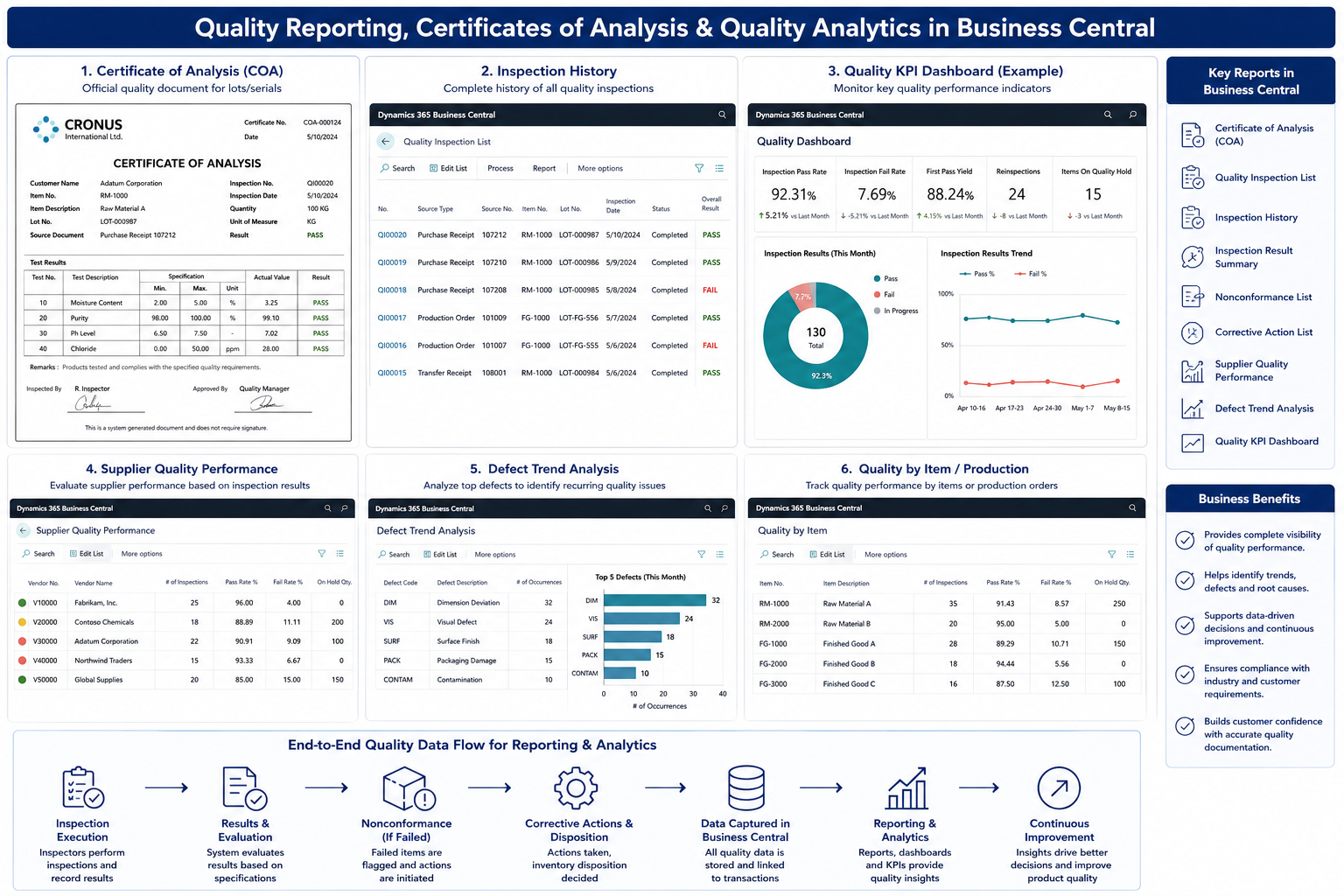
Certificate of Analysis (COA)
One of the most valuable reporting capabilities available within Quality Management is the Certificate of Analysis (COA).
A Certificate of Analysis is an official quality document that summarizes inspection results for a specific product, lot, serial number, or shipment. It demonstrates that the inspected product has been tested against predefined quality standards and provides documented evidence of the inspection outcome.
Many manufacturing industries - including pharmaceutical, food & beverage, chemical, medical device, and specialty manufacturing - require Certificates of Analysis to accompany customer shipments.
Business Central automatically generates the Certificate of Analysis using information recorded during the inspection process. The report typically includes product information, lot or serial number, inspection characteristics, recorded measurements, inspection results, acceptance status, and company contact information.
Providing a Certificate of Analysis improves customer confidence and simplifies regulatory compliance.
Inspection History
Business Central maintains a complete history of every inspection performed within the system.
Inspection history includes the inspection number, source transaction, inspector, inspection date, recorded measurements, assigned results, comments, attachments, and any related reinspection records.
Maintaining historical inspection records enables organizations to review previous inspections, investigate customer complaints, compare product quality across production batches, and demonstrate compliance during audits.
Historical quality records also support long-term trend analysis and continuous improvement initiatives.
Measuring Quality Performance
Inspection data becomes significantly more valuable when converted into measurable performance indicators.
Organizations can monitor quality KPIs such as inspection pass rate, inspection failure rate, first-pass yield, average inspection completion time, number of reinspection, defect frequency, and inventory blocked due to quality issues.
Tracking these metrics over time provides management with objective insights into operational quality performance and helps prioritize improvement initiatives.
Rather than reacting only when problems occur, organizations can proactively identify declining quality trends before they impact customers.
Supplier Quality Analysis
Incoming material quality has a direct impact on manufacturing performance and customer satisfaction.
Business Central allows organizations to analyze inspection results by supplier, enabling quality teams to identify vendors with consistently high or low-quality performance.
Supplier quality reports help businesses evaluate inspection pass rates, recurring defect types, rejected materials, and supplier-specific quality trends.
These insights support supplier performance reviews, vendor development programs, and strategic sourcing decisions.
Production Quality Analysis
Manufacturing organizations can use inspection reporting to evaluate production quality across different products, production orders, work centers, routing operations, or manufacturing locations.
By analyzing inspection outcomes over time, businesses can identify recurring production defects, equipment-related quality issues, or process variations affecting product consistency.
Production quality analysis enables organizations to improve manufacturing efficiency while reducing scrap, rework, and customer complaints.
Defect Trend Analysis
One of the most valuable uses of inspection history is identifying recurring quality problems.
Business Central allows organizations to review defect trends by item, supplier, production line, location, defect code, or inspection type.
Analyzing defect trends helps quality managers determine whether specific issues occur repeatedly under similar conditions. These insights support root cause analysis and help organizations implement preventive actions before quality issues become widespread.
Continuous monitoring of defect trends contributes to a more proactive quality management strategy.
Regulatory Compliance & Audit Readiness
Many industries operate under strict quality regulations that require documented evidence of inspections and product quality.
Business Central maintains complete inspection records, Certificates of Analysis, measurement history, inspection comments, and supporting documentation, making it easier for organizations to demonstrate compliance during internal audits, customer assessments, and regulatory inspections.
Having centralized quality records significantly reduces the time required to prepare for audits and improves confidence in regulatory reporting.
Quality Dashboards and Business Intelligence
Although standard reports provide valuable operational information, many organizations extend their quality reporting capabilities using Power BI.
By connecting Business Central quality data with Power BI, organizations can create interactive dashboards that visualize inspection trends, supplier performance, defect analysis, quality KPIs, production quality metrics, and inventory quality status.
Interactive dashboards allow management to monitor quality performance in real time and make faster, data-driven decisions.
Continuous Improvement Through Analytics
Quality reporting should not be viewed simply as a compliance requirement.
The true value of quality analytics lies in continuous improvement. By regularly reviewing inspection reports, supplier performance, production quality metrics, and defect trends, organizations can identify improvement opportunities, optimize operational processes, and strengthen their overall quality management system.
Data-driven decision-making enables businesses to move from reactive quality control toward proactive quality assurance.
Best Practices
Organizations should establish a regular review process for quality reports and inspection metrics. Supplier performance should be evaluated periodically using inspection history, while recurring defects should trigger formal root cause analysis and corrective action reviews.
Management dashboards should focus on meaningful KPIs that align with business objectives, and Certificates of Analysis should be standardized to ensure consistency across customer deliveries.
Combining Business Central reporting with Power BI dashboards provides a comprehensive view of organizational quality performance.
Conclusion
Quality reporting is the final step that transforms inspection data into meaningful business insights. Microsoft Dynamics 365 Business Central enables organizations to generate Certificates of Analysis, monitor quality KPIs, evaluate supplier and production performance, analyze defect trends, and maintain complete inspection traceability.
By leveraging reporting and analytics effectively, organizations can improve decision-making, strengthen regulatory compliance, enhance customer confidence, and drive continuous quality improvement across the entire supply chain.


