In the previous article, we explored how quality inspections are executed and how inspectors record measurements, evaluate inspection results, and complete inspections in Microsoft Dynamics 365 Business Central. However, not every inspection ends with a successful outcome. Products may fail to meet quality standards due to manufacturing defects, supplier issues, transportation damage, or process variations. Simply identifying a failed inspection is not enough - the organization must also determine how to handle the affected inventory and prevent similar issues from occurring in the future.
This is where nonconformance management and corrective actions become essential. A well-defined process ensures that defective materials are isolated, investigated, corrected, and, where possible, prevented from recurring. Business Central provides the flexibility to integrate these quality decisions into everyday operational processes, helping organizations improve product quality while maintaining complete traceability.
Understanding Nonconformance
A nonconformance occurs whenever a product, material, or process fails to satisfy predefined quality requirements. These requirements may be based on internal specifications, customer expectations, regulatory standards, or supplier agreements.
A nonconformance is not simply a failed inspection; it is a formal record that documents the quality issue and initiates actions to investigate and resolve it. Recording nonconformances enables organizations to build a historical database of quality issues that can later be analyzed for trends and continuous improvement initiatives.
Properly documenting every nonconformance ensures that quality problems are not overlooked and that corrective measures are consistently applied.
Identifying Nonconforming Inventory
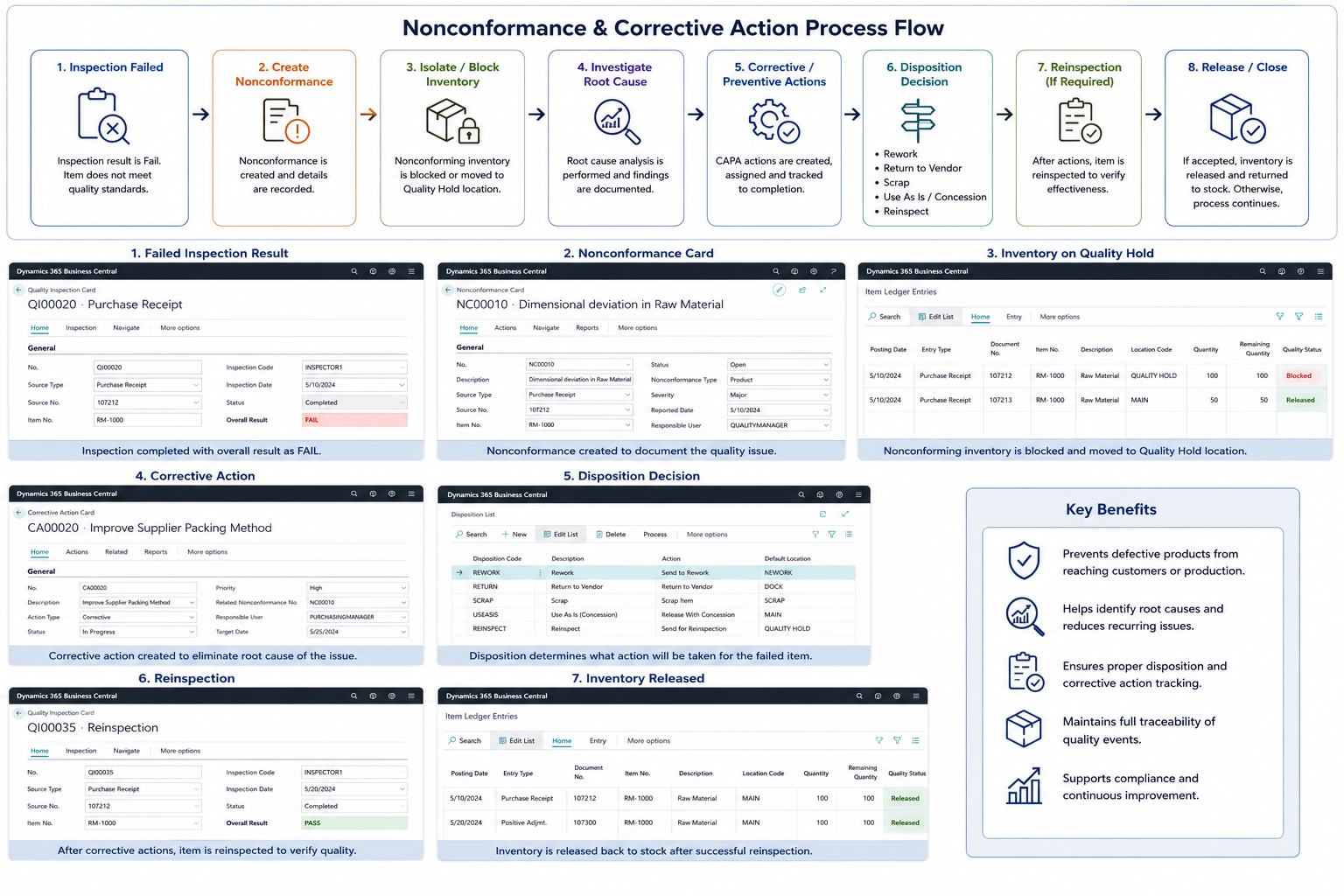
After an inspection is completed, Business Central determines whether the inventory meets the configured acceptance criteria. If the inspection result is Fail, the inventory should not continue through normal business processes until an appropriate decision has been made.
Depending on the organization's quality policy, failed inventory may be blocked automatically, moved to a dedicated quality location, or placed in a quarantine area for further evaluation. This prevents defective products from being consumed in production, shipped to customers, or transferred between warehouses.
Separating nonconforming inventory from approved inventory protects downstream operations and reduces the risk of quality-related incidents.
Inventory Disposition Decisions
Once a quality issue has been identified, the organization must determine the most appropriate disposition for the affected inventory.
The disposition decision defines what will happen to the product after the inspection. In many organizations, this decision is made jointly by quality teams, production managers, and warehouse personnel.
Typical disposition decisions include releasing the product for use, placing it on hold, sending it for rework, returning it to the supplier, scrapping the material, or scheduling a reinspection after corrective actions have been completed.
Establishing standardized disposition procedures helps organizations ensure that quality decisions remain consistent across all departments.
Corrective Actions
Corrective actions focus on eliminating the root cause of an identified quality issue.
Rather than simply addressing the immediate defect, corrective actions investigate why the problem occurred and implement changes to prevent it from happening again. Examples include adjusting manufacturing processes, updating work instructions, replacing defective tooling, retraining employees, or improving supplier quality requirements.
Documenting corrective actions provides visibility into how quality issues are resolved and supports continuous process improvement initiatives.
Preventive Actions
While corrective actions address existing problems, preventive actions focus on reducing the likelihood of future quality issues.
Preventive actions may be introduced after analyzing inspection trends, supplier performance, recurring defects, or production data. Organizations might revise inspection frequencies, improve preventive maintenance schedules, strengthen supplier qualification procedures, or introduce additional quality checkpoints.
Combining corrective and preventive actions creates a proactive quality management approach rather than reacting only after defects occur.
Root Cause Analysis
One of the most valuable aspects of quality management is identifying the true cause of a defect instead of treating only its symptoms.
Organizations often perform root cause analysis using techniques such as the Five Whys, Fishbone (Ishikawa) Diagram, or Failure Mode and Effects Analysis (FMEA). These structured methods help quality teams determine whether issues originate from materials, equipment, processes, personnel, or environmental conditions.
Understanding the root cause allows organizations to implement effective corrective actions that permanently eliminate recurring quality problems.
Reinspection Process
After corrective actions have been completed, products often require another quality inspection before they can be released for operational use.
Business Central supports reinspection scenarios by allowing organizations to create new inspection records while preserving the complete inspection history. This enables quality teams to compare inspection cycles, verify the effectiveness of corrective actions, and maintain full traceability throughout the product lifecycle.
Reinspection ensures that corrected products meet quality standards before they are returned to inventory or delivered to customers.
Quality Traceability
Every quality event should be fully traceable throughout the product lifecycle.
Business Central maintains a detailed history of inspections, inspection results, corrective actions, inventory movements, and disposition decisions. This information is valuable during customer audits, regulatory inspections, supplier evaluations, and internal quality reviews.
Comprehensive traceability also enables organizations to quickly investigate quality incidents and understand how a product moved through the supply chain.
Continuous Improvement
Quality Management should not end when an inspection is completed or a corrective action is implemented. Every inspection provides valuable data that can be used to improve business processes.
By analyzing recurring defects, supplier performance, production quality, and inspection trends, organizations can identify opportunities for process optimization, reduce operational risks, and improve customer satisfaction.
Continuous improvement transforms Quality Management from a reactive process into a strategic business function that supports long-term operational excellence.
Best Practices
Organizations should ensure that every failed inspection is formally documented and reviewed. Nonconforming inventory should always be isolated until an authorized quality decision has been made. Corrective actions should focus on eliminating root causes rather than temporary fixes, while preventive actions should be implemented wherever recurring issues are identified.
Regularly reviewing quality metrics, defect trends, and corrective action effectiveness helps organizations strengthen their quality management system and improve operational performance over time.
Conclusion
Managing nonconformances and corrective actions is one of the most important aspects of Quality Management in Microsoft Dynamics 365 Business Central. By isolating defective inventory, documenting quality issues, investigating root causes, and implementing corrective and preventive actions, organizations can reduce recurring defects, improve compliance, and strengthen customer confidence.
A structured nonconformance process not only protects inventory integrity but also drives continuous improvement across purchasing, production, warehouse, and distribution operations.
In the next article, we'll explore how organizations can generate Certificates of Analysis (COA), analyze inspection data, monitor quality KPIs, identify defect trends, evaluate supplier quality performance, and leverage Business Central's reporting capabilities to make data-driven quality decisions.


