web
You’re offline. This is a read only version of the page.
close
Skip to main content

Announcements

Community site session details

Community site session details

Session Id :
Supply chain | Supply Chain Management, Commerce
Suggested Answer

Can't able to delete the Warehouse

(1) ShareShare
ReportReport
Posted on by 6
Hi Team,

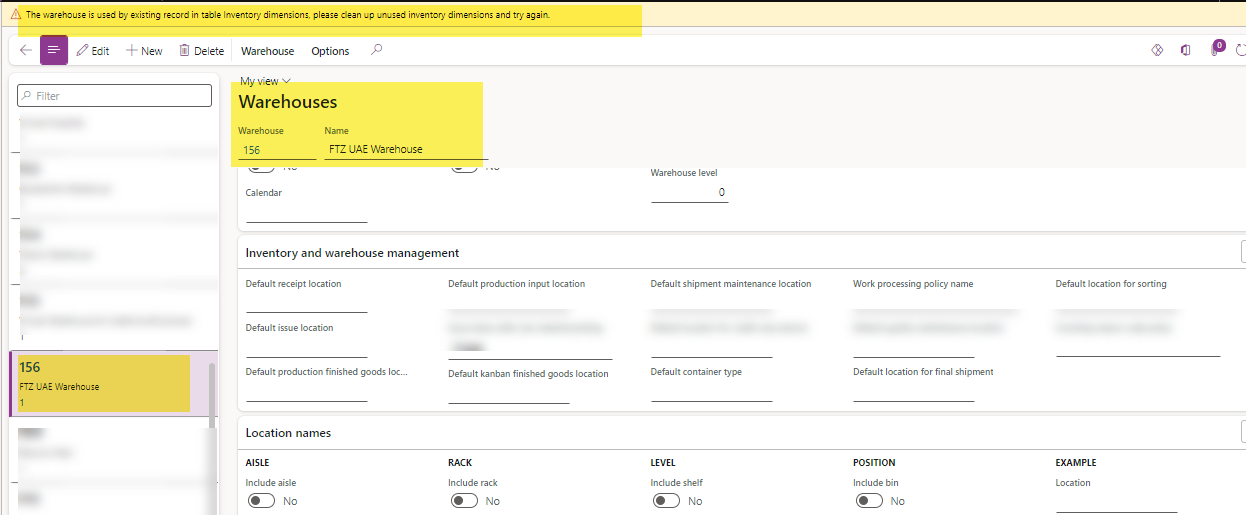
I'm facing the following error while trying to delete the warehouse in D365. There is no open transactions under this warehouse and no dependencies are linked. Also i have tried to clean up unused inventory dimensions from inventory management. still facing the same issue.
I have the same question (0)
  • Hana Xue Profile Picture
    Microsoft Employee on at
    Hi,
    If you want to delete a warehouse, you must delete the dependencies (including inventory, location, inventory dimensions, etc.) before deleting. You can also consider renaming the warehouse and marking do not use.
    For the error message mentioned, you can view this blog to check whether it was deleted correctly.
    https://d365ffo.com/2023/12/06/ax-d365fo-cleanup-unused-inventory-dimensions-inventdim/
    Best Regards,
    Hana
  • RK-15050737-0 Profile Picture
    6 on at
    Hi Hana,

    Thanks for your response, I tried this way but it's not working. Any other suggestions from your end?
     
    Regards,
    Rithika
  • Hana Xue Profile Picture
    Microsoft Employee on at
    Hi,
    Hopefully if the method in this old thread will inspire you. Warehouses cannot be deleted while dependent Warehouses exist. Delete dependent Warehouses and try again. (dynamics.com) And it seems that the process of completely removing all dependencies is not that easy, what about renaming the warehouse?
    Best Regards,
    Hana
  • Suggested answer
    Laurens vd Tang Profile Picture
    4,319 Super User 2026 Season 1 on at
    Good day,
     
    Can you check if there isn't any inventory location and aisle anymore?
     
     
    Best regards,
     
    Laurens van der Tang
  • Suggested answer
    Jerrod Profile Picture
    4 on at
    Hello,
     
    Please log a ticket with Microsoft or your approved support vendor to look at the warehouse through SQL. Sometimes items are stored on backend tables and do not appear on the UI level. If that is the case, a script will need to be written to delete the item(s) from the backend table and you'll be able to then delete the warehouse. 
     
    Warm regards,
    Jerrod
  • Anton Venter Profile Picture
    20,624 Super User 2026 Season 1 on at
    The error messages means there are records in the inventory dimensions table (InventDim) which prevent the deletion of the warehouse.
  • Nigel J Cox Profile Picture
    40 on at
    Also remove any reference to an In-Transit warehouse on the setup for your warehouse . . .

Under review

Thank you for your reply! To ensure a great experience for everyone, your content is awaiting approval by our Community Managers. Please check back later.

Helpful resources

Quick Links

Introducing the 2026 Season 1 community Super Users

Congratulations to our 2026 Super Stars!

Congratulations to our 2025 Community Spotlights

Thanks to all of our 2025 Community Spotlight stars!

Leaderboard > Supply chain | Supply Chain Management, Commerce

#1
Mallesh Deshapaga Profile Picture

Mallesh Deshapaga 1,085

#2
André Arnaud de Calavon Profile Picture

André Arnaud de Cal... 198 Super User 2026 Season 1

#3
Laurens vd Tang Profile Picture

Laurens vd Tang 142 Super User 2026 Season 1

Last 30 days Overall leaderboard

Product updates

Dynamics 365 release plans
