web
You’re offline. This is a read only version of the page.
close
Skip to main content

Announcements

No record found.

News and Announcements icon
Community site session details

Community site session details

Session Id :
Customer Insights - Journeys forum

Remove default value for required dropdown

(0) ShareShare
ReportReport
Posted on by 10

I have a drop down field on a marketing form (mapped to an option set on the Lead entity) and I need to make it ‘required’ - but when I make it required it automatically sets the default value to the first option, rather than an ‘unassigned value’ (which is how it displays on the Lead entity. Is there a way to set the field as required and keep the value as null/blank?

I have the same question (0)
  • Suggested answer
    megcda Profile Picture
    2,192 on at

    Hi Floman,

    Sorry to say that you have uncovered a bug for us.  I'll get that opened and in the queue for a fix.  As a kind of hacky workaround, I created the option set and put SELECT ONE as the first option in my set.  The bad side of that is that if someone doesn't select anything, it will think something is selected.  You could try putting code behind it to surface an error but that is beyond my skillset.OptionSetWorkaround.png

    Thanks for letting us know about this issue.

    Megan

    Please mark as Verified if this answers your question!

  • Suggested answer
    LuHao Profile Picture
    40,892 on at

    Hi Floman,

    You could try following steps:

    1. Unchecked the Required checkbox in Field properties.(Back to initial default setting)

    2.1 Copy required="required" attribute from any previous field that has been set to required.

    2.2 Paste the attribute into select tag.

    2.3 Copy <span class="lp-required" style="color: rgb(255, 0, 0);">*</span>. (The red symbol for required field)

    2.4 Paste the element after option set field label tag.

    Go live
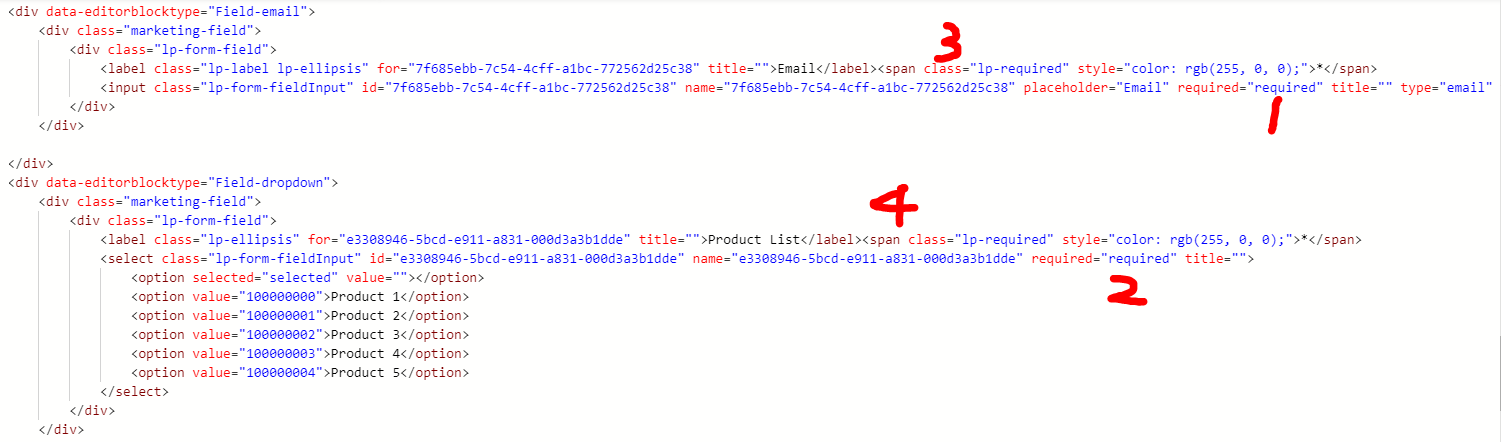
    6180.PNG

    3. The result would meet your requirements.
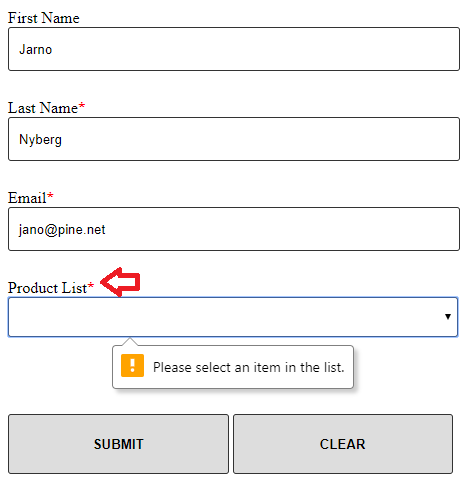
    5076.PNG

    Regards,

    Clofly

  • LuHao Profile Picture
    40,892 on at

    Hi partner,

    Don't forget to mark the verified answer by clicking Yes.

    3872.PNG

    This will help other users quickly navigate to this theme.

    Thanks. 

  • Simon Niederkircher Profile Picture
    217 on at

    Thanks you saved my day. I can confirm that the workaround with HTML hacking fixes the issue.

Under review

Thank you for your reply! To ensure a great experience for everyone, your content is awaiting approval by our Community Managers. Please check back later.

Helpful resources

Quick Links

November Spotlight Star - Khushbu Rajvi

Congratulations to a top community star!

Forum Structure Changes Coming on 11/8!

In our never-ending quest to help the Dynamics 365 Community members get answers faster …

Dynamics 365 Community Platform update – Oct 28

Welcome to the next edition of the Community Platform Update. This is a status …

Leaderboard > Customer Insights - Journeys

Last 30 days Overall leaderboard

Featured topics

Product updates

Dynamics 365 release plans
